Black Friday countdown widget for your Mac
Count down the days until Black Friday, right from your Mac menu bar. Wishbar turns plain English into widgets like this in minutes, using your own AI.
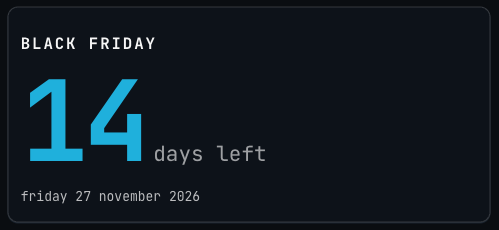
Black Friday countdown · A Black Friday countdown for your Mac menu bar: the days left as one big number, then the hours and minutes on the last day, with no internet needed.
Made with  Wishbar
Have Wishbar on this Mac? This opens it with this widget ready to make. Wishbar asks first, then your AI makes it in a few minutes.
The wish that made it, as typed into Wishbar:
A countdown to Black Friday, 27 November 2026. Big number of days left, the date under it, and once we are inside the last day switch to hours and minutes. After the day, say "Black Friday was N days ago" until the end of the month, then count down to next year's.
Read all of itFold it
Refresh once a minute
“A widget like this can be made for you from one sentence, to your taste. Nobody else will have it.”
Just your email, no card. You bring the AI: a free ChatGPT account is enough.
“Wishbar turned a one-sentence request into a working Mac widget in minutes … I've stopped hunting for menu-bar apps; I just wish for them now.”
What it does
- Shows the days left until Black Friday as one very large number, the only thing on the card in colour, with days left beside it.
- Puts a bold Black Friday title above the number and the date it counts to under it, weekday and year included.
- In the last 24 hours it counts hours and minutes instead, down to midnight on your Mac.
- On Black Friday it says it's today, all day, and for the rest of November it says how many days ago it was.
- From 1 December it counts down to the next Black Friday, and works the new date out by itself.
- Checks the time each time you open the panel and once a minute while it is open, from your Mac's clock alone, so it needs no internet.
Where the data comes from, and what it needs
Nothing outside your Mac. No account, no key. It runs on your Mac and never goes online. Once made, it runs without your AI: it uses no Claude or ChatGPT tokens.
When it is useful
- Knowing how long you have to write the shopping list and set a budget before the sales start.
- Running a shop or a newsletter, with the days left to get your own offer ready one click away.
- A number to glance at between tasks, all through the run-up to the sales.
How to add this widget to your Mac
- Get Wishbar, free for seven days, and install it.
- Copy this widget's recipe link:
https://wishbar.app/recipes/black-friday-countdown.html - Paste it into the box at the bottom of Wishbar's panel and send it. Wishbar asks, then your AI builds it.
- Press Keep when you like what you see.
Questions people ask
When is Black Friday?
Black Friday 2026 is Friday 27 November. It is the day after Thanksgiving in the United States, which is the fourth Thursday of November, so the date moves each year: 26 November in 2027 and 24 November in 2028. The widget works the date out by itself.
How many days until Black Friday?
It depends on today's date, so the widget counts it again from your Mac's calendar: on 13 November 2026, when the picture above was taken, it read 14. On 25 November 2026 it reads 2 days left.
What does it show on the last day?
Hours and minutes. Once Black Friday is 24 hours away, the big number becomes the hours left, with the minutes beside it, counting down to midnight on your Mac: at half past nine in the morning on the day before, it reads 14 h 30 m left.
What does it show on Black Friday, and after?
On the day it says it's today, all day. For the rest of November it says how long ago it was, starting with black friday was 1 day ago. From 1 December it counts down to the next one, starting at 360 days in 2026.
Does it need the internet or an account?
No. It works from your Mac's own clock and calendar, so it needs no internet, no account and no key, and nothing leaves your Mac.
Can it count down to something else?
Yes, as its own wish: Cyber Monday, Christmas, a birthday or a launch. Name the day in the wish and your AI makes a countdown to it.
Can I put it on my Mac desktop?
Not this one. Wishbar's widgets live in its panel, which opens from the W in your menu bar, so the countdown is one click away whatever window is in front.
What if it does not look the way I want?
Say what to change, in plain words. The first version here showed the number in thin white type, and one more line gave it the look above: "Make the days one very large number in the accent colour, the only colour on the card, under a bold Black Friday title. Keep everything else in white and grey."
How long does it take to make?
Under two minutes in Wishbar's own test on 13 November 2026: Claude made it from the wish above in 51 seconds, and the follow-up just above took 28 more. Naren's own Black Friday countdown, made from the same wish by ChatGPT, as Codex, on 12 October 2026, took a little over a minute and a half.
Added Last updated


More like this
See the gallery's Time section.