Codex credits: what they cost and how they work.
Codex credits are a balance you pay for in advance, charged per million tokens at a rate set by the model. On a personal plan, or a Standard or Premium seat in a Business workspace, Codex uses your included allowance first and then spends the credits without asking. Plus and Pro accounts can buy them where purchases are available to the account, and a Business workspace shares one pool.
By NarenLast updated
Codex credits in short
- What they are: a balance paid for in advance. On a personal plan, and on a Standard or Premium seat in a Business workspace, your included usage is used first, and after its limit Codex draws on credits.
- Who can buy them: Plus and Pro accounts where credit purchases are available to the account, a limited group of Free and Go accounts, and the owners of a Business workspace.
- What Codex charges: credits per million tokens, by model. GPT-6 Luna is 2.5 credits per million input tokens, GPT-6.1 Sol is 50 and GPT-6 Astra is 250.
- What a credit costs in money: OpenAI’s pages do not say. You see the price at checkout, so read it there before you pay.
- Where to see them: your Codex usage dashboard, or Settings, then Usage, in ChatGPT.
- The thing to know before you buy: Codex does not ask before it spends credits. On a personal plan, or a Standard or Premium seat in a Business workspace, it uses your included allowance first and then the credits.
- Expiry: on a personal plan or in a Business workspace, credits expire 12 months after you buy them (180 days if bought in Japan after 13 November 2026), and OpenAI refunds them only in a few cases.
What are Codex credits?
On a personal plan, or a Standard or Premium seat in a Business workspace, Codex credits are how you pay for Codex once your plan’s own allowance is used up. A legacy Codex seat in a Business workspace has no allowance: it spends the workspace’s credits from its first request. OpenAI’s pricing page puts it this way: “Credits are the unit used to pay for eligible usage on credit-based plans. After you reach your included limits, available credits let you continue working.” Buying them does not change your plan or raise its limits.
OpenAI calls them ChatGPT credits, because they are not only for Codex. On a personal plan, one balance pays for Codex, ChatGPT Work and ChatGPT for Word, Excel and PowerPoint, where your account has them. OpenAI’s example: credits bought through Codex can pay for another of these once your included usage is gone.
What Codex credits are not
- Not API credits. Codex signed in with an API key is billed at API prices instead.
- Not your ChatGPT balance (the wallet). That is money in US dollars, for example from a gift card, and redeeming a gift card does not add credits.
- Not a reset. A reset refills your plan’s allowance. It adds nothing to your credit balance.
- Not a way into a model or a mode. OpenAI: “Credits pay for usage; they do not add model access.” Ultrafast stays closed on Plus, Pro $100, Pro $200 and Business, with or without credits.
Sources, read 13 November 2026: Codex pricing, Using Credits for Flexible Usage in ChatGPT (Personal plans), Using your ChatGPT balance, How resets work in Codex, Managing usage with GPT-6 Astra in Work and Codex, Speed in Codex.
Who can get Codex credits?
It depends on your plan, and on a personal plan it also depends on your account: OpenAI says purchase amounts, prices and availability can vary by account, region and plan. If you see no way to add credits, they are not on offer to your account. This guide covers personal plans (Free, Go, Plus and Pro) and Business.
| Plan | Credits | Who buys them | Where |
|---|---|---|---|
| Free and Go | A limited group of accounts for now | You | Add credits, shown after you reach your Work or Codex limit; Settings, then Usage, in ChatGPT; Usage & Billing in the Codex app |
| Plus and Pro | Yes, where purchases are available to your account | You | The option to add credits when you hit a limit in Codex; Settings, then Usage, in ChatGPT; Usage & Billing in the Codex app |
| Business | Optional. One pool for the whole workspace | A workspace owner | Workspace settings, then Billing |
| An API key | None: you pay API prices | Not applicable | The OpenAI API’s own billing |
Enterprise, Edu, Health, Gov and ChatGPT for Teachers workspaces billed in credits follow their contract and admin settings: see OpenAI’s rate card.
In a Business workspace, Standard and Premium seats use their included allowance first, then the pool, if the owner has bought credits and the spend controls allow it. Legacy Codex seats are different: they use credits from the pool from their first use.
Credits you do not buy yourself
- A gift. Where the feature is on, an eligible personal account can buy credits for someone else, who claims them with a link. Free and Go accounts can redeem a gift but not buy one. OpenAI says gifting is rolling out gradually.
- A referral. OpenAI’s desktop referral offers may pay out in credits, a reset or extra usage. The offer itself says which.
- A promotion. Business workspaces sometimes get promotional credits, which can expire sooner than bought ones.
Sources, read 13 November 2026: Using Credits for Flexible Usage in ChatGPT (Personal plans), Flexible pricing for the Enterprise, Edu, and Business plans, Managing credits and spend controls in ChatGPT Business, Gifting credits in ChatGPT, ChatGPT Desktop Referral Promotions, Codex pricing.
What do Codex credits cost?
There are two prices: what Codex charges in credits, which OpenAI publishes, and what a credit costs in money, which it does not. The first is a rate per million tokens that depends on the model. These are OpenAI’s rates at Standard speed for the main models in Codex. Its own table has more rows, for image and specialist models.
| Model | Input | Cached input | Output |
|---|---|---|---|
| GPT-6 Astra | 250 credits | 25 credits | 1,250 credits |
| GPT-6.1 Sol | 50 credits | 2.5 credits | 250 credits |
| GPT-6.1 Terra | 25 credits | 1.25 credits | 125 credits |
| GPT-6 Sol | 50 credits | 5 credits | 250 credits |
| GPT-6 Luna | 2.5 credits | 0.25 credits | 12.5 credits |
| GPT-5.6 Sol | 100 credits | 10 credits | 500 credits |
| GPT-5.6 Terra | 50 credits | 5 credits | 300 credits |
| GPT-5.6 Luna | 5 credits | 0.5 credits | 30 credits |
Each figure is credits per million tokens. Input is what Codex reads: your prompt, files, chat history and tool results. Cached input is what it read a moment ago and reuses, at a tenth or a twentieth of the input rate. Output is what it writes. Codex charges nothing extra to write the cache.
A worked example
This sum is ours, with made-up token counts. A task on GPT-6.1 Sol reads 100,000 fresh tokens and 400,000 cached ones, and writes 10,000. That is 0.1 × 50, plus 0.4 × 2.5, plus 0.01 × 250: 5 + 1 + 2.5, or 8.5 credits. The same task on GPT-6 Astra is 47.5 credits, and on GPT-6 Luna under half a credit. OpenAI’s pages put a typical task at 2 to 15 credits, but name different models for it: the Codex pricing page says GPT-5.6 Sol, and the rate card for Business and Enterprise says GPT-6.1 Sol.
What makes credits go faster
- Fast mode: 2 times the Standard rate when you pay in credits. Type
/fastin the Codex CLI to switch it on or off. - Ultrafast: 6 times the Standard rate in credits. It is only on Pro $500 and eligible Enterprise and Edu plans.
- A bigger model, a higher reasoning level, a long chat and many tool calls all mean more tokens.
- Making images: after your included limit, image generation draws on credits too, at the image model’s own rates.
- Voice in the desktop app: 1.25 credits a minute once Plus and Pro accounts are spending credits, on top of the tokens the task uses.
One thing is free: when you are signed in with ChatGPT, Codex’s auto-review safety checks do not count toward your limits or your credits.
What a credit costs in money
We could not find a price for one credit, or the sizes you can buy, on any OpenAI page we read on 13 November 2026. The pricing page says only that “credit purchase prices and applicable discounts depend on your plan or agreement”, and the Help Center says amounts and prices can vary by account, region and plan. So the price that counts is the one at checkout. Read the amount, the price and the payment method there before you confirm.
For teams, OpenAI’s rate card for Business and Enterprise gives one figure in dollars: on average, Codex costs about $100 to $200 per developer a month, and it says real costs vary a lot with the model, automations and Fast mode.
Sources, read 13 November 2026: Codex pricing, Speed in Codex, Using Credits for Flexible Usage in ChatGPT (Personal plans), ChatGPT Rate Card (Business, Enterprise/Edu credit-based pricing).
How to buy Codex credits and see your balance
We have not bought credits to write this, so the steps are OpenAI’s, not screens we clicked through.
On Plus or Pro (and Free or Go, where offered)
- Open Settings, then Usage, in ChatGPT, or Usage & Billing in the Codex app. If you have just hit a limit in Codex, the limit notice has an option to add credits.
- Your balance is on that page, if credit purchases are available to your account.
- Choose to add credits, then check the amount, the price and the payment method at checkout before you confirm.
- If you have money in your ChatGPT balance, check the balance amount applied and what Due today shows before you pay. OpenAI says a balance you can see is not used for every credit purchase, and whatever it does not cover goes to your payment method.
In a Business workspace
- Sign in as a workspace owner. Only owners can buy credits.
- Go to Workspace settings, then Billing.
- Select the option to add credits.
- Review the payment method and the credit amount, and note that the credits are valid for 12 months (180 days if bought in Japan after 13 November 2026).
- If the workspace has a ChatGPT balance, review the Balance amount applied and what Due today shows as well. If either is not what you expect, stop before you confirm and contact OpenAI Support.
- Confirm the purchase.
Automatic reload buys more by itself
Automatic reload is a switch on the same page, where your account has it. You pick a minimum balance and a target balance. When your credits fall below the minimum, OpenAI charges your default payment method for enough to reach the target. Three things to know before you turn it on:
- If your balance is already below the minimum when you switch it on, a purchase may happen right away.
- On a personal plan you can set a maximum monthly spend. It caps automatic reloads only, not credits you buy one at a time.
- In a Business workspace, leaving the monthly recharge limit blank allows unlimited automatic purchases each month.
In the Codex CLI
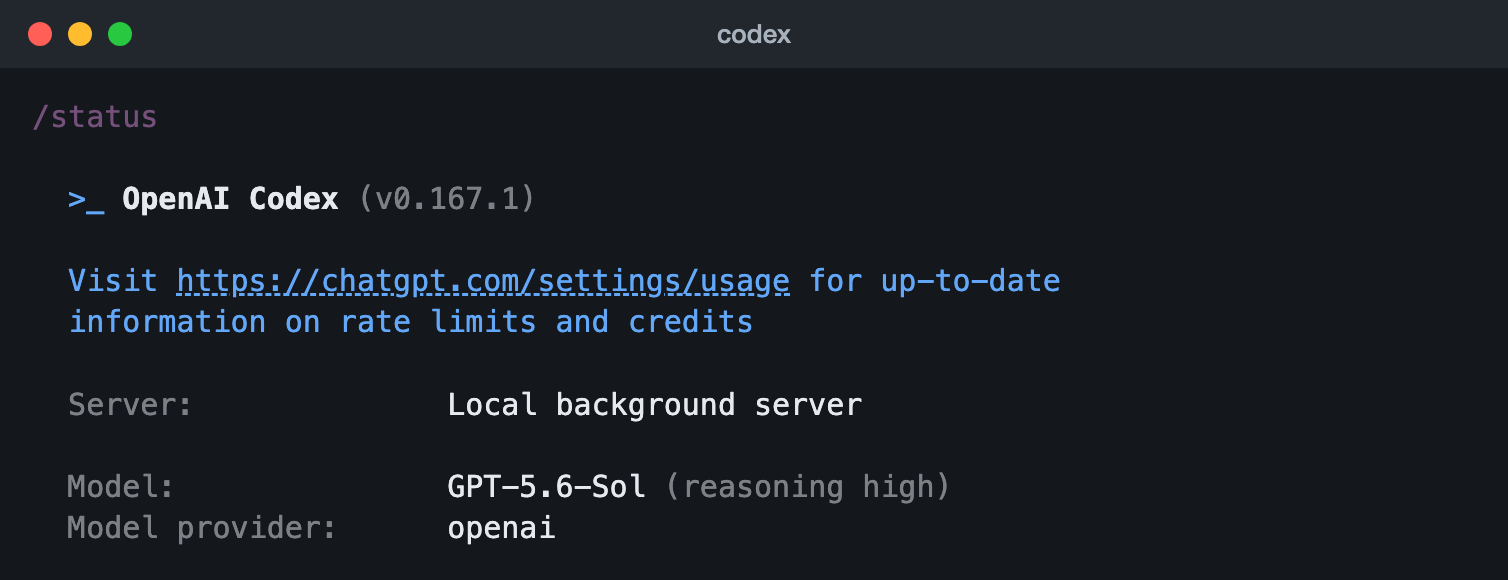
/status in the Codex CLI 0.167.1 (13 Nov 2026). The rows under these name the folder, account, workspace and session, so they are left out.In the Codex CLI, /status sends you to chatgpt.com/settings/usage for your credits, and every way to check your limits is in our Codex usage guide.
Sources, read 13 November 2026: Using Credits for Flexible Usage in ChatGPT (Personal plans), Using your ChatGPT balance, Managing credits and spend controls in ChatGPT Business, Using Codex with your ChatGPT plan.
What uses Codex credits?
On a personal plan, and on a Standard or Premium seat in a Business workspace, nothing uses credits while your included allowance lasts. A legacy Codex seat in a Business workspace runs on credits from the start. Either way, the work credits pay for includes:
- Codex, wherever you run it signed in with ChatGPT: the CLI, the IDE extension, the app and cloud tasks.
- ChatGPT Work, which shares Codex’s pricing, credits and limits.
- ChatGPT for Word, Excel and PowerPoint, on the plans that have them.
- In a Business workspace, the shared pool also pays for other ChatGPT features, such as Thinking models, Deep Research, images and voice. The rates are on OpenAI’s rate card.
- Other apps you sign in to with ChatGPT, on Go, Plus, Pro and Business, but only if you turn that on. On a personal plan, letting apps use your credits is off by default; in a Business workspace it needs your admin’s permission. The app may also charge you separately for its own plan.
For what you bought and what was spent, go to Settings, then Usage, in ChatGPT or Usage & Billing in the Codex app. Workspace owners can download usage reports from Workspace settings, then Billing.
Sources, read 13 November 2026: Codex pricing, Using Credits for Flexible Usage in ChatGPT (Personal plans), Managing credits and spend controls in ChatGPT Business, Flexible pricing for the Enterprise, Edu, and Business plans, ChatGPT Rate Card (Business, Enterprise/Edu credit-based pricing), Using your ChatGPT plan in other apps and sites.
What happens when you hit a limit
With credits in your balance, on a personal plan, Codex carries on and spends them. OpenAI is plain about it: “available credits can be used automatically”, and telling Codex to “ask me before using credits” “does not add a billing approval step”. If you want Codex to stop at the limit, the sure way is to have no balance and leave automatic reload off.
With no credits, Codex can finish the turn it is on, within fair-use limits. After that, two of the ways to carry on cost money:
| Option | Who has it | What it does | What it costs |
|---|---|---|---|
| Add credits | Plus and Pro where purchases are available to the account, some Free and Go, Business owners | Work carries on, paid by the token | The price at checkout, then the rates above |
| Buy an instant reset | Eligible Plus and Pro personal accounts | Restores the five-hour and weekly allowance the moment you pay, even if you have usage left. It pulls your normal week forward: the new week starts with your next Work or Codex request. It is not extra allowance, and it cannot be saved | The price at checkout. OpenAI generally gives no refund |
The ways that cost nothing extra, such as waiting for the reset on a plan whose allowance resets, or using a saved reset, are in our Codex usage guide, with which limit you hit and how to make an allowance last.
When the credits run out too
- Personal plans: your balance can go below zero if a task starts while you have credits and ends after they are gone. Your next purchase or automatic reload pays that off first.
- Business: members see a banner when their included usage runs out. With no credits in the pool, the feature is blocked until an owner adds more.
Sources, read 13 November 2026: Using Credits for Flexible Usage in ChatGPT (Personal plans), Codex pricing, Using Codex with your ChatGPT plan, Paid weekly Work and Codex rate limit resets, How resets work in Codex, Flexible pricing for the Enterprise, Edu, and Business plans.
What changes for credits in December
OpenAI says that starting in December, the usage allowance on Plus, Pro and Business will be shared across ChatGPT and Codex. For credits, its announcement says one thing: at the limit you can “wait for it to reset, upgrade your plan, or buy credits to continue using eligible features”. So credits carry on for eligible features only, not for everything in ChatGPT, and the announcement does not say whether the credit rates change. What the shared allowance is, and how to check it, are in our Codex usage guide and our ChatGPT usage guide.
Sources, read 13 November 2026: Understanding ChatGPT and Codex usage limits, Using Credits for Flexible Usage in ChatGPT (Personal plans).
Do Codex credits expire, and can you get a refund?
| Personal plans | Business | |
|---|---|---|
| Expiry | 12 months from purchase. 180 days for credits bought in Japan after 13 November 2026 | 12 months after purchase. 180 days for credits bought in Japan after 13 November 2026 |
| Roll over | Unused credits do not roll over | Not stated beyond the 12 months |
| Refunds | None, unless the law or a contract requires it or an approved exception applies | The same for self-serve workspaces |
| Transfers | No. No cash value; you cannot transfer, resell or give them away | Not stated |
The exceptions OpenAI names for unused credits on personal plans and self-serve Business: a verified billing error, confirmed unauthorised activity, or a confirmed OpenAI service failure or wrong account restriction. If your account was compromised and credits were spent, OpenAI says it will investigate and restore them if misuse is confirmed.
Gifted credits expire 12 months after they are redeemed (180 days if redeemed in Japan after 13 November 2026), and a gift nobody claims within 30 days is refunded to the buyer. Promotional credits follow their offer’s own dates.
Sources, read 13 November 2026: Using Credits for Flexible Usage in ChatGPT (Personal plans), Flexible pricing for the Enterprise, Edu, and Business plans, Managing credits and spend controls in ChatGPT Business, Gifting credits in ChatGPT.
Questions people ask
How much is one Codex credit in dollars?
OpenAI’s pricing page and Help Center give the rates in credits, not the price of a credit. It says prices depend on your plan or agreement and can vary by account and region. The price you pay is the one shown at checkout.
Will Codex ask before it spends my credits?
No. On a personal plan, once your included usage is gone, credits in your balance can be used automatically, and an instruction such as “ask me before using credits” adds no approval step. Automatic reload is a separate switch that buys more.
Can I use credits before my plan’s limit?
Not on a personal plan or a Standard or Premium Business seat: there, your included usage is used first. A legacy Codex seat in a Business workspace uses credits from its first use.
Can I cap what I spend on credits?
On a personal plan, the maximum monthly spend caps automatic reloads only; with reload off, you spend only what you buy by hand. Business owners and admins can set a monthly credit limit for each seat type and each person, and by default there is none.
Are Codex credits the same as OpenAI API credits?
No. Codex credits belong to your ChatGPT account or workspace. Codex signed in with an API key is billed by the API at its own token prices, and ChatGPT credits are not used.
Is buying a reset the same as buying credits?
No. A purchased reset restores your five-hour and weekly allowance the moment you pay, even if you have usage left. It pulls your normal week forward, so the new week starts with your next Work or Codex request; it is not extra allowance on top, and it cannot be saved. Credits are a balance you draw down by the token. A reset adds nothing to your credit balance.
Why is my credit balance negative?
A task that starts while you have credits can finish after other work has used them up, which leaves the balance below zero. OpenAI says later purchases or reloads may pay that off before they add to what you can spend.
Do credits unlock GPT-6 Astra or Ultrafast?
No. Credits pay for usage on the models and modes your plan already has. Check that your plan has the model before you buy.