How to set up the Claude Code status line.
The Claude Code status line is a row at the bottom of Claude Code that shows whatever a script of yours prints: the model, folder, git branch, context used, cost or your usage limits. Type /statusline and say what you want, or add a statusLine command to ~/.claude/settings.json. Claude Code sends the script the session’s details as JSON, and it runs on your computer without using tokens.
By NarenLast updated
Set it up in one minute
The quickest way: in Claude Code, type /statusline and say what you want to see. Claude Code writes a small script in ~/.claude/ and points your settings at it. Approve the file edits if it asks. If Claude Code is not set up yet, our Claude Code install guide covers a Mac from the install to the first run.
/statusline show the model, folder, git branch and context used, with a progress bar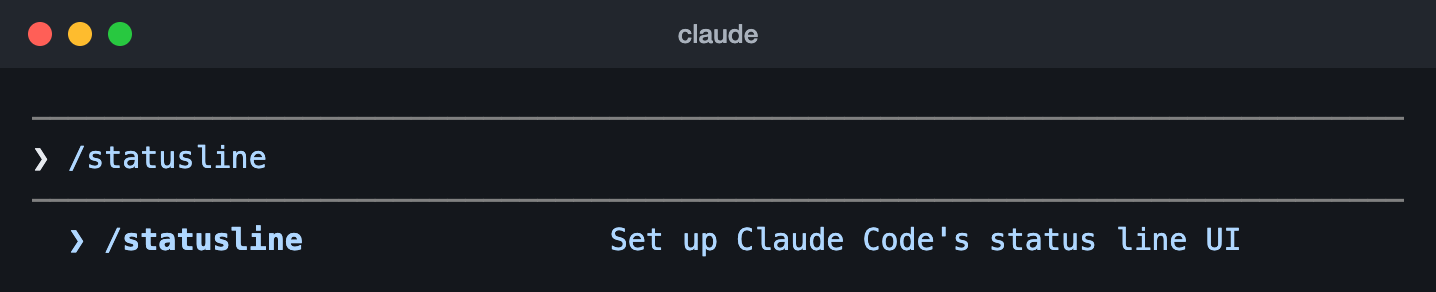
/statusline typed into Claude Code 2.1.323 (13 Nov 2026), before pressing Enter: the command menu lists it as “Set up Claude Code’s status line UI”.Type /statusline with nothing after it and it builds one from your shell prompt instead. /statusline delete removes it.
Or set it by hand, with no script file: add this to ~/.claude/settings.json. It needs jq and shows the model and how full the context window is, as in [Opus] 42% context.
{
  "statusLine": {
    "type": "command",
    "command": "jq -r '\"[\\(.model.display_name)] \\(.context_window.used_percentage // 0)% context\"'"
  }
}
If the file already has settings, put the statusLine part inside its outer braces, next to them. Claude Code picks up the change as soon as you save.
Sources, read 15 November 2026: Set up a status line, statusLine setting, Claude Code commands.
What the status line is, and isn’t
The status line is a row at the bottom of Claude Code, under the prompt. Claude Code runs a command you choose, hands it the session’s details as JSON on standard input, and shows whatever it prints. People use it to keep the model, the folder, the git branch, the context window, the cost or their usage limits in view while they work.
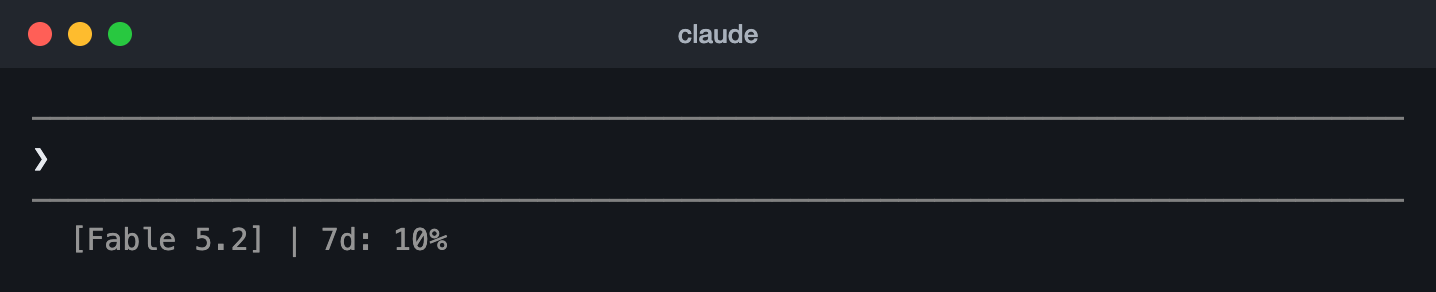
- It runs on your computer and uses no API tokens.
- It gets its own row, above the footer’s badges, and doesn’t replace them. With a status line set, Claude Code stops showing most of the footer’s keyboard hints, such as
esc to interruptand? for shortcuts. - It hides for a moment during some screens, such as the help menu and permission prompts.
- Outside fullscreen rendering, notifications such as MCP server errors and updates share its row, on the right, and can cut a long line short on a narrow terminal.
It isn’t /status, which opens Settings on its Status tab: your version, model, account and connection (our Claude status guide shows it, next to Anthropic’s status page). And to turn IDs in the conversation into clickable badges in the footer, Claude Code has a separate setting, footerLinksRegexes, that needs no script.
Sources, read 15 November 2026: How status lines work, Claude Code commands, statusLine setting.
The statusLine setting
The status line is one entry, statusLine, in a Claude Code settings file. This one runs a script, indents the line by two spaces and runs it again every minute:
{
  "statusLine": {
    "type": "command",
    "command": "~/.claude/statusline.sh",
    "padding": 2,
    "refreshInterval": 60
  }
}| Key | What it does |
|---|---|
type | Always "command". Required. |
command | The script’s path, or a shell command written in place. It runs in a shell. Required. |
padding | Extra spaces before the line, in characters, on top of the built-in spacing. Optional; 0 if you leave it out. |
refreshInterval | Also runs the command every so many seconds, at least 1. Use it for a clock or a countdown, or when background subagents change git while the session is idle. Leave it out to run only on events. Claude Code 2.1.97 or later. |
hideVimModeIndicator | true hides the built-in -- INSERT -- text under the prompt, for when your script shows vim.mode itself. |
Which settings file
| File | Who gets the status line |
|---|---|
~/.claude/settings.json | You, in every project on this computer |
.claude/settings.json | Everyone who works in the project, once you commit it |
.claude/settings.local.json | You, in that one project only. Claude Code keeps it out of git when it creates the file |
| Managed settings | Everyone your organisation deploys them to. Nothing in your own files overrides them |
When several files set it, the highest one wins: managed settings, then the --settings flag you start claude with, then .claude/settings.local.json, then .claude/settings.json, then ~/.claude/settings.json.
Turn it off
Type /statusline delete, or remove the statusLine entry from your settings. "disableAllHooks": true turns it off too, along with your hooks.
Sources, read 15 November 2026: Set up a status line, statusLine setting, Settings files and precedence, disableAllHooks, Claude Code changelog.
When it runs, and what it can print
Your script runs when a session starts or resumes, then again when:
- a new answer from Claude arrives
/compactfinishes- the permission mode changes, or vim mode is switched on or off
- you change the command in your settings (the new one runs at once)
- the
refreshIntervaltimer runs out, if you set one - a usage limit window or a warm prompt cache in the data it last got reaches its reset or expiry time
Claude Code waits 300 milliseconds for changes to settle, then runs it once. If a new update comes while the script is still running, it cancels that run. It shows the output only once the script exits with code 0: a script that fails or prints nothing leaves the line blank, and a slow one keeps the old line up until it finishes. When you edit the script, your changes show the next time it runs.
What it can print
- Several lines: each line your script prints is its own row.
- Colours, with ANSI escape codes such as
\033[32mfor green and\033[0mto reset. - Clickable links, with OSC 8 escape codes, in terminals that support them, such as iTerm2, Kitty and WezTerm: Cmd+click on macOS, Ctrl+click on Windows and Linux.
To fit the terminal, read the COLUMNS and LINES environment variables (Claude Code 2.1.153 or later). Claude Code captures your output instead of passing it straight to the terminal, so tput cols can’t see its size.
Sources, read 15 November 2026: How status lines work, Claude Code changelog.
Every field Claude Code sends your script
Each run gets one JSON object on standard input. These are all its fields, from Anthropic’s reference, grouped by what they’re for. A dot means a field inside an object: model.display_name is display_name inside model.
The model and the session
| Field | What it holds |
|---|---|
model.id, model.display_name | The model’s ID and the name Claude Code shows for it, such as claude-opus-5-5 and Opus |
version | Your Claude Code version |
session_id | A unique ID for the session. It stays the same all session, so it makes a good name for a cache file |
session_name | The name you gave the session with --name or /rename, or else the title Claude Code made for it. Missing until there is one: the default name, such as my-app-3f, doesn’t count |
prompt_id | An ID for the prompt Claude is working on, the same as prompt.id in OpenTelemetry events. Missing until your first message |
transcript_path | Where the conversation’s transcript file is |
output_style.name | The current output style |
effort.level | The session’s reasoning effort: low, medium, high, xhigh or max, not one a skill, a subagent or ultrathink set. Missing when the model has no effort setting |
thinking.enabled | Whether extended thinking is on |
fast_mode | Whether fast mode is on |
vim.mode | NORMAL, INSERT, VISUAL or VISUAL LINE. Only there when vim mode is on |
agent.name | The agent’s name, when you run Claude Code with --agent or agent settings |
The folder, the repository and the pull request
| Field | What it holds |
|---|---|
workspace.current_dir, cwd | The current folder. Both hold the same path; Anthropic prefers workspace.current_dir |
workspace.project_dir | The folder Claude Code started in, which can differ from the current one |
workspace.added_dirs | Folders added with /add-dir or --add-dir. An empty list if none |
workspace.git_worktree | The worktree’s name when the folder is inside a linked git worktree. Missing in the main working tree |
workspace.repo.host, .owner, .name | The repository, from the origin remote, such as github.com, anthropics and claude-code. Missing outside a git repository or without an origin remote |
pr.number, pr.url | The open pull request for the current branch, as in the footer’s PR badge; on GitLab, the merge request. Missing until one is found, and once it merges or closes |
pr.review_state | approved, pending, changes_requested or draft. Can be missing even when pr is there |
pr.kind | mr for a GitLab merge request; missing for a GitHub pull request |
worktree.name, worktree.path | The worktree session’s name and folder. Only there during a worktree session |
worktree.branch | Its git branch, such as worktree-my-feature. Missing for hook-based worktrees |
worktree.original_cwd, worktree.original_branch | The folder and branch you were on before entering the worktree (no branch for hook-based worktrees) |
The context window
| Field | What it holds |
|---|---|
context_window.used_percentage | How full the context window is, in percent. Can be null early in a session |
context_window.remaining_percentage | How much of it is left, in percent |
context_window.context_window_size | Its size in tokens: 200,000 by default, or 1,000,000 for models with extended context |
context_window.total_input_tokens, total_output_tokens | The tokens in the context window now, from the latest response. Input includes cache reads and writes. Both 0 before the first response |
context_window.current_usage | The latest call’s tokens by kind: input_tokens, output_tokens, cache_creation_input_tokens and cache_read_input_tokens. Null before the first call, and just after /compact |
exceeds_200k_tokens | Whether the latest response’s tokens (input, cache and output together) went over 200,000, whatever the window’s size |
used_percentage counts input tokens only: input_tokens plus cache_creation_input_tokens plus cache_read_input_tokens, without the output. Use the same sum if you work it out yourself from current_usage.
Cost and time
| Field | What it holds |
|---|---|
cost.total_cost_usd | The session’s estimated cost in US dollars, worked out on your computer at list price, or at your organisation’s rates if it sets them. It can differ from your bill, and starts again at $0 when /clear starts a new session |
cost.total_duration_ms | How long the session has been running, in milliseconds, across resumes, leaving out the time it wasn’t running |
cost.total_api_duration_ms | Time spent waiting for API responses, in milliseconds |
cost.total_lines_added, cost.total_lines_removed | Lines of code added and removed |
The prices behind that estimate, and what Claude Code costs on each plan, are in our Claude Code pricing guide.
Usage limits
| Field | What it holds |
|---|---|
rate_limits.five_hour.used_percentage | How much of your five-hour limit you’ve used, from 0 to 100 |
rate_limits.seven_day.used_percentage | How much of your weekly limit you’ve used, from 0 to 100 |
rate_limits.five_hour.resets_at, rate_limits.seven_day.resets_at | When each one resets, in Unix time (seconds) |
rate_limits.spend_limit.used_percentage, .resets_at | Behind a Claude apps gateway with spend limits: how much of your spend limit you’ve used (over 100 once you pass it) and when its period resets. Claude Code 2.1.251 or later |
rate_limits.spend_limit.used_usd, .limit_usd, .period | Your estimated spend and your limit in US dollars, and the period: daily, weekly or monthly. They come in a separate request about every five minutes, so they can be missing or a little behind the percentage. 2.1.284 or later, on Claude Code and the gateway |
rate_limits is only there on a Claude Pro, Max or Ultra plan, or behind a gateway that sets you a spend limit, and only after the session’s first API response, which can come before you send anything. Each window can be missing on its own, and Claude Code drops a window once its reset time passes, so read them with a fallback, such as // empty in jq.
The prompt cache
| Field | What it holds |
|---|---|
prompt_cache.warm | Whether the cached part of the conversation is still within its lifetime |
prompt_cache.ttl | That lifetime: "5m" or "1h" |
prompt_cache.expires_at | When the cache goes cold, in Unix time. Null when the last response reported no cache tokens |
prompt_cache.hit_ratio | Cache reads as a share of all input tokens this session, from 0 to 1 |
prompt_cache.caching_observed | Whether any response this session reported cache tokens. False means caching is off, or your provider doesn’t report it |
prompt_cache.requests | API requests in the main conversation this session |
prompt_cache.misses | Requests that processed again what the cache already held (over 5% of it and at least 2,000 tokens), with no compaction or clearing of old tool results to explain it |
prompt_cache.expected_rebuilds | Rebuilds after a compaction or after old tool results were cleared |
prompt_cache.cache_write_tokens | All tokens written to the cache this session |
prompt_cache.miss_recache_tokens | Tokens the misses wrote to the cache |
prompt_cache.last_miss_at | When the last miss happened, in Unix time. Null with no misses |
prompt_cache.last_miss_cause | The likely cause of the last miss, as a list such as tools_changed, system_prompt_changed, ttl_expired_5m or likely_server_side. Claude Code 2.1.260 or later |
prompt_cache.miss_causes | How many misses had each cause. Claude Code 2.1.260 or later |
prompt_cache.recache_tokens_if_cold | Tokens the next request caches again if the cache has gone cold by then |
prompt_cache arrives with the main conversation’s first response, leaves subagents out, and needs Claude Code 2.1.251 or later. /usage shows the same figures on its Prompt cache (main) line.
What can be missing or null
- Missing until they apply:
session_name,prompt_id,workspace.git_worktree,workspace.repo,effort,vim,agent,pr,worktree,rate_limitsandprompt_cache. - Null early on:
context_window.current_usage(before the first call, and after/compactuntil the next one),used_percentageandremaining_percentage.
So give every field a fallback: // 0 or // empty in jq, .get() and or 0 in Python, ?. in JavaScript.
Sources, read 15 November 2026: Available data, Claude Code changelog.
A full status line in Bash, Python or Node.js
Each of these shows the model, the folder, the git branch, how full the context window is, and, on a Pro, Max or Ultra plan, how much of your five-hour and weekly limits you’ve used. They are Anthropic’s examples, combined into one, and each prints a line like this:
[Opus] my-app | main | ctx 42% | 5h 24% 7d 41%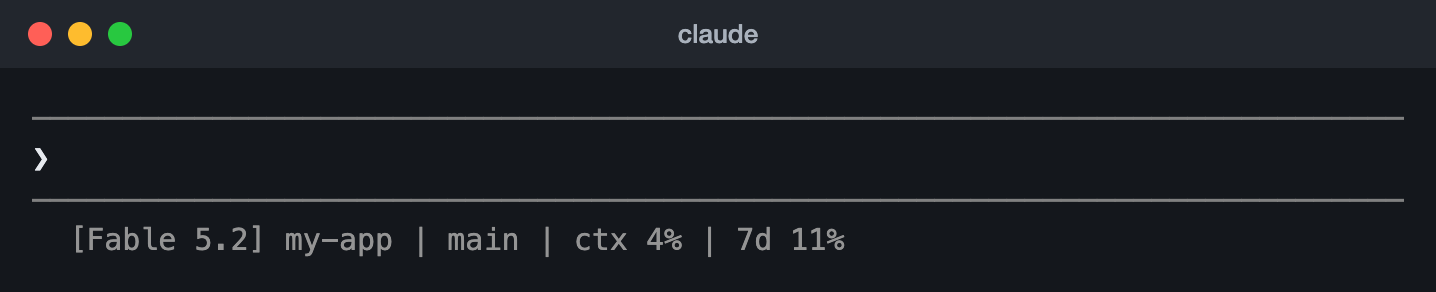
Bash
It needs jq, the JSON tool: brew install jq on macOS, sudo apt-get install jq on Debian or Ubuntu, winget install jqlang.jq on Windows.
#!/bin/bash
# Claude Code status line: model, folder, git branch, context used, usage limits
input=$(cat)

MODEL=$(echo "$input" | jq -r '.model.display_name')
DIR=$(echo "$input" | jq -r '.workspace.current_dir')
CTX=$(echo "$input" | jq -r '.context_window.used_percentage // 0' | cut -d. -f1)
# "// empty" prints nothing when Claude Code sends no rate_limits
FIVE_H=$(echo "$input" | jq -r '.rate_limits.five_hour.used_percentage // empty')
WEEK=$(echo "$input" | jq -r '.rate_limits.seven_day.used_percentage // empty')
BRANCH=$(git branch --show-current 2>/dev/null)

LINE="[$MODEL] ${DIR##*/}"
[ -n "$BRANCH" ] && LINE="$LINE | $BRANCH"
LINE="$LINE | ctx ${CTX}%"
LIMITS=""
[ -n "$FIVE_H" ] && LIMITS="5h $(printf '%.0f' "$FIVE_H")%"
[ -n "$WEEK" ] && LIMITS="${LIMITS:+$LIMITS }7d $(printf '%.0f' "$WEEK")%"
[ -n "$LIMITS" ] && LINE="$LINE | $LIMITS"
echo "$LINE"
Python
#!/usr/bin/env python3
# Claude Code status line: model, folder, git branch, context used, usage limits
import json, os, subprocess, sys

data = json.load(sys.stdin)
model = data['model']['display_name']
folder = os.path.basename(data['workspace']['current_dir'])
ctx = int(data.get('context_window', {}).get('used_percentage') or 0)
rate = data.get('rate_limits', {})
five_h = rate.get('five_hour', {}).get('used_percentage')
week = rate.get('seven_day', {}).get('used_percentage')
try:
    branch = subprocess.check_output(
        ['git', 'branch', '--show-current'], text=True, stderr=subprocess.DEVNULL
    ).strip()
except Exception:
    branch = ''

parts = [f'[{model}] {folder}']
if branch:
    parts.append(branch)
parts.append(f'ctx {ctx}%')
limits = []
if five_h is not None:
    limits.append(f'5h {five_h:.0f}%')
if week is not None:
    limits.append(f'7d {week:.0f}%')
if limits:
    parts.append(' '.join(limits))
print(' | '.join(parts))
Node.js
#!/usr/bin/env node
// Claude Code status line: model, folder, git branch, context used, usage limits
const { execSync } = require('child_process');
const path = require('path');

let input = '';
process.stdin.on('data', (chunk) => (input += chunk));
process.stdin.on('end', () => {
  const data = JSON.parse(input);
  const model = data.model.display_name;
  const folder = path.basename(data.workspace.current_dir);
  const ctx = Math.floor(data.context_window?.used_percentage || 0);
  const fiveH = data.rate_limits?.five_hour?.used_percentage;
  const week = data.rate_limits?.seven_day?.used_percentage;
  let branch = '';
  try {
    branch = execSync('git branch --show-current', {
      encoding: 'utf8',
      stdio: ['pipe', 'pipe', 'ignore'],
    }).trim();
  } catch {}

  const parts = [`[${model}] ${folder}`];
  if (branch) parts.push(branch);
  parts.push(`ctx ${ctx}%`);
  const limits = [];
  if (fiveH != null) limits.push(`5h ${Math.round(fiveH)}%`);
  if (week != null) limits.push(`7d ${Math.round(week)}%`);
  if (limits.length) parts.push(limits.join(' '));
  console.log(parts.join(' | '));
});
Turn it on
Make the script executable, then point your settings at it. For the Python or Node.js one, write statusline.py or statusline.js in both places.
chmod +x ~/.claude/statusline.sh{
"statusLine": {
"type": "command",
"command": "~/.claude/statusline.sh"
}
}Test it first
Save a sample of the JSON as test.json and feed it to your script. It should print one line, with no error:
{
  "model": { "id": "claude-opus-5-5", "display_name": "Opus" },
  "workspace": { "current_dir": "/home/user/my-app" },
  "cost": { "total_cost_usd": 1.84, "total_duration_ms": 2712000 },
  "context_window": { "used_percentage": 42, "context_window_size": 200000 },
  "rate_limits": {
    "five_hour": { "used_percentage": 23.5, "resets_at": 1738425600 },
    "seven_day": { "used_percentage": 41.2, "resets_at": 1738857600 }
  },
  "session_id": "test-session-abc"
}~/.claude/statusline.sh < test.json
Fine here but blank in Claude Code? Start it with claude --debug: it logs what your script writes to stderr each time it runs, and its exit code the first time in a session.
Sources, read 15 November 2026: Status line examples, Tips, Troubleshooting, Download jq.
Colours, reset times, cost and links
Use any of these in place of the script above, or copy the lines you want into it. All four are Bash with jq.
A context bar that turns yellow, then red
Ten blocks, green under 70%, yellow from 70% and red from 90%, as in Anthropic’s example:
#!/bin/bash
# The model and a 10-block context bar: green, yellow from 70%, red from 90%
input=$(cat)
MODEL=$(echo "$input" | jq -r '.model.display_name')
PCT=$(echo "$input" | jq -r '.context_window.used_percentage // 0' | cut -d. -f1)

GREEN='\033[32m'; YELLOW='\033[33m'; RED='\033[31m'; RESET='\033[0m'
if [ "$PCT" -ge 90 ]; then COLOR="$RED"
elif [ "$PCT" -ge 70 ]; then COLOR="$YELLOW"
else COLOR="$GREEN"; fi

FILLED=$((PCT / 10)); EMPTY=$((10 - FILLED))
printf -v FILL "%${FILLED}s"; printf -v PAD "%${EMPTY}s"
echo -e "[$MODEL] ${COLOR}${FILL// /█}${PAD// /░}${RESET} ${PCT}%"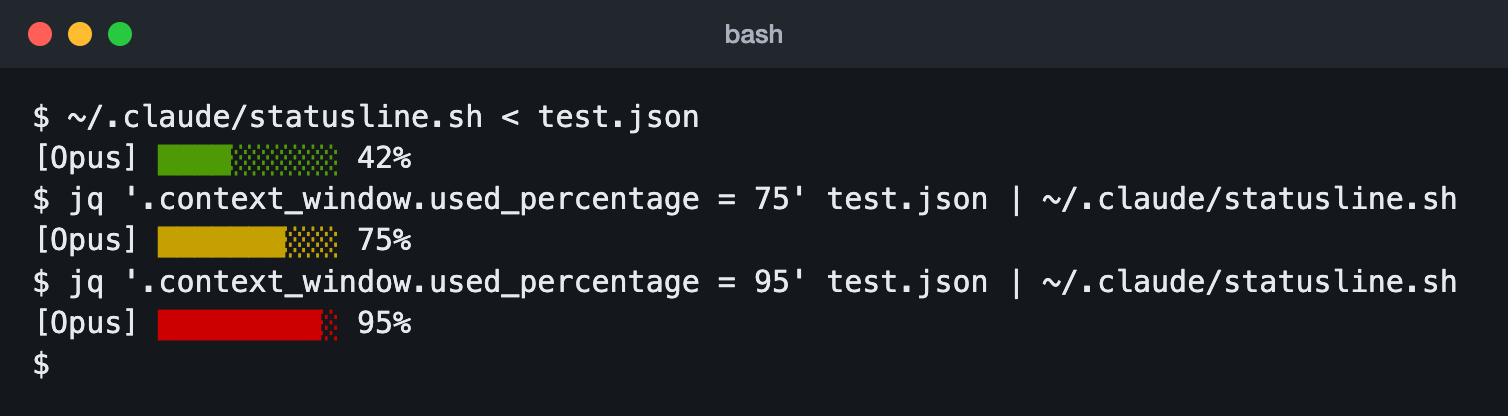
Your limits, and when each one resets
resets_at is in Unix seconds, so the time left is that minus now. It shows, for example, [Opus] | 5h 24%, resets in 1h 41m | 7d 41%, resets in 3d 3h:
#!/bin/bash
# Your five-hour and weekly limits, each with the time left until it resets
input=$(cat)
MODEL=$(echo "$input" | jq -r '.model.display_name')
NOW=$(date +%s)

window() { # $1: five_hour or seven_day, $2: its label
  USED=$(echo "$input" | jq -r ".rate_limits.$1.used_percentage // empty")
  RESET=$(echo "$input" | jq -r ".rate_limits.$1.resets_at // empty")
  if [ -z "$USED" ] || [ -z "$RESET" ]; then return; fi
  MINS=$(( (RESET - NOW) / 60 )); [ "$MINS" -lt 0 ] && MINS=0
  if [ "$MINS" -ge 1440 ]; then LEFT="$((MINS / 1440))d $((MINS % 1440 / 60))h"
  else LEFT="$((MINS / 60))h $((MINS % 60))m"; fi
  printf ' | %s %.0f%%, resets in %s' "$2" "$USED" "$LEFT"
}

echo "[$MODEL]$(window five_hour 5h)$(window seven_day 7d)"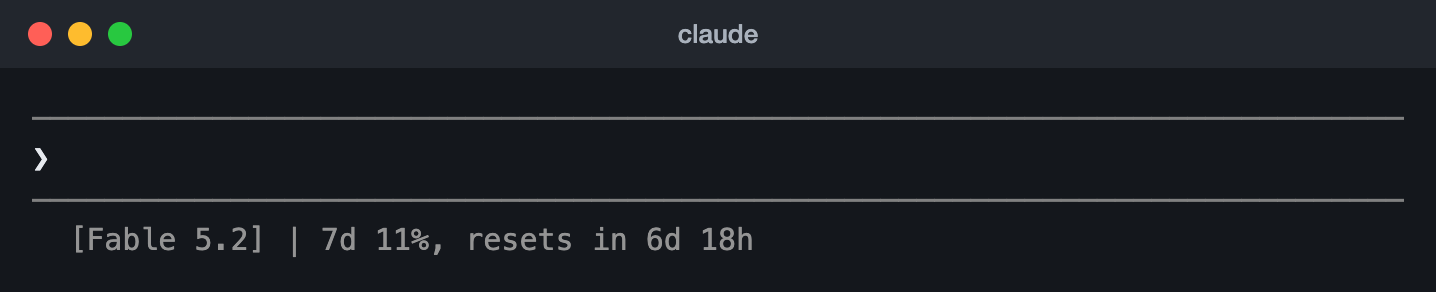
The time left only changes when the script runs. Add "refreshInterval": 60 to the setting to update it every minute.
Cost, time and lines changed
#!/bin/bash
# The session's estimated cost, how long it has run, and the lines changed
input=$(cat)
MODEL=$(echo "$input" | jq -r '.model.display_name')
COST=$(echo "$input" | jq -r '.cost.total_cost_usd // 0')
MS=$(echo "$input" | jq -r '.cost.total_duration_ms // 0')
ADDED=$(echo "$input" | jq -r '.cost.total_lines_added // 0')
REMOVED=$(echo "$input" | jq -r '.cost.total_lines_removed // 0')

printf '[%s] $%.2f | %dm %ds | +%s -%s\n' "$MODEL" "$COST" \
  $((MS / 60000)) $(((MS % 60000) / 1000)) "$ADDED" "$REMOVED"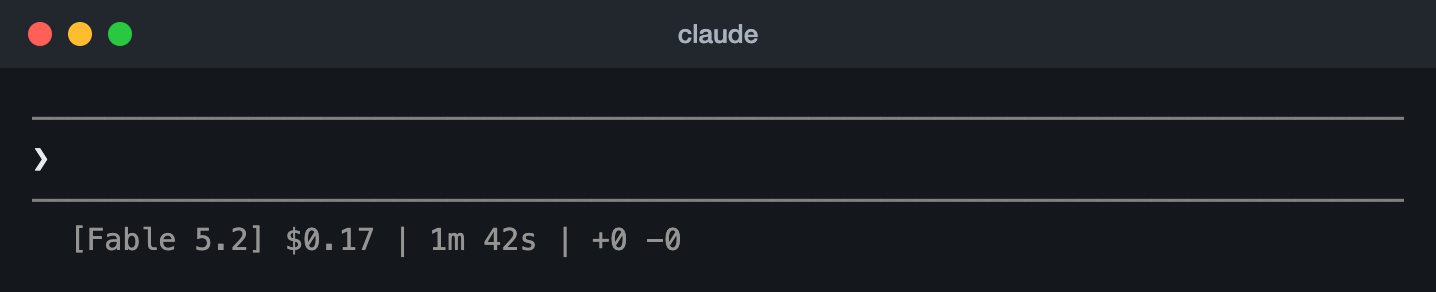
A clickable link to the repository
It reads workspace.repo, so it runs no git command, and uses OSC 8 to make the name a link in terminals that support it:
#!/bin/bash
# The repository's name as a link you can Cmd+click or Ctrl+click
input=$(cat)
MODEL=$(echo "$input" | jq -r '.model.display_name')
REPO=$(echo "$input" | jq -r '.workspace.repo // empty | "\(.host)/\(.owner)/\(.name)"')

if [ -n "$REPO" ]; then
  # OSC 8: ESC ]8;; then the address, BEL, the text, then ESC ]8;; BEL
  printf '%b\n' "[$MODEL] \e]8;;https://${REPO}\a${REPO##*/}\e]8;;\a"
else
  echo "[$MODEL]"
fi
Keep git fast in a big repository
The script runs often, and git status can be slow in a large repository. Anthropic’s caching example saves git’s answer in a file named after the session, such as /tmp/statusline-git-cache-$SESSION_ID with session_id from the JSON, and runs git again only when the file is more than 5 seconds old. Don’t name it after the process ID ($$): that changes on every run and defeats the cache.
Sources, read 15 November 2026: Status line examples, Available data.
On Windows
Claude Code runs the command through Git Bash if it’s installed, and through PowerShell if not. Write the path with forward slashes: Git Bash reads a backslash as an escape, so a path like C:\Users\you\script.mjs arrives broken and the line stays blank, with no error. ~ works too, for your home folder.
To use a PowerShell script, start it with powershell, which works either way. This is Anthropic’s example:
{
  "statusLine": {
    "type": "command",
    "command": "powershell -NoProfile -File C:/Users/username/.claude/statusline.ps1"
  }
}$input_json = $input | Out-String | ConvertFrom-Json
$cwd = $input_json.cwd
$model = $input_json.model.display_name
$used = $input_json.context_window.used_percentage
$dirname = Split-Path $cwd -Leaf
if ($used) {
Write-Host "$dirname [$model] ctx: $used%"
} else {
Write-Host "$dirname [$model]"
}With Git Bash installed, a Bash script works as well, with "command": "~/.claude/statusline.sh". The Bash scripts on this page need jq there too.
Sources, read 15 November 2026: Windows configuration, Download jq.
Ready-made status lines from the community
If you’d rather not write a script, these free, open-source projects give you a finished status line with a setup screen or wizard. Anthropic’s docs point to two of them, ccstatusline and starship-claude. They’re made by Claude Code users, not Anthropic, and their command runs every time the line updates, so look at each project before you install it.
| Tool | What it shows | You need |
|---|---|---|
| claude-hud | Model, project and git branch on one line; a context bar and your usage limits with the time to reset on the next; optional rows for tools, agents and to-dos | Claude Code 2.1.260 or later, Node.js 22.18 or later |
| ccstatusline | Widgets you pick and colour in a setup screen: model, git, tokens, context, weekly and extra usage limits, cost, timers and more, on as many lines as you like, Powerline style if you want | Node.js or Bun |
| ccusage statusline | The cost of the session, of today and of the current five-hour block, the burn rate and context use (in beta) | Bun or Node.js |
| CCometixLine | Model and effort, folder, git, context, prompt cache, the five-hour and weekly limits with your pace, cost and PR, from eight presets; written in Rust | Claude Code 2.1.153 or later; a Nerd Font for its icons |
| claude-powerline | A vim-style Powerline bar: folder, git, model, and the session’s, today’s and the month’s usage with budgets, in six themes | Node.js 18 or later, Git 2.0 or later |
| starship-claude | Your Starship prompt as the status line, with a context bar that starts warning at 40% | Starship; a Nerd Font is optional |
To install them, as each README says:
/plugin marketplace add jarrodwatts/claude-hud
/plugin install claude-hud
/reload-plugins
/hudnpx -y ccstatusline@latest{
"statusLine": {
"type": "command",
"command": "npx -y ccusage statusline",
"padding": 0
}
}npm install -g @cometix/ccline
ccline/plugin marketplace add Owloops/claude-powerline
/plugin install claude-powerline@claude-powerline
/powerline/plugin marketplace add martinemde/starship-claude
/plugin install starship-claude@starship-claude
/reload-plugins
/starshipTwo notes. A run through npx took about a second in ccstatusline’s own measurements on Windows; its pinned global install, which sets the command to plain ccstatusline, skips the package runner. And CCometixLine’s README suggests a subagentStatusLine entry as well: Claude Code 2.1.323 removed that setting, so it no longer does anything.
Sources, read 15 November 2026: claude-hud README, ccstatusline README, ccusage statusline guide, CCometixLine README, claude-powerline README, starship-claude README, Tips, Claude Code 2.1.323 release notes.
Status line blank or wrong? The fixes
| What you see | What to do |
|---|---|
| Nothing at all | Make the script executable (chmod +x), run it by hand with test.json to see that it prints, and check it prints to stdout, not stderr. Claude Code shows nothing when the script exits with an error or prints nothing. |
| Blank in one folder or repository | Accept the workspace trust dialog there: until you do, the status line stays blank. Since Claude Code 2.1.232, a git repository inside another needs its own trust. claude --debug logs Status line command skipped: workspace trust not accepted. |
| Blank everywhere | Look for "disableAllHooks": true in your settings: it turns the status line off with your hooks. If your organisation sets allowManagedHooksOnly, or you start Claude Code with --safe-mode, only a status line from managed settings runs. |
| Blank on Windows | Use forward slashes in the command’s path: Git Bash swallows backslashes. |
-- or empty values | Some fields are null or missing until Claude’s first answer. Give each a fallback, such as // 0 in jq. If values stay empty after several messages, restart Claude Code. |
| No five-hour or weekly numbers | They come only on a Pro, Max or Ultra plan, and only after the session’s first API response, which can be before you send anything and is never later than Claude’s first answer. With an API key there are none to show. |
A different percentage from /context | /context adds an estimate for messages since the last answer, so it can read higher until the next one. used_percentage is the simplest accurate figure. |
| Links show but don’t click | The terminal must support OSC 8 links: iTerm2, Kitty and WezTerm do, Terminal.app doesn’t. If yours does, start Claude Code with FORCE_HYPERLINK=1. SSH and tmux can strip the codes. If you see \e]8;; as text, print with printf '%b' instead of echo -e. |
| Garbled text | Colour and link codes can clash with other screen updates, more so on several lines. Try plain text. |
| Slow or stale | A slow script keeps the old line up until it ends, and a newer update cancels it. Cache slow commands such as git status for a few seconds, as above. |
| Cut short | Notifications share the row outside fullscreen and can truncate a long line on a narrow terminal. Keep it short, or size it with COLUMNS. |
claude --debugFORCE_HYPERLINK=1 claudeSources, read 15 November 2026: Troubleshooting, disableAllHooks, Claude Code changelog.
Questions people ask
Does the status line use tokens or count against my usage limits?
No. It runs on your computer and doesn’t use API tokens.
Can it show my five-hour and weekly limits, and when they reset?
Yes, on a Pro, Max or Ultra plan: rate_limits.five_hour and rate_limits.seven_day hold the percent used and the reset time, from each session’s first API response. The limits script above shows both, with the time left. For every other way to check your limits, see our Claude usage guide.
Is the cost it shows what I pay?
It’s Claude Code’s own estimate at list price, or at your organisation’s rates if it sets them, so it can differ from your bill. It starts again at $0 when /clear starts a new session.
How do I make it update every few seconds?
Add "refreshInterval": 5 to the statusLine setting (Claude Code 2.1.97 or later; the least is 1). Without it the script runs only on events, such as a new answer, so a clock or a countdown stops while the session is idle.
Can each project have its own status line?
Yes. Put a statusLine entry in the project’s .claude/settings.local.json for just you, or in its .claude/settings.json for everyone who works on it. Either one wins over ~/.claude/settings.json.
What happened to subagentStatusLine?
Claude Code 2.1.323, out on 12 November 2026, removed it: subagent rows always use the default look now, and settings files that still have the key load as before. Older guides and some tools still mention it.
Does Codex have a status line too?
Yes, but you pick from built-in items instead of writing a script: in the Codex CLI, /statusline picks and orders footer items such as the model, context, limits and git branch, and saves them in config.toml. Our Codex usage guide shows how to put your Codex limits on it, and our Codex status guide covers the status line beside the /status command. Our Codex CLI guide has the CLI itself, from the install to the first run.
Sources, read 15 November 2026: How status lines work, Available data, statusLine setting, Settings files and precedence, Claude Code 2.1.323 release notes, Codex slash commands.