Claude Code vs Cursor: price, limits and where each runs.
Claude Code is Anthropic’s coding agent and Cursor is an AI code editor and coding agent: both have a desktop app, a command-line tool and cloud agents. Claude Code comes with Claude’s paid plans, from Pro at $20 a month. Cursor has a Free plan, then paid plans from $8 to $200 a month, as of 14 November 2026.
By NarenLast updated
Claude Code vs Cursor in short
- Claude Code is Anthropic’s coding agent. Cursor is an AI code editor and coding agent. Each reads your code, edits files and runs commands for you.
- Both have a desktop app, a command-line tool and agents that run in the cloud. Both can be directed from a phone, while the code runs in the cloud or on your own computer, not on the phone.
- Claude Code comes with Claude’s paid plans, not Free: Pro $20 a month or $200 for a year, Max $100 a month, Ultra $200 a month.
- Cursor is sold as part of The X Subscription, with Grok and X: Free $0, Plus $8, Premium $30, Super $100, Ultra $200 a month. People who subscribed before it keep their older Cursor plans.
- Claude Code’s limits are a five-hour limit and a weekly limit on Pro and Max, and a weekly limit on Ultra. Max and Ultra also have a separate weekly limit for Fable. Cursor’s Plus, Premium, Super and Ultra plans and its Teams seats have one weekly pool of usage.
- To see your usage, type
/usagein Claude Code. For Cursor, open Usage at grok.com/dashboard or look in the editor’s settings. - You can use both at once: Anthropic has a Claude Code extension for Cursor, and Cursor offers Claude models from Premium up, paid for separately from the plan.
- Prices are the ones each vendor’s own pages show, as of 14 November 2026. Anthropic labels Pro’s $20 as its US price. Cursor’s pricing page shows dollar amounts, and its page data marks them as USD. Checkout may differ by region, so check the total and any tax at checkout.
What is the difference between Claude Code and Cursor?
Claude Code is one company’s agent for its own models. Anthropic describes it as “an agentic coding tool that reads your codebase, edits files, runs commands, and integrates with your development tools”. Cursor is an editor with an agent built in, and its docs call it “a coding agent for building ambitious software”. It runs its own models and other companies’ models, Anthropic’s among them. This table has each difference, from the two vendors’ own pages as of 14 November 2026. It compares facts, not how well either one codes: neither vendor’s pages settle that.
| What | Claude Code | Cursor |
|---|---|---|
| Sign in with | A Claude account on a Pro, Max, Ultra, Team or Enterprise plan, a Claude Console account or API key, a cloud provider (Amazon Bedrock, Google Cloud’s Agent Platform or Microsoft Foundry), or an organisation gateway | A Cursor account. The Cursor CLI also takes a Cursor API key |
| Where it runs | The terminal, VS Code and JetBrains IDEs, the Claude desktop app, the web (claude.ai/code) and the Claude app for iOS and Android | The Cursor editor, the Cursor CLI, JetBrains IDEs, the web (cursor.com/agents) and the Cursor app for iOS |
| Comes with | Claude’s paid plans, not Free | Every plan on The X Subscription, Free included, with limited usage on Free |
| Lowest-priced plan with it | Pro, $20 a month, or $200 for a year paid up front | Free, $0 a month |
| Models | Claude models, through Anthropic or a supported cloud provider | Cursor models in the plan’s pool. From Premium up, third-party models, paid for separately |
| Usage limits | On Pro and Max, a five-hour limit and a weekly limit. On Ultra, a weekly limit, and no five-hour limit for verified accounts. Max and Ultra also have a separate weekly limit for Fable | On Plus, Premium, Super, Ultra and Teams seats, one weekly pool of usage for Cursor models. Enterprise has pooled usage. Older Cursor plans have two monthly pools |
| The allowance is shared with | Claude on the web, desktop and mobile | Grok Bot and the Grok apps |
| See your usage | /usage in Claude Code, or Settings, then Usage, in Claude | Usage at grok.com/dashboard, or the editor’s settings. On older plans, the Spending tab of the Cursor dashboard |
| Past a limit | Usage credits on paid plans, at standard API rates | Prepaid credit, bought as top-ups |
| Project instructions file | CLAUDE.md. By default it reads AGENTS.md when the project has no CLAUDE.md, .claude/CLAUDE.md or CLAUDE.local.md | Rules in .cursor/rules, or AGENTS.md |
The rest of this page takes those rows one at a time: where each runs, what each costs, how each is limited and how to see your usage.
Sources, read 14 November 2026: Claude Code overview, Authentication in Claude Code, Claude plans and pricing, How Claude remembers your project, Cursor documentation, Cursor pricing and plans, Cursor models and pricing, Cursor usage and limits, Cursor CLI authentication, Cursor rules.
Where does each one run?
Both reach the terminal, a desktop app, JetBrains IDEs, the web and a phone. On the desktop, Claude Code is the Code tab of the Claude app or an extension in VS Code, and Cursor is its own editor.
| Where | Claude Code | Cursor |
|---|---|---|
| Terminal | The Claude Code CLI, on macOS 13 or later, Windows 10 1809 or later, and Ubuntu, Debian and Alpine Linux | The Cursor CLI, with installers for macOS, Linux, Windows under WSL and native Windows |
| Editor | An extension for VS Code, with an install link for Cursor too | Cursor is its own editor |
| JetBrains IDEs | A plugin from the JetBrains Marketplace. It needs the Claude Code CLI | Through the Agent Client Protocol and JetBrains’ AI Assistant plugin, 2025.1 or later. It needs a paid Cursor plan |
| Desktop app | The Code tab of the Claude desktop app, for macOS and Windows. On Ubuntu and Debian the app is in beta. It needs a paid subscription | The Cursor app, for macOS 12 or later, Windows 10 or later, and Linux |
| Web | Claude Code on the web, at claude.ai/code, runs cloud sessions. They are on Pro, Max, Ultra and Team plans, and for Enterprise users with premium or Chat + Claude Code seats | Cloud Agents, at cursor.com/agents, run in isolated virtual machines. They are on Premium and above, not Free or Plus |
| Phone | The Claude app for iOS and Android: cloud sessions, or a session on your own computer through Remote Control | The Cursor app for iPhone and iPad, on iOS or iPadOS 26.0 or later: Cloud Agents, or Remote Control, where the agent loop runs in Cursor’s cloud while terminal commands, file edits and tests run on your computer. On Android, cursor.com/agents installs as a web app, and Cursor says a native app is planned |
On a phone, neither app is where the code runs. Anthropic calls the Claude app “a client for Claude Code sessions rather than a place where code runs”, and Cursor says of its iOS app, “It isn’t an IDE”.
Install each one in a terminal
On macOS or Linux, each installs with one line. Claude Code then starts with claude in a project folder, and the Cursor CLI with agent. Each vendor’s page has the Windows command.
curl -fsSL https://claude.ai/install.sh | bash
claudecurl https://cursor.com/install -fsS | bash
agentUsing both together
The two are not either-or. Anthropic’s Claude Code docs have an “Install for Cursor” link beside “Install for VS Code”, so the Claude Code extension installs in the Cursor editor too. Going the other way, Cursor lists Claude among the third-party models you can pick from Premium up, paid for separately from the plan’s pool. Which sign-in the work goes through decides how you pay, which is next.
Sources, read 14 November 2026: Claude Code overview, Claude Code setup, Claude Code on the web, Claude Code on mobile, Cursor quickstart, Cursor CLI, Cursor in JetBrains IDEs, Cursor Cloud Agents, Cursor for iOS, Cursor models and pricing.
What does each one cost?
Claude Code comes with a paid Claude plan, which also covers the Claude apps, or runs on pay-as-you-go API billing through a Claude Console account. Cursor, for new customers, is part of The X Subscription, which Cursor calls “one subscription for Grok, Cursor, and X”. These are the prices shown on each vendor’s pages on 14 November 2026.
| List price a month | Claude Code, in a Claude plan | Cursor, in The X Subscription |
|---|---|---|
| $0 | Free. Claude Code is not included | Free. Cursor’s help page says “Agent, Chat, and Tab completions with Cursor models (Grok and Composer)”, with limited usage |
| $8 | No plan at this price | Plus, or $80 for a year. Cursor models only, at fixed settings. No Cloud Agents and no third-party models |
| $20 | Pro. Claude Code is included. $20 billed monthly, or $17 a month with the annual discount, $200 billed up front | No plan at this price for new customers |
| $30 | No plan at this price | Premium, or $300 for a year. 4x Plus usage. It adds Cloud Agents and third-party models, paid for separately |
| $100 | Max. 5x Pro usage every 5 hours and every week | Super, or $1,000 for a year. 15x Plus usage |
| $200 | Ultra. 10x Pro usage every week, and no 5-hour limit for verified accounts | Ultra, or $2,000 for a year. 50x Plus usage |
| Teams | Team, for 2 to 150 people. A Standard seat is $20 per seat per month billed annually, or $25 billed monthly. A Premium seat is $100 per seat per month billed annually, or $125 billed monthly | Teams. A Premium seat is $30 per user per month, a Super seat $100 and an Ultra seat $200, each with the usage of the individual plan of the same name |
| Larger organisations | Enterprise. $20 per seat per month billed annually, with a 20 seat minimum, plus usage at API rates | Enterprise. A custom price through Cursor’s sales team, with pooled usage |
The same price does not buy the same amount of work. Anthropic says there is no fixed message count and gives Max and Ultra as multiples of Pro. Cursor gives Premium, Super and Ultra as multiples of Plus, and calls Free “Limited”. Nothing on either vendor’s pages converts one allowance into the other.
One thing is easy to miss: Cursor’s plan covers its own models only. Claude, GPT and Gemini models in Cursor are paid for separately, from Premium up. Those rates, and the older Cursor plans that earlier subscribers keep, are in the Cursor usage guide.
On currency, each page is labelled its own way. Anthropic’s Help Center says Pro is $20 a month in the US, with pricing in your local currency where supported, and its pricing page writes the Enterprise seat as US$20. Cursor’s pricing page shows a dollar sign, and the data in the page marks each price as USD; its pages do not say whether checkout uses a local currency. Checkout may differ by region, so check the total and any tax at checkout. Neither vendor’s listed prices include tax. Anthropic’s pricing page says “Prices shown don’t include applicable tax”, and Cursor’s says “Prices shown do not include applicable taxes or fees (e.g. VAT)”.
With an API key instead of a plan’s allowance
Both have a pay-for-what-you-use route, and they are not the same thing. Claude Code can sign in with a Claude Console account or an API key instead of a plan, and Anthropic calls that pay-as-you-go API credits. In Cursor you add your own key from OpenAI, Anthropic, Google, Azure or AWS Bedrock under Cursor Settings, then Models. Cursor says that on its individual plans from Premium up, those requests are billed by your provider and do not draw from your included usage or prepaid credit. Plus does not take your own keys. The Cursor CLI’s own API key is a different thing: it signs you in to your Cursor account for scripts.
What each plan’s price buys in limits is in our two usage guides: the Claude usage guide has Claude’s plans side by side, and the Cursor usage guide has Cursor’s, older plans included.
Sources, read 14 November 2026: Claude plans and pricing, What is the Pro plan?, Authentication in Claude Code, Cursor pricing, Cursor pricing and plans, Cursor models and pricing, Cursor team pricing, Bring your own API key to Cursor, Cursor CLI authentication.
How is each one limited?
Neither vendor gives a number of messages: Anthropic sizes its plans as multiples of Pro and Cursor as multiples of Plus, and both say the model you pick changes how fast the allowance goes. The shape differs: Claude Code has a short window and a week, and Cursor has a week.
| Limit | Claude Code | Cursor |
|---|---|---|
| Limit windows | Pro and Max have a five-hour limit and a weekly limit. Verified Ultra accounts have the weekly limit only | Plus, Premium, Super, Ultra and Teams seats have one weekly pool, for Cursor models. Cursor lists Enterprise usage as “Pooled”. Older Cursor plans have two monthly pools instead |
| Limits by model | Anthropic says “Max and Ultra plans also have a separate weekly limit for Fable” | The weekly pool covers Cursor models only. Third-party models are outside it, paid for separately |
| Shared with | Claude on the web, desktop and mobile: one pool | Grok Bot and the Grok apps: one pool |
| At the limit | Wait for the reset, move to a higher plan, or turn on usage credits at standard API rates | Wait for the reset, move to a higher plan, or keep working from prepaid credit |
How big each allowance is, how each window resets, what counts against it and how to make it last are in the Claude usage guide and the Cursor usage guide. Whichever you use, the next thing you need is where to look.
Sources, read 14 November 2026: Use Claude Code with your Pro, Max, or Ultra plan, Claude plans and pricing, Cursor usage and limits, Cursor models and pricing.
How do you see your usage in each?
Claude Code shows your limits with a command, /usage, and Cursor shows them on a page, Usage at grok.com/dashboard.
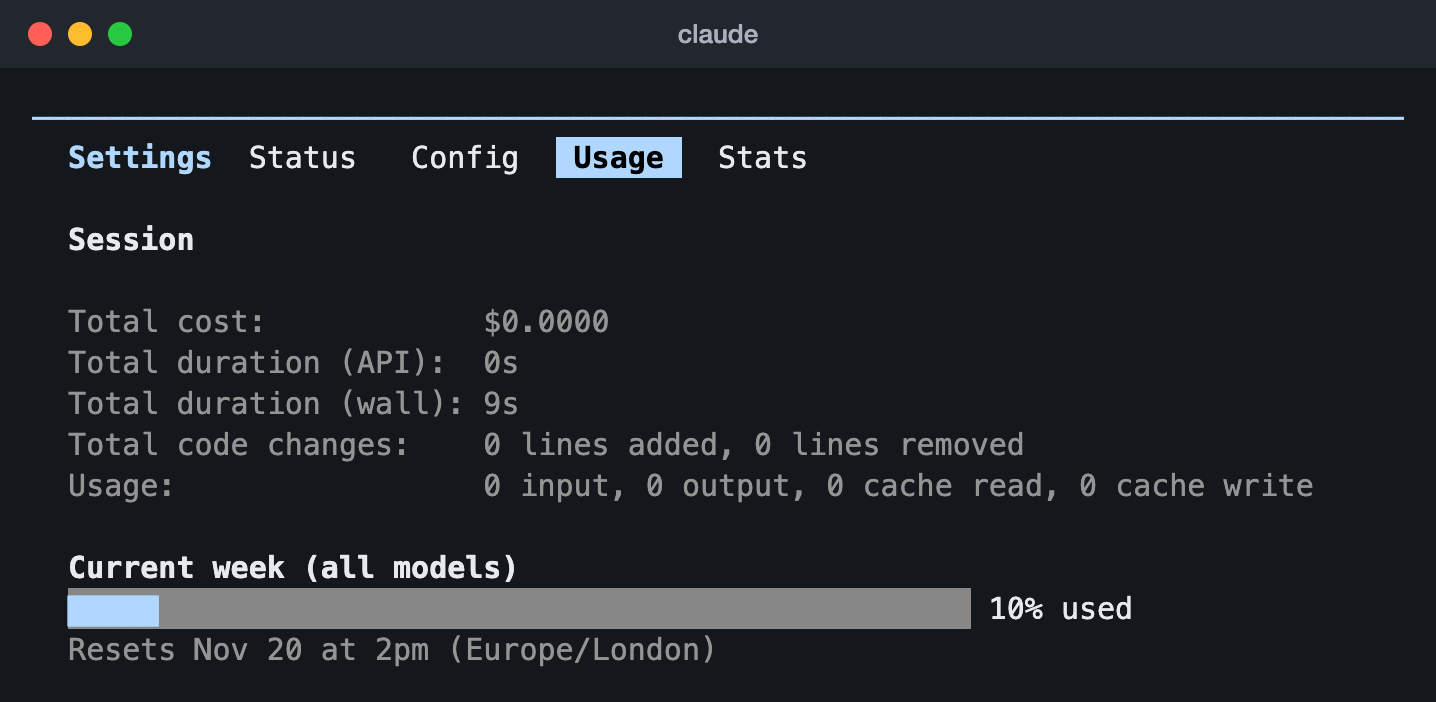
/usage in Claude Code 2.1.323 on a verified Ultra account (13 Nov 2026): the week across all models, 10% used, and when it resets. This account had no five-hour limit, so only the week shows. Cursor has no command like it: its usage is on the web page above.Every other way to check is in the Claude usage guide and the Cursor usage guide, and the scripts that keep Claude Code’s limits on screen are in our Claude Code status line guide.
Sources, read 14 November 2026: Claude Code commands, Cursor usage and limits, Cursor CLI slash commands.
Questions people ask
Is Claude Code or Cursor free?
Cursor has a Free plan at $0. Its help page says Free has limited usage, with “Agent, Chat, and Tab completions with Cursor models (Grok and Composer)”. Claude Code is not in Claude’s Free plan: Anthropic says it is included in all paid plans, which start with Pro at $20 a month.
Can I use Claude Code inside Cursor?
Yes. Anthropic’s Claude Code docs give an “Install for Cursor” link for the Claude Code extension, beside the one for VS Code. It is still Claude Code: you sign in to it the way Anthropic’s docs describe, with a Claude account on a paid plan or one of the other routes in the table above.
Can I use Claude models in Cursor?
Yes, from Premium up. Cursor lists Claude among its third-party models and says they are not part of the included weekly pool. On Premium, Super and Ultra they are billed at API list price, paid from prepaid credit. On Teams and Enterprise, eligible third-party models also carry the Cursor Token Rate. Free and Plus do not include third-party models. On Premium, Super and Ultra you can also add your own Anthropic API key, and Anthropic then bills you directly.
Which costs less, Claude Code or Cursor?
The lowest listed prices are $0 for Cursor and $20 a month for Claude Code, and they do not buy the same thing. Cursor’s Free plan has limited usage, and Plus at $8 runs Cursor models only. Claude’s Pro plan, $20 a month or $200 for a year, is the first with Claude Code. Both vendors have plans at $100 and $200 a month. Neither vendor’s pages say how much work one price buys against the other.
Can Claude Code and Cursor share one instructions file?
Yes, by default, on three conditions. Cursor supports AGENTS.md in the project root and in subdirectories. Claude Code reads CLAUDE.md, and by default it reads AGENTS.md only when there is no CLAUDE.md, .claude/CLAUDE.md or CLAUDE.local.md in your working directory or above it. Anthropic says that needs Claude Code 2.1.277 or later with its built-in plugin that reads AGENTS.md left on, and that otherwise a CLAUDE.md can import AGENTS.md instead.
Do Claude Code and Cursor both work on Windows?
Yes. Claude Code runs on Windows 10 1809 or later, and the Claude desktop app has Windows builds. Cursor has a Windows installer for Windows 10 and later, and the Cursor CLI installs on native Windows through PowerShell or under WSL.
Sources, read 14 November 2026: Claude Code overview, Claude plans and pricing, How Claude remembers your project, Claude Code setup, Cursor pricing and plans, Cursor models and pricing, Bring your own API key to Cursor, Cursor rules, Cursor quickstart, Cursor CLI.