Tea and pomodoro timer widget for your Mac
Time your tea or a focus session with one press, right from your Mac menu bar. Wishbar turns plain English into widgets like this in minutes, using your own AI.
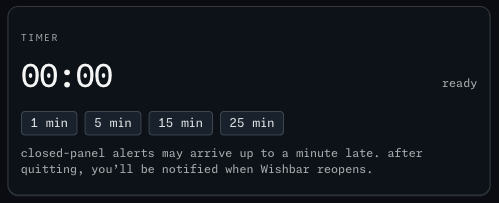
Tea and pomodoro timer · A one-press countdown for tea or a pomodoro that keeps running with the panel closed, and tells you when it ends.
Made with  Wishbar
Have Wishbar on this Mac? This opens it with this widget ready to make. Wishbar asks first, then your AI makes it in a few minutes.
The wish that made it, as typed into Wishbar:
Make me a timer with buttons for 1, 5, 15 and 25 minutes. Show the minutes and seconds counting down while the panel is open. Keep running when the panel is closed and even when Wishbar is quit, and send me a notification when the time is up; if Wishbar was quit, tell me the moment it next opens.
“A widget like this can be made for you from one sentence, to your taste. Nobody else will have it.”
No card needed. You bring the AI: a free ChatGPT account is enough.
“Wishbar turned a one-sentence request into a working Mac widget in minutes … I've stopped hunting for menu-bar apps; I just wish for them now.”
What it does
- Four preset buttons, 1, 5, 15 and 25 minutes, start a countdown; the minutes and seconds tick while the panel is open.
- The timer keeps running when the panel is closed and even when Wishbar is quit.
- A notification arrives within a minute of the end, because Wishbar checks the timer once a minute in the background; if Wishbar was quit, it tells you the moment it next opens, and the widget says so under the buttons.
- One timer at a time; starting a new one replaces the old; a cancel button stops it.
Where the data comes from, and what it needs
Nothing outside your Mac. No account, no key. It runs on your Mac and never goes online. Once made, it runs without your AI: it uses no Claude or ChatGPT tokens.
- Permission to show notifications
When it is useful
- Tea steeping, eggs boiling, twenty-five minutes of focus.
- A timer you cannot forget because it lives where you look.
How to add this widget to your Mac
- Get Wishbar, free for seven days, and install it.
- Copy this widget's recipe link:
https://wishbar.app/recipes/timer.html - Paste it into the box at the bottom of Wishbar's panel and send it. Wishbar asks, then your AI builds it.
- Press Keep when you like what you see.
Questions people ask
Does it keep going if I quit Wishbar?
Yes. The end time is saved on your Mac; Wishbar checks once a minute while it runs, and tells you at its next start if it was quit.
Can I set my own length?
This widget has presets only. A custom length is a one-line wish away.
Does it send anything anywhere?
No. There is no network in it at all.
Added Last updated


More like this
See the gallery's Time section.