Days left in the year widget for your Mac
See how much of the year is left at a glance, right from your Mac menu bar. Wishbar turns plain English into widgets like this in minutes, using your own AI.
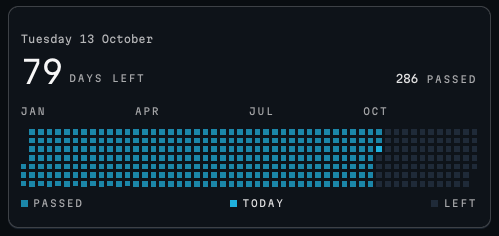
Days left in the year · Today's date, the days passed and the days left, and the whole year as a grid of small squares with today marked.
Made with  Wishbar
Have Wishbar on this Mac? This opens it with this widget ready to make. Wishbar asks first, then your AI makes it in a few minutes.
The wish that made it, as typed into Wishbar:
Show how much of this year is left, like GitHub's contribution graph. At the top, a quiet line with today's weekday, date and month, like Thursday 8 October, without the year. Under it, one big thin number for the days left with a small spaced-out label DAYS LEFT beside it, and on the right the smaller number of days passed with the label PASSED.
Read all of itFold it
Count today as passed. Then the whole year as a grid of small square cells with sharp corners: one column per week, seven rows for Sunday to Saturday, with JAN, APR, JUL and OCT written above it. Passed days in the accent colour, a little faded, today in the full accent colour, and the days left in a dark grey. Under the grid, a small legend: PASSED, TODAY and LEFT. Hovering a square shows its day number and whether it has passed, like: day 177 · passed. Use small capital labels in a monospaced font. Call it Days left in the year.
“A widget like this can be made for you from one sentence, to your taste. Nobody else will have it.”
No card needed. You bring the AI: a free ChatGPT account is enough.
“Wishbar turned a one-sentence request into a working Mac widget in minutes … I've stopped hunting for menu-bar apps; I just wish for them now.”
What it does
- Shows the weekday, the date and the month, then one large number: the days left, with the days passed beside it.
- Draws the year as a grid, one square per day, seven rows per week, the passed days filled in.
- Needs nothing but the clock; it never fetches anything.
Where the data comes from, and what it needs
Nothing outside your Mac. No account, no key. It runs on your Mac and never goes online. Once made, it runs without your AI: it uses no Claude or ChatGPT tokens.
When it is useful
- A gentle reminder of the shape of the year.
- The quiet one you leave on a tab for the whole year.
How to add this widget to your Mac
- Get Wishbar, free for seven days, and install it.
- Copy this widget's recipe link:
https://wishbar.app/recipes/year-progress.html - Paste it into the box at the bottom of Wishbar's panel and send it. Wishbar asks, then your AI builds it.
- Press Keep when you like what you see.
Questions people ask
Does it track anything I do?
No. The filled squares are days that have passed, nothing more.
Can I mark days?
Not this one. A habit grid is a different wish.
Does it need an account?
No.
What if it does not come out right the first time?
Say what to change, in plain words. This one came out a little too wide at first, and one more line fixed it: "Make the whole year fit inside the card, without scrolling."
Added Last updated


More like this
See the gallery's Time section.