Skip to content

Stop hunting for menu bar apps. Make a wish. Get a live widget.

Type what you want in plain English. Your own AI builds a real, working widget in Wishbar, one click away in your menu bar. Made for people who cannot code, and for people who can but want no server to run.

Try free for 7 days
Every reviewer gave it 5 stars
Pay once, no subscription14-day money-back guaranteeSigned and notarised by AppleLicence key required

You bring the AI: a free ChatGPT account is enough, or a paid Claude plan. macOS 13 Ventura or later, Apple silicon and Intel.

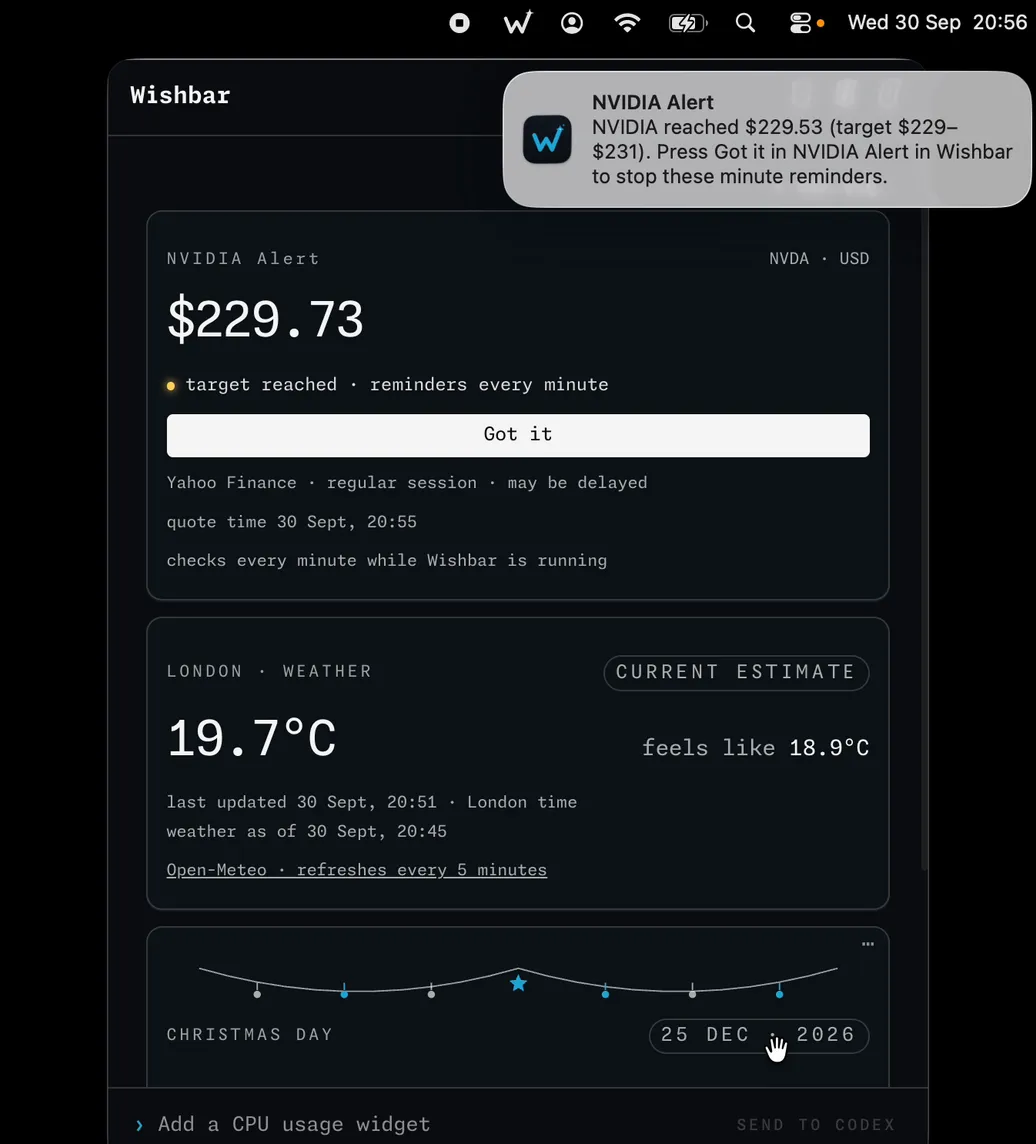
The Wishbar panel with three widgets: an NVIDIA share price with a Got it button, London weather, and a Christmas countdown. A macOS alert says NVIDIA reached $229.53.

The wish · “Show me NVIDIA's share price and alert me when it is around $230. Keep reminding me every minute until I press Got it. Call it NVIDIA Alert.”

Try one. Right here.

Box breathing · Press start and breathe with it: in, hold, out, hold, four to twenty seconds each. Voice on or off.

Made with Wishbar

The wish, as typed into Wishbar:

Make a box breathing guide like the calm breathing apps. Draw a soft square. A small round character, like the one from the old arcade game, travels along the sides one side per step and eats the dots on that side as it goes: breathe in along the top, hold down the right side, breathe out along the bottom, hold up the left side.

Read all of itFold it

Give each step its own calm colour, and show the step in big words in the middle with a countdown of the seconds. Say each step out loud as it starts, with a button to turn the voice off. Start at 4 seconds per side and let me add a second at a time as I get better, up to 20 seconds, and remember my choice. Add start and stop buttons, count the rounds I finish today, and show a small note under the square: if you feel dizzy, stop and breathe normally.

“I've stopped hunting for menu-bar apps; I just wish for them now.”

Mani, Co Founder

Naren, who made Wishbar
From the maker

Hey, it's Naren. I made Wishbar.

Here are the three widgets I use most, and why I wished for them.

Wish one

Can I call Mum now?

I call my mum every day, sometimes more than once, depending on my day. She lives in a care home in India and I live in the UK: four and a half hours apart in summer, five and a half in winter. For years I kept her clock on my phone's home screen and did the sum in my head before every call: is she at lunch? At tea? In bed by now? I even wrote little scripts to work it out. They never helped, because I had to remember to run them.

So I wrote a wish: I typed in her schedule and explained the situation. Wishbar turned it into a widget in my menu bar, and now I can see at a glance whether I can call her right now and, if not, when I can.

CAN I CALL MUM NOW?
Yes
Until 4:30 pm your time, when she goes to bed.
Mum · India7:42 pm
You · UK3:12 pm
Next free in your daytime: tomorrow 9:00 to 11:30 am · 11:50 am to 2:30 pm
Wish two

What does this month's money cost me today?

Every month I send my mum money for her care home in India. I send pounds, she receives rupees, and the rate changes every day. Some days the same rupees cost me a few pounds more, some days a few pounds less.

So I wrote a wish: how much I send each month, and that I wanted to know the best day to send it. Wishbar turned it into a widget, and now I can see what this month's amount costs me in pounds right now, and whether today is a good day to send it or a day to wait.

WHAT DOES THIS MONTH COST ME?
£1 buys₹118.02
This month's rupees cost you today
£423.65
Better than the 30-day average (₹117.40)
Updated 2 min ago · mid-market rate
Wish three

Will it rain in the next 30 minutes?

I walk 10,000 steps every day, and I have not missed a single day in over two and a half years. But I live in England, so the weather can change while I am putting my shoes on. Before I go out I need to know one thing: is it going to rain in the next 30 minutes? If yes, I go for a short walk in the waterproof shoes and the raincoat. If no, I can go for a long one.

I used to check the BBC, Apple Weather, even a little phone app I built just for this question. So I wrote a wish: will it rain in the next 30 minutes, and for how long? Wishbar turned it into a widget in my menu bar, and now I look there instead, because I am at my desk most of the day anyway.

RAIN IN THE NEXT 30 MIN?
Rain in 22 min
Light, for about 15 minutes. A short walk now, or a long one after 3:50 pm. Take the raincoat.

No app store will ever have these three, because only I need them. I did not have to wait for anyone to build them. That is the whole point of Wishbar.

How it works

Describe it. See it work. Make it yours.

  1. Wish

    Say what you want

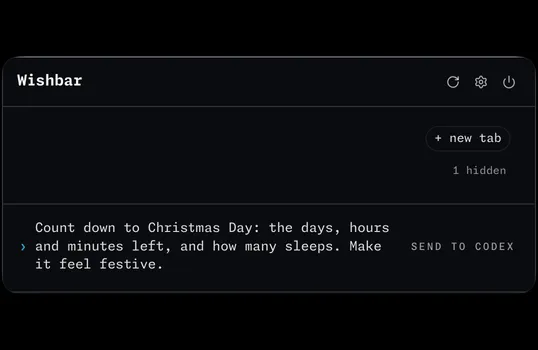
    Wishbar with no widgets on show and a wish typed in the box at the bottom: Count down to Christmas Day: the days, hours and minutes left, and how many sleeps. Make it feel festive.

    In your own words, in the box at the bottom of Wishbar.

  2. Build

    Your AI builds it

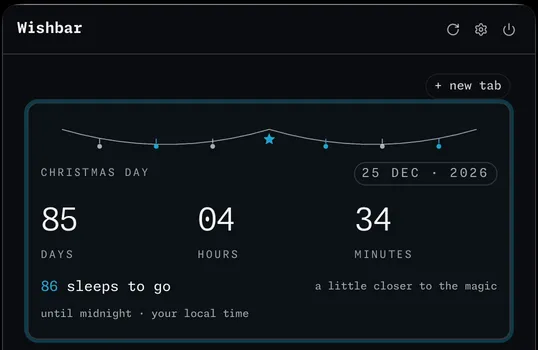
    The new Christmas countdown widget in Wishbar, outlined: 85 days, 4 hours and 34 minutes, 86 sleeps to go

    It appears inside Wishbar, one click away in your menu bar.

  3. Refine

    Ask for a change

    Another view, a new alert, a different colour. Keep the version you like.

Pricing

Pay once. No subscription.

Try Wishbar free for 7 days, or buy once today. Prices include the $10 discount.

Free 7-day trial

Trial · 1 Mac

$0for 7 days

Full Wishbar access. After 7 days it locks; a paid licence reopens your saved widgets.

Get free trial licence
  • No card or automatic charge.

Solo · 1 Mac

$39$29one-time

For the Mac you use every day.

Get Wishbar
  • 14-day money-back guarantee
Most people pick this

Personal · 2 Macs

$49$39one-time

Your desk Mac and your laptop.

Get Wishbar
  • 14-day money-back guarantee

Family · 5 Macs

$69$59one-time

The whole household, one purchase.

Get Wishbar
  • 14-day money-back guarantee
  • Pay once. There is no subscription, and every update is included.
  • 14-day money-back guarantee. Not for you? Email hello@wishbar.app with the address you bought with, and you get a full refund. No questions asked.
  • Signed with our Apple Developer ID and notarised by Apple. macOS opens it like any other Mac app.
  • A licence key is required: the free 7-day trial key, or a paid one. Either is in your Polar customer portal shortly after you complete checkout, with the download; Polar's email links you there.
  • It uses your own ChatGPT or Claude account. A free ChatGPT account is enough. Claude needs a paid plan. Your AI works only while it makes or changes a widget; most widgets then run without it. The only thing you pay us for is Wishbar.
  • macOS 13 Ventura or later, Apple silicon and Intel. Solo covers 1 Mac, Personal 2, Family 5.

Prices in US dollars; where VAT applies it is included. Final currency, tax and total are shown by Polar at checkout.

“Wishbar feels genuinely well crafted - it has a clean, developer-friendly interface and makes building useful desktop widgets surprisingly effortless.”
Abdul Khader, Director ·
FAQ

Fair questions.

What does Wishbar do?

You type what you want in plain English, like "a widget that shows the live gold price", and your own AI builds it as a live widget inside Wishbar, one click away in your menu bar. It runs there from then on. No code, ever.

Who is it for?

Anyone on a Mac who wants a tool of their own that does not exist yet. People who cannot code, because Wishbar writes it for them. And people who can, because it means no server to run, and every widget in one place.

What problem does it solve?

Each new thing you want in your menu bar usually means another app to find and install, sometimes one to pay for, and it rarely does exactly what you want. Wishbar replaces all of that with one wish: describe the widget, and keep it if you like it.

Are there any other costs?

Not from us: Wishbar is a one-time purchase. It builds with your own AI account. A free ChatGPT account is enough (inside Wishbar it appears as Codex, OpenAI's builder). Claude also works, and needs a paid Claude Pro or Max plan. Whatever your AI provider charges, if anything, you pay them, not us.

Does a widget keep using my Claude or ChatGPT allowance?

Only while your AI makes or changes it. Once you keep a widget, it runs on your Mac by itself and uses no Claude or ChatGPT tokens, however long you keep it. The exception is a widget you ask to write something new each time it runs, like fresh ideas or a written summary of the news: that one asks your AI each time, and that uses your allowance. Every widget in the gallery runs without your AI.

Do I need to know how to code?

No. You describe what you want in plain English and you never see any code.

How long does a widget take?

With ChatGPT, usually one to three minutes. With Claude, about three. You watch it happen inside Wishbar, and when it is done you choose Keep or Undo.

Which Macs does it run on?

macOS 13 Ventura or later, on Apple silicon and Intel.

How many Macs can I use it on?

The free 7-day trial covers 1 Mac. Solo covers 1 Mac, Personal 2 and Family 5. Every tier is the full app.

Can I get a refund?

Yes. There is a 14-day money-back guarantee, no questions asked.

Is there a Windows version?

Not today. Wishbar is Mac-only. Leave your email and we will tell you if that changes.

Who sees my wishes?

Your wish goes to the AI you connected, on your own account: ChatGPT or Claude. It writes the widget. We never see your wishes. The widget is a small set of files on your Mac, in its own folder under .wishbar/extensions in your home folder, and you can open it, change it or delete it whenever you like.

What leaves my Mac?

Four things. Your wish goes to the AI you connected, ChatGPT or Claude, on your own account. A widget fetches what it shows from the sites it uses, like a weather or share-price site. When you enter your licence key, Wishbar sends the key and an id for your Mac to Polar and to our licence check. And if "share usage data" is on in Settings, Wishbar sends the usage events listed in the privacy policy, tied to a number, not to your name. We never receive your wishes or what a widget shows.

What permissions does it need?

Installing and running Wishbar asks for nothing. A widget may need something on your Mac to do its job: your calendar for a meetings countdown, a folder if it saves a file, a notification if it needs to alert you. macOS asks the first time Wishbar needs that kind of access. Your answer applies to Wishbar for that permission, and you can say no.

Do I need an account?

Not with us. Your licence key and the download are in your Polar customer portal shortly after you complete checkout, Polar's email links you there, and you paste the key in once. For a purchase, your receipt is there too. The only sign-in is to your own ChatGPT or Claude account, inside Wishbar, and it walks you through it.

Can I undo what the AI did?

Yes. When the AI finishes, you get two buttons: Keep and Undo. Undo puts the widget's files back the way they were; it cannot reverse something the build already did elsewhere, such as sending a message. Once you Keep, that change is final: to change or remove the widget later, make a new wish.

What if I switch Macs?

The free trial covers 1 Mac; Solo covers 1, Personal 2 and Family 5. Deactivate the old Mac, either in the licence screen inside Wishbar or in your Polar customer portal, then paste your key on the new one. Your key and your Macs are always in the portal; for a purchase, your receipt is there too.

How do I get the app again, or find my key?

Your Polar customer portal always has your licence key, the download and, for a purchase, your receipt. Sign in there with the address you used at checkout.

Is there a free trial?

Yes: full Wishbar access on 1 Mac, free for 7 days. No card or automatic charge. Start it on the pricing page. After 7 days, Wishbar locks; your widgets and settings stay saved, and entering a paid licence restores access. Paid licences come with the 14-day money-back guarantee.

Is the download safe?

Yes. Wishbar is signed with our Apple Developer ID and notarised by Apple, which means Apple has scanned it for malware and macOS opens it like any other downloaded Mac app: no security workaround, no Terminal. You get it from your Polar customer portal after checkout.

Wall of love

Don't take my word for it.

Every review, unedited. If you are quoted here and want it removed, email hello@wishbar.app and it goes the same day.

Wishbar turned a one-sentence request into a working Mac widget in minutes - I asked for a Claude usage tracker and got exactly that, pulling live data, without touching any code myself. I've stopped hunting for menu-bar apps; I just wish for them now. It's easily the most "it just works" AI tool on my Mac - impressively accurate, and it delivers exactly what I actually need.

Zero friction. No account hoops, no manual to read - I typed my first wish and it just built the thing. Within five minutes I had a live widget in my menu bar. That first-run experience sold me instantly.

Mani
Co Founder ·

I have been using Wishbar for more than a week now on my personal MacBook.

It's a great handy tool which has made my everyday tasks and activities remarkably simpler.

First time setup and initial configuration was quite easy and straightforward.

Wishbar has quickly become part of my daily routine. Instead of juggling a bunch of separate widgets scattered around my desktop, I have everything in one clean, simple spot.

It's intuitive enough that I didn't need a tutorial, and it doesn't feel heavy or slowing down my MacBook.

Simple widgets I have managed to create so far:

- Weather updates based on my local region.

- Price movements tracker of my favourite stocks.

- Price movements tracker of my favourite cryptos.

- Overall performance tracker of my investment portfolio.

- Latest technology and business news updates.

Big thanks to the creators of Wishbar, wishing you all the success ahead.

Sandeep R
Test Manager ·

WishBar is super promising! The ability to build custom, functional widgets on demand genuinely feels like a cheat code for desktop workflows. Being able to plug micro-gaps in your daily setup without writing an entire app from scratch is a total game-changer for me.

During the initial beta test period, I built two widgets:

SaaS Idea Generator: Spits out valid SaaS concepts with long, contextual prompts I can paste directly into Claude Code.

Smart Stock Ticker: Tracks my watchlist and sends notifications with brief summaries whenever there's a steep price movement.

It took an idea and turned it into a working desktop utility in minutes. That level of flexibility for power users is incredible!

WishBar is one of the most exciting tools I’ve used recently. If you love tailoring your workspace with personalized and private automation, you need to check it out.

On top of that, Narendra and team are moving at absolute lightning speed - shipping fixes and polishing edge cases almost daily based on feedback.

Sudesh G
Software Engineer ·

The Wishbar app has been truly sensational. Throughout the seven-day trial, I found myself using it day after day and quickly realised just how useful and convenient it is. Whenever I had a question, or an idea, I would normally open ChatGPT or Gemini, but now I find myself turning to Wishbar instead. It has become a really valuable part of my everyday routine. I would also like to sincerely thank you for giving me the opportunity to trial Wishbar and experience it.

Getting started with Wishbar was incredibly easy and enjoyable. During my seven-day trial, I found myself using it every day and quickly realised how useful it could be. Whenever I had a question, query or idea, I would normally open ChatGPT or Gemini, but I now find myself turning to Wishbar instead. It has become a really useful part of my everyday routine, and I’m genuinely impressed by how convenient it is. At first, you will not know how to use the Wishbar, but as you use it over and over again then it becomes really easy to use it to its full extent.

Rushil
year 10 student ·

I’m someone who uses a lot of developer and AI tools in my day-to-day workflow, especially for productivity and experimentation.

Wishbar feels genuinely well crafted - it has a clean, developer-friendly interface and makes building useful desktop widgets surprisingly effortless. I liked how naturally it turns a simple request into a working utility, while still feeling at home as a macOS menu-bar app.

For anyone who wants to quickly create small productivity tools, trackers, dashboards, or personal utilities without breaking their flow, it’s a very compelling experience.

Abdul Khader
Director ·

I’ve been using Wishbar for about a week now, and I’m genuinely impressed.

The best part is that it doesn’t feel like a normal menu bar app with a fixed set of features. You can describe what you want in your own words, and it works with Codex or Claude to build useful little widgets inside the app. I’ve been using it with Codex, and that worked really well for me.

For example, if there’s a website or data source you regularly check, like rates, share prices, or energy prices, you can ask Wishbar to build a widget with the statistics you want to see. You can keep making changes until it looks and works the way you want. It can also keep track of the data and, if needed, export the data you’ve collected as part of the widget. That is something you often don’t get with fixed menu bar apps.

That’s what made the idea click for me. It feels like having a small custom app builder on the Mac, without needing to start a proper development project each time.

What I also like is that it doesn’t feel limited to one small widget. You can keep building more visualisations and organise them in a way that suits you, either on a scrollable page or in separate tabs.

There are still a few early rough edges. Sometimes, after making changes, the visual doesn’t load straight away, but using the refresh button fixes it. You also need access to Codex or Claude, and I’m not sure yet how smooth it would be on free accounts, as token limits or wait times could become a factor.

Overall, I liked it enough to purchase it, and I’m excited to see where it goes next.

Getting started was quite straightforward. I installed Wishbar, connected it with Codex, and was able to start describing the kind of widget I wanted to build.

It took a little bit of trial and error to get the result exactly how I wanted, but that is also part of what I liked about it. I could keep asking for changes and improving the widget step by step instead of being stuck with a fixed app.

For something that is still early, the onboarding felt good overall. Once I understood the idea, it was easy to see the value.

Srinu
IT Consultant ·

Really like the core idea - type what you want, get a live widget in your menu bar. That's a clean pitch. And the Market 3Lens example which I have developed using Stock Market Influencer Adam Khoo youtube video actually backs it up: it's not just a pretty mockup, it's pulling real signals (recession, froth, trend) with sensible notes when data's stale or hasn't landed yet. That gives me some confidence the AI behind it is doing real work, not just faking a nice-looking screen.

Good experience

Veer
Software Test Engineer ·

I got the opportunity to try Wishbar through a friend, and honestly, I initially thought it would be just another app that I’d probably ignore. But when I was bored, I decided to give it a try - and I was pleasantly surprised!

What I really love about Wishbar is how easily you can create useful widgets using simple plain English. You can create a water-hydration schedule, set reminders for daily activities, track stocks you’re interested in, and keep them refreshed with live updates. Basically, whatever you need, you can simply ask for it and Wishbar creates it for you.

The alerts are another great feature, with pop-ups and sounds that make sure you don’t miss important reminders.

I genuinely loved the experience. I’d recommend everyone give Wishbar a try before deciding whether it’s for you. I’m pretty sure you’ll enjoy it as much as I did! ⭐⭐⭐⭐⭐

Narayana
Software engineer ·

Hi, I found the Wishbar app referred to by a friend. It is a mac menu bar app that turns my Menu Bar Into a Personal Task Assistant.

A Mac productivity app.

Tucked away until I need it with one click.

All handy features in one organized place.

All standard things - Timer, weather, stock prices, news and fun trivia - But with your own customization using AI. Your imagination and/or necessity is the limit.

Ready to turn rough thoughts into clear, actionable tasks using AI in few seconds.

No limit or constraint and create your own AI generated tasks and as many as you want. Can work wonders with Claude pro.

Lightweight menu bar design, diff themes, easy to use.

If you live on a Mac then Wishbar is a no‑brainer. It’s fast, unobtrusive, and surprisingly good at creating your own idea based tasks with AI.

Overall it is brilliantly simple and my Rating is 5*.

-DVCM

Easy to start and simple to use.

Connect to any AI - provides 2 options. Click of a button.

Organize into categories helped me.

Try a fun "developer joke" task every day.

Chandra
IT consultant ·

Had the privilege of (beta) testing Wishbar and can say that the app had been built to the highest standards as there were minimal defects.

Wishbar is a very useful utility that sits on your menu bar, providing valuable insights through the widgets you create using the coding AI tools. Found the app very useful and helpful with the widgets I created in it.

Very easy to setup and use application.

Anil
Test Consultant ·

Stop hunting. Start wishing.

Get Wishbar
Pay once, no subscription14-day money-back guaranteeSigned and notarised by AppleLicence key required

Wait. Don't lose your $10.

We will email you the link with your $10 off. Use it when you come back.

›

Confirm from your inbox and you are in: product updates and notes from the maker. Unsubscribe any time, one click, out of everything. We never sell your address.

Your link arrives when you confirm.