Claude usage credits: what they cost and how they work.
Usage credits let you keep using Claude after you reach a limit on a paid plan: your work carries on and is billed at Anthropic’s standard API rates, on top of your subscription. On Pro, Max and Ultra you turn them on in Settings, then Usage, on claude.ai, buy credits up front, and can set a monthly spend limit; on Team and seat-based Enterprise an owner turns them on and sets the limits. Everyday usage moves to credits only once a limit is full, but a few things, such as fast mode in Claude Code, are paid from credits from the start.
By NarenLast updated
Usage credits in short
- What they are: pay-as-you-go usage on top of a paid Claude plan. When a limit is full, your work carries on and is paid from credits.
- Who has them: Pro, Max, Ultra, Team and seat-based Enterprise plans. The Free plan and usage-based Enterprise plans do not.
- Turn them on or off: Settings, then Usage, on claude.ai. In Claude Code,
/usage-creditsopens that page. On Team and Enterprise, an owner turns them on for the organization. - What they cost: Anthropic’s standard API rates, by model and by token. On Pro, Max, Ultra and Team you buy credits first, and bundles take up to 30% off. Seat-based Enterprise is billed at the end of each month.
- Your cap: a monthly spend limit, or unlimited. You set it on Pro, Max and Ultra; an owner sets it on Team and Enterprise. Where credits are bought first, spending also stops when the balance runs out with auto-reload off.
- Your plan’s limits still reset on their usual schedule. Credits never change when a reset comes.
Not sure which limit you hit or when it resets? Our Claude usage guide covers every way to check. This page is about credits only.
Sources, read 13 November 2026: Manage usage credits for paid Claude plans, Manage usage credits for Team and seat-based Enterprise plans, Buy usage bundles, Claude plans and pricing, Add usage credits to your subscription.
What are Claude usage credits?
Usage credits pay for work beyond what your plan includes. On Pro, Max, Ultra and Team they are money added to the account in advance; on seat-based Enterprise the organization is billed each month for what was used. Without them, Claude stops when your five-hour session or your weekly limit is full, and you wait for the reset. When only your weekly Fable limit is full, you can switch to another model and carry on. With them, your next request goes through anyway and is paid from usage credits at Anthropic’s standard API rates.
They are charged separately from your subscription and show as additional charges on your bill. They cover Claude on the web, the desktop and mobile apps, Claude Cowork and Claude Code.
The name changed. Some of Anthropic’s pages still say “extra usage”, and the Claude Code command was /extra-usage before it became /usage-credits. It is the same thing.
Which plans have usage credits?
| Plan | Usage credits | Who turns them on | How you pay |
|---|---|---|---|
| Free | No | Not available | Not available |
| Pro | Yes | You | You buy credits up front |
| Max | Yes | You | You buy credits up front |
| Ultra | Yes | You | You buy credits up front |
| Team | Yes | An Owner or Primary Owner | The owner buys credits up front |
| Enterprise, seat-based | Yes | An Owner or Primary Owner | Billed at the end of each month for what was used |
| Enterprise, usage-based | Do not apply | Nobody: there is no included allowance to run out of | All usage is billed at API rates from the first token |
Usage credits are not API credits
Max, Ultra and Team plans also come with monthly API credits: $100 a month on Max, $200 on Ultra and up to $500 pooled on Team. Those are for building your own apps on the Claude Platform. They do not pay for interactive Claude Code sessions or for usage past your plan’s limits, and usage credits do not pay for the API. They are two separate balances.
Sources, read 13 November 2026: Manage usage credits for paid Claude plans, Manage usage credits for Team and seat-based Enterprise plans, Claude plans and pricing, Claude Code commands.
How to turn usage credits on and off
On Pro, Max and Ultra
- Open Settings, then Usage, on claude.ai.
- Find the Usage credits section and switch the toggle on.
- Add a payment method if you have not already.
- Click “Adjust limit” and set a monthly spend limit, or choose “Set to unlimited” for no cap.
- Click “Buy usage credits”, pick an amount and click “Continue”. You see when the credits expire before you confirm.
- If you want, turn on auto-reload, which buys more credits when your balance falls below an amount you set.
To turn them off, switch the same toggle off. You can do that at any time, and from then on you only have your plan’s included usage.
If you subscribed in the iPhone or Android app, you can buy credits and set a spend limit in the app where in-app purchases are available. Auto-reload is on the web only.
In Claude Code: /usage-credits
Type /usage-credits in Claude Code. What happens depends on who you are:
| You are | What /usage-credits does |
|---|---|
| On Pro, Max or Ultra | Opens Settings, then Usage, on claude.ai in your browser, where you turn credits on or off and see your balance, this month’s spend and your spend limit |
| On Team or Enterprise, with billing access | Opens your organization’s usage settings in the browser |
| On Team or Enterprise, without billing access | Asks you to confirm, then sends a request to your organization’s admins |
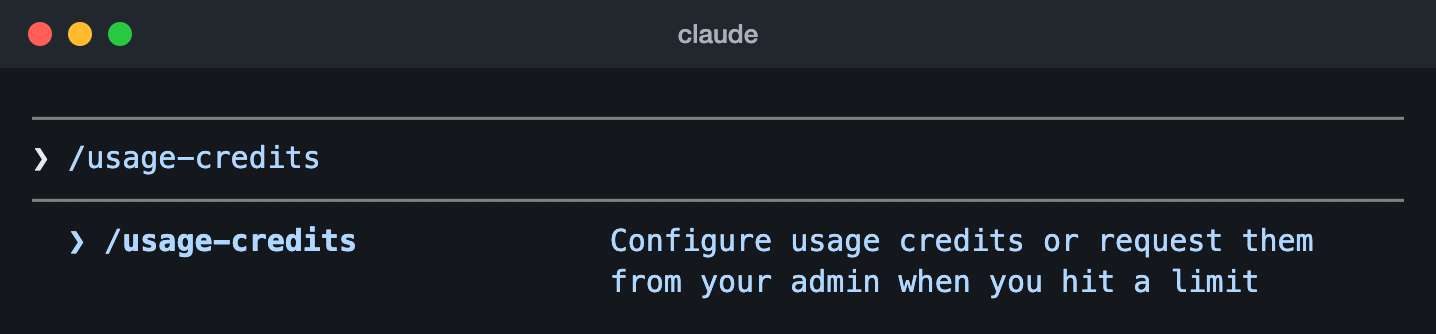
/usage-credits typed into Claude Code 2.1.323 (13 Nov 2026), with the command menu’s own description of it.The command needs a Claude plan sign-in, so it is not there when Claude Code runs on an API key. Where no browser can open, such as over SSH, it prints the address instead (Claude Code 2.1.205 or later). If you were waiting at a limit when you added credits this way, Claude Code checks straight away and carries on. It does not notice credits you bought in a browser on your own.
On Team and Enterprise
Members cannot turn usage credits on for themselves. An Owner or Primary Owner does it in Organization settings, then Usage: click “Enable” under Usage credits, then pay for credits (Team) or set the spend limits (seat-based Enterprise). On Team they can be on for everyone or, where available, for certain people. The same owners can switch them off for the whole organization.
If you are a member at your limit on a seat-based Enterprise plan, you see a “Request usage credits” link. It asks your admins to give you credits or a Premium seat. In Claude Code, /usage-credits sends the same kind of request.
Sources, read 13 November 2026: Manage usage credits for paid Claude plans, Manage usage credits for Team and seat-based Enterprise plans, Add usage credits to your subscription, Claude Code commands, Wait for a usage limit to reset.
What do usage credits cost?
Usage credits are billed at Anthropic’s standard API rates. There is no flat price per message: you pay for the tokens each request reads and writes, and the rate depends on the model. These are the rates for selected current models, in US dollars per million tokens. Anthropic’s pricing page has every model.
| Model | Input | Output | Cache write (5 min) | Cache read |
|---|---|---|---|---|
| Fable 5.2 | $8 | $40 | $10 | $0.20 |
| Fable 5.1 | $10 | $50 | $12.50 | $0.25 |
| Opus 5.5 | $4 | $20 | $5 | $0.20 |
| Sonnet 5.5 | $2 | $10 | $2.50 | $0.10 |
| Haiku 5.5, prompts up to 100,000 tokens | $0.10 | $0.50 | $0.125 | $0.01 |
| Haiku 5.5, prompts over 100,000 tokens | $0.50 | $2.50 | $0.625 | $0.05 |
A worked example, our own sum from those rates: a request that sends Opus 5.5 100,000 tokens of new input and gets 5,000 tokens back costs $0.40 for the input and $0.10 for the output, so $0.50. Text Claude has read before is cheaper, because it comes from the cache: the same 100,000 tokens read from the cache cost $0.02.
So the model matters most. The same work costs about four times as much on Fable 5.2 as on Sonnet 5.5, and Anthropic’s own tip for credits is to use Haiku or Sonnet for most tasks.
Bundles: up to 30% off
Once usage credits are on, you can buy them in bundles at a discount, under “Buy usage” in Settings, then Usage. Bundles are sold on Pro, Max, Ultra and Team plans.
| Bundle | Discount | You pay |
|---|---|---|
| $50 | 10% | $45 |
| $250 | 20% | $200 |
| $1,000 | 30% | $700 |
You can buy up to $2,000 of discounted bundles a month on Pro, Max and Ultra, and $3,000 on Team. Past that, you still have usage credits, at the standard rate.
Things that use credits even when your plan has room
Most of the time credits are only touched after a limit is full. A few things are paid from credits from the start:
- Fable on a Pro plan, or on a standard seat on Team or seat-based Enterprise. Outside limited-time offers, Fable is not part of those plans’ limits, so Fable requests are paid from credits.
- Fable on Max, Ultra and premium seats, once you have used half of your weekly limit on it. You can carry on with Fable on credits, or switch model and stay inside your plan.
- Fast mode in Claude Code. On every plan it is paid from credits only, at a higher rate: $16 input and $80 output per million tokens on Fable 5.2, and $8 and $40 on Opus 5.5.
- Sonnet 4.6 with the 1M context window in Claude Code, on every plan. On Pro, Opus 4.6 with 1M context too.
- Ultrareview in Claude Code, after the three free runs that come with Pro, Max and Ultra.
Claude Code tells you before it happens. The /model picker shows “Requires usage credits” on the Fable row when Fable bills to credits, and Claude Code can ask before it continues on Fable with credits. The exceptions: in non-interactive mode, with the -p flag, and in an app built on the Agent SDK that does not show the prompt, it bills without asking.
One more cost to know in Claude Code. Inside your plan, Claude Code keeps your conversation cached for an hour. On credits it keeps it for five minutes, so after a break of more than five minutes your next message processes the whole conversation again and writes it back to the cache. That is billed at the cache write rate, 1.25 times the input rate, where a cache read costs a small fraction of it. Our Claude usage guide has the habits that keep that small.
Sources, read 13 November 2026: Manage usage credits for paid Claude plans, Claude API pricing, Buy usage bundles, Claude Fable models on your plan, Fast mode in Claude Code, Extended context, Fable and usage credits, Claude Code commands, How Claude Code uses prompt caching.
Can you cap what you spend?
Yes. On Pro, Max and Ultra, three things stop the spending, and you control all of them in Settings, then Usage.
- A monthly spend limit. Click “Adjust limit” and enter the most you want to spend on usage credits in a month. “Set to unlimited” removes it.
- Your balance. You buy credits first, so with auto-reload off you cannot spend more than you bought.
- Auto-reload, off or on. On, it buys more credits when your balance drops below the amount you chose. Off, an empty balance simply stops the credits.
The two stops need different fixes. If you reach your monthly spend limit, credits stop until you raise or remove the limit. If your balance runs out with auto-reload off, they stop until you buy more. Either way your plan still works as it does without credits: once the limit that was full resets, you carry on inside your plan. In Claude Code the spend limit message reads You’ve hit your monthly spend limit, and on Pro, Max and Ultra it offers to raise or remove the limit there and then if you still have credits left. Anthropic’s advice is to start with a low cap and raise it once you know what you use.
On Team and Enterprise
Owners set a monthly spend limit for the whole organization, and it takes effect at once. Where the plan allows it, they can also set a limit for each member, and on seat-based Enterprise plans one for each seat type. A member who reaches their own limit has their credits paused until the end of the month, and waits for the plan’s limits to reset in the meantime. An organization that passes its spend limit is blocked until the next billing period, or until an owner changes the limit.
A limit can be passed by a little. Anthropic checks it before each request and counts the tokens after, so the request that crosses the line still finishes. The ones after it are blocked.
Sources, read 13 November 2026: Manage usage credits for paid Claude plans, Manage usage credits for Team and seat-based Enterprise plans, Add usage credits to your subscription, You’ve hit your monthly spend limit.
What happens when your plan’s limit resets?
Nothing changes: credits do not move any reset, and each limit comes back at its usual time. Anthropic’s pages do not describe the moment your work goes back from credits to your plan, so check Settings, then Usage, afterwards. When each limit resets is in our Claude usage guide.
What you see when a limit is reached
- With credits on and funds available, your next request just goes through. The warning that you are near your limit may still be on screen for a moment, then it changes to “Now using credits”. You have not been cut off.
- With credits off, Claude stops until the reset. In Claude Code you can also choose there and then, as in the picture below.
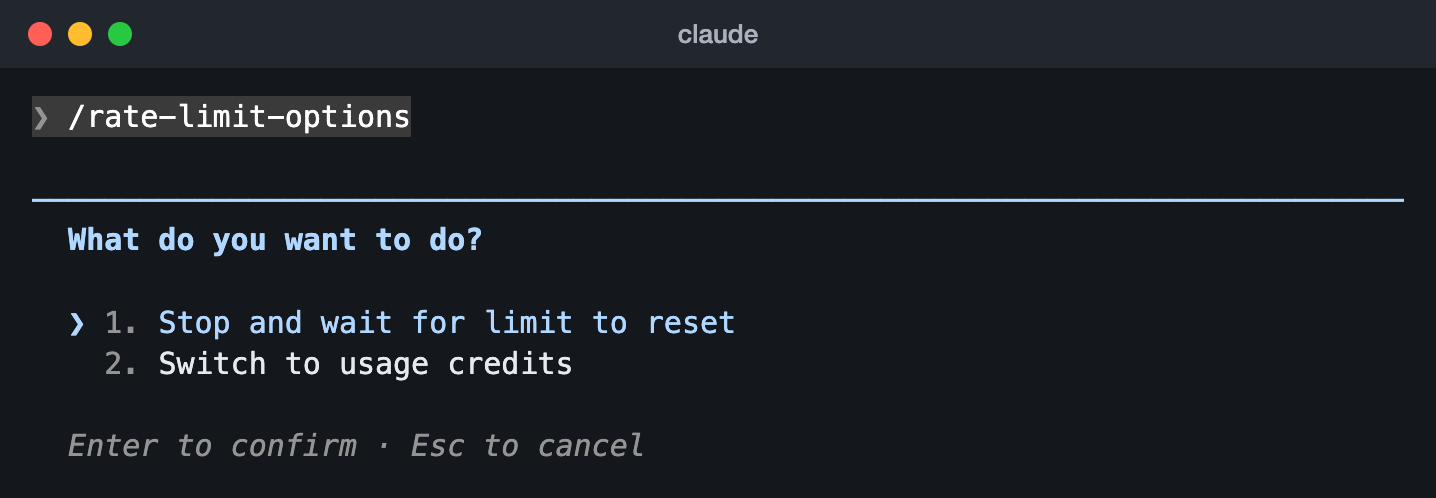
/rate-limit-options in Claude Code 2.1.323 on an Ultra plan (13 Nov 2026): wait for the reset, or switch to usage credits. Claude Code can open this menu by itself when you hit a limit. We closed it with Esc.Sources, read 13 November 2026: Manage usage credits for paid Claude plans, How do usage and length limits work?, Claude Code commands, Wait for a usage limit to reset.
How usage credits show in /usage
In Claude Code, /usage ends with a usage credits row, under your plan’s limits. What it says depends on your plan:
| Your plan | What the usage credits row shows |
|---|---|
| Pro, Max or Ultra, with a spend limit | This month’s spend against your monthly limit. It reads 0% until you first spend credits |
| Pro, Max or Ultra, with no limit | Unlimited, and no spend figure |
| Team or Enterprise | Your own spend this month, against any limit set for you. A limit on the whole organization is not shown |
| Credits off | No row at all, or a line saying they are off, as in the picture below |
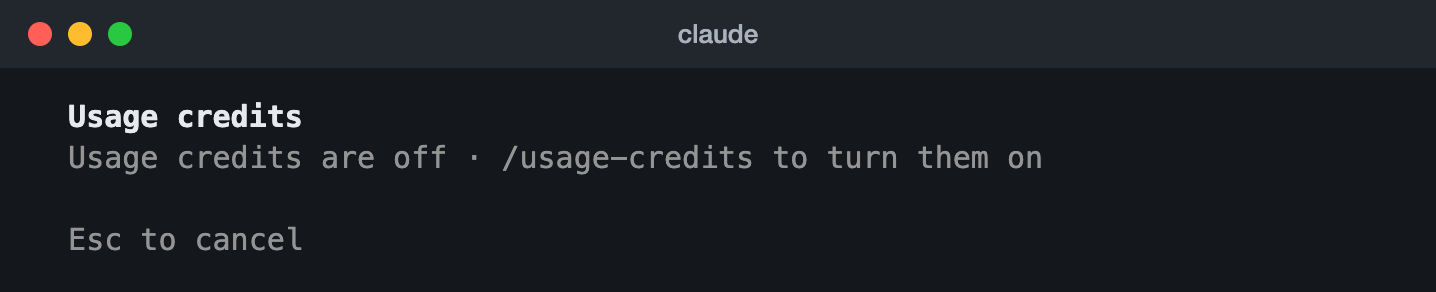
/usage screen in Claude Code 2.1.323 on an Ultra plan (13 Nov 2026), with usage credits off. The rows above it show the plan’s limits and this computer’s own sessions, so they are left out.Anthropic’s page says /usage shows no usage credits row while they are off. Claude Code 2.1.323 showed the line above, so expect one or the other depending on your version.
On Pro, Max and Ultra, the same numbers are on claude.ai and in the desktop and mobile apps, in Settings, then Usage, in a Usage credits section: your balance, this month’s spend, your spend limit and when your credits expire. For your plan’s limits, in Claude Code and on that page, see our Claude usage guide.
Sources, read 13 November 2026: Check your usage-credits spend, Add usage credits to your subscription, Manage usage credits for paid Claude plans.
Usage credits or a bigger plan?
Both get you past a limit, in different ways. An upgrade raises the limits themselves for a fixed monthly price. Credits leave the limits where they are and charge you for what you use beyond them, and for the few things that use credits from the start, such as fast mode.
| What to compare | Usage credits | Upgrading your plan |
|---|---|---|
| What you get | The same limits, and paid usage once one is full. Fast mode and the other things listed under the cost section use credits at once | Higher limits. The plans side by side are in our Claude usage guide |
| What it costs | API rates for the tokens you use, paid from credits | A fixed monthly price, whatever you use |
| When it starts | With your next request after a limit is full, or at once for the things that always use credits | Right away, with the unused time on your old plan credited toward the new one |
| How you cap it | A monthly spend limit and, where credits are bought first, the balance | The price is the cap |
| When you stop | Switch the toggle off, at any time | A downgrade takes effect at the end of the billing period |
Our view, not Anthropic’s: if you hit a limit now and then, credits cost you only for those days. If you hit one most weeks, add up a month of credit spending in Settings, then Usage, and compare it with the price of the next plan up. And you can do both: credits work on Pro, Max and Ultra, and on Team and seat-based Enterprise once an owner turns them on.
Sources, read 13 November 2026: Claude plans and pricing, Manage usage credits for paid Claude plans, How do usage and length limits work?.
Do usage credits expire, and can you get a refund?
- Expiry on Pro, Max and Ultra: credits bought on or after 7 December 2026 expire 12 months after you buy them. Credits bought before that date do not expire. The dates can differ in some countries.
- On Team and seat-based Enterprise: purchased credits expire 12 months after purchase and are non-refundable, and an unused balance carries over if the organization moves from Team to Enterprise. The rest of this list is what Anthropic says for Pro, Max and Ultra.
- Where to see it, on Pro, Max and Ultra: the expiry date is shown before you confirm a purchase and on the Usage page in Settings, and Anthropic emails you before credits expire.
- Refunds on Pro, Max and Ultra: purchases are non-refundable, except where local law requires one or in cases of fraud. Credits you have used are never refunded.
- The four cases where unused credits you bought directly from Anthropic are refunded: you upgrade to Team in place, you move your personal account to an organization, you close it with the Start fresh option, or it closes at a domain claim deadline.
- If you cancel a Pro, Max or Ultra plan: the balance stays on your account, but you can only use it with an active paid plan.
- If you delete your personal account: the remaining credits are gone, with no refund.
Sources, read 13 November 2026: Manage usage credits for paid Claude plans, Manage usage credits for Team and seat-based Enterprise plans.
Questions people ask
Is “extra usage” the same as usage credits?
Yes. Usage credits is the current name. Some of Anthropic’s pages still say extra usage, and in Claude Code the command /usage-credits used to be /extra-usage.
How do usage credits work on Claude Pro?
The same way as on Max and Ultra: you turn them on in Settings, then Usage, buy credits, and they pay for usage past your five-hour or weekly limit at API rates. One thing is different on Pro: outside limited-time offers, Fable is not part of the plan’s limits and runs on usage credits.
Why was I charged when my plan still had usage left?
Some things are paid from credits whatever your plan has left: Fable on Pro and on standard seats (outside limited-time offers), Fable past half of your weekly limit on Max and Ultra, fast mode in Claude Code, and the 1M context window on some models. Switch model or turn fast mode off to stay inside your plan.
Do usage credits reset my limit or make it reset sooner?
No. Credits do not change your limits or when they reset. They pay for the work you do while a limit is full. A limit reset is a different thing, and our Claude usage guide explains it.
Do usage credits work in Claude Code?
Yes. Claude and Claude Code share your plan’s limits, and usage credits cover both. In Claude Code, /usage-credits opens the settings and /usage shows what you have spent.
Can I use my Max or Ultra API credits instead?
No. The monthly API credits that come with Max, Ultra and Team are for the Claude Platform only: the API, the Agent SDK and the like. They do not pay for interactive Claude Code sessions or for usage past your plan’s limits.
Will I be warned before I start spending credits?
You see a notice as you get close to a limit. When your next request goes through on credits, it changes to “Now using credits”. Nothing asks you to confirm each time, which is why a monthly spend limit is worth setting first. And there is no warning at all for Fable in Claude Code’s non-interactive mode (the -p flag) or in an app built on the Agent SDK that does not show the prompt: where Fable bills to credits, those requests are billed without asking.
Does the Free plan have usage credits?
No. Usage credits are for paid plans. On the Free plan you wait for the reset or move to a paid plan.
Sources, read 13 November 2026: Manage usage credits for paid Claude plans, Claude Fable models on your plan, Claude plans and pricing, Claude Code commands.