Hit your Claude usage limit? Here's what to do.
Claude says "usage limit reached" when your five-hour session or a weekly limit is full. Check which one before you wait: open Settings, then Usage, on claude.ai, the desktop app or your phone, or type /usage in Claude Code. It shows what you've used and when each limit resets.
By NarenLast updated
Stuck right now? Your options
- If the session bar is full, wait for the five-hour reset. If a weekly bar is full, the session reset won't help: you need the weekly one.
- Use a free limit reset if one shows in Settings, then Usage. It is not available in Claude Code itself, but the reset applies there too.
- Turn on usage credits, so your work carries on at standard API rates. In Claude Code,
/usage-creditsopens the settings (on Team or Enterprise it asks your admin). Our Claude usage credits guide has what they cost, how to cap them and what happens at the reset. - Upgrade. A new plan's limits apply right away. What each plan costs is in our Claude Code pricing guide.
- In Claude Code 2.1.234 or later, leave the session open: it picks the task back up after the reset. Press Esc to cancel that.
- Switching models won't help, except after a model-specific limit such as "You've hit your Opus limit".
Claude, Claude Code, the desktop app and your phone all share one allowance. The rest of this guide shows why it ran out so fast, and how to make the next one last.
Sources, read 15 November 2026: How do usage and length limits work?, Limit resets, Manage usage credits for paid Claude plans, Wait for a usage limit to reset, Manage costs effectively, Claude Code commands.
Every way to check your Claude usage
Your limits are the same wherever you look, because Claude, Claude Code and Claude Desktop all count toward one allowance. Pick the place you already are.
| Where | How | What you see |
|---|---|---|
| Web (claude.ai) | Settings, then Usage | Your current five-hour session and time left, your weekly limits and when they reset, a separate Fable bar if your plan has one, and usage credits |
| Desktop app | Settings, then Usage | The same page as on the web |
| Mobile app | Settings, then Usage | The same page, where you can also use a limit reset |
| Desktop app, Code tab | Click the usage ring under the prompt box | Your plan usage, shared across all your Claude Code surfaces |
| Claude Code (terminal) | /usage (or /cost, /stats) | Plan usage bars, activity stats, and a breakdown of what used your limits |
| Claude Code status line | /statusline | Your five-hour and seven-day usage, always on screen |
| VS Code extension | /usage | The Account & usage dialog: usage bars, recommendations and a Day or Week breakdown |
| JetBrains IDEs | /usage in the Claude Code terminal | The same as in the terminal, because the plugin runs Claude Code there |
In Claude Code: /usage
New to Claude Code? Our Claude Code install guide has the install, the sign-in and the first run on a Mac.
/usage shows your session cost, your plan’s usage limits and your activity. /cost and /stats are other names for it. On a Pro, Max, Ultra, Team or Enterprise plan it also shows what used your limits: skills, subagents, plugins and MCP servers, each as a share, with suggested changes. Press d or w to switch between the last day and the last week, and press f to let Claude Code apply the changes it can.
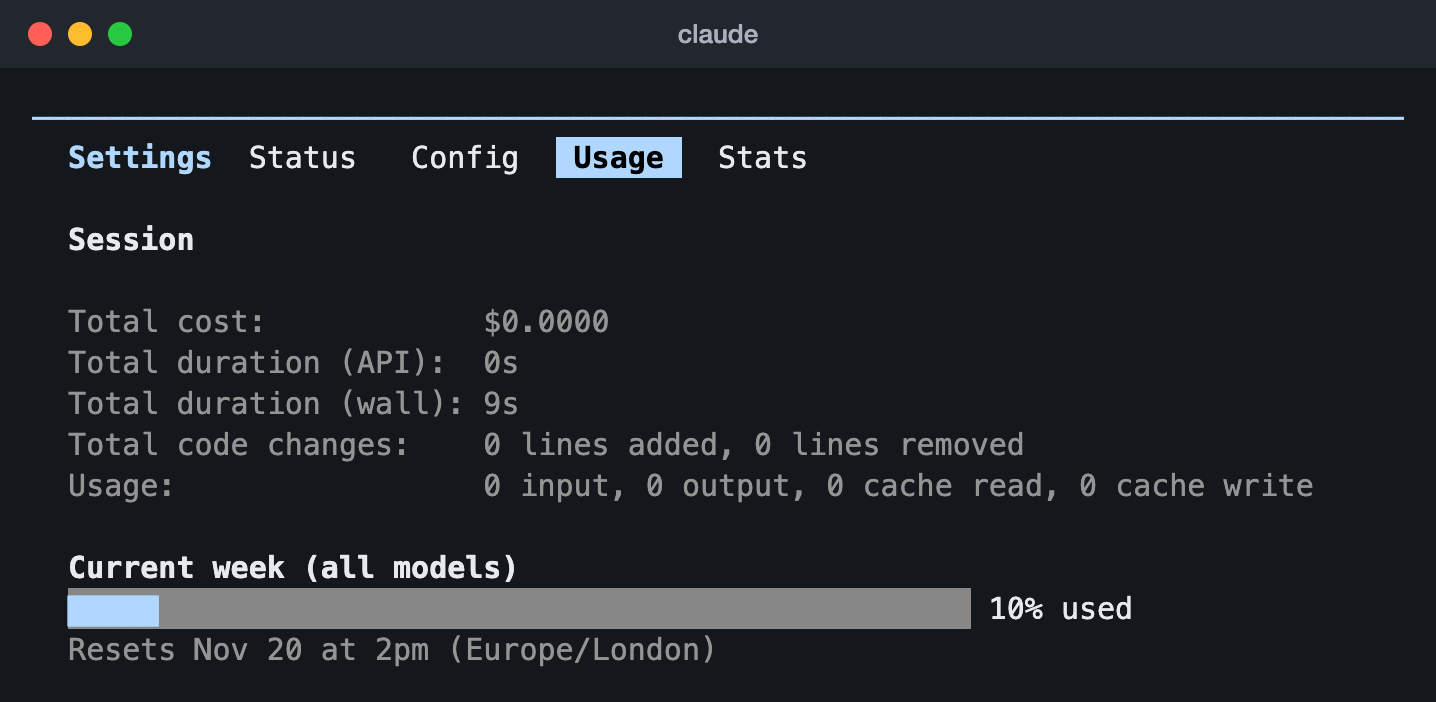
/usage in Claude Code 2.1.323 on an Ultra plan (13 Nov 2026): the week across all models and when it resets. Ultra has no five-hour limit, so only the week shows.Two things to know. The dollar figure at the top is for API users; on a subscription your usage is included, so ignore it. And the breakdown is worked out from the sessions on this computer, so it leaves out what you did on claude.ai or another machine. /status is a different screen: the commands page describes it as your version, model, account and connection, so use /usage for your limits. If Claude has stopped answering and no limit is full, see how to check if Claude is down.
Keep your limits on screen: the status line
The status line is the row at the bottom of Claude Code. The easy way is to type /statusline and say what you want:
/statusline show my five-hour and weekly usage limitsClaude Code writes a small script in ~/.claude/ and updates your settings.
To set it up by hand, save this script as ~/.claude/statusline.sh and make it executable with chmod +x ~/.claude/statusline.sh. It needs jq. It is the subscriber part of the example in Anthropic’s status line docs:
#!/bin/bash
input=$(cat)

MODEL=$(echo "$input" | jq -r '.model.display_name')
# "// empty" produces no output when rate_limits is absent
FIVE_H=$(echo "$input" | jq -r '.rate_limits.five_hour.used_percentage // empty')
WEEK=$(echo "$input" | jq -r '.rate_limits.seven_day.used_percentage // empty')

LIMITS=""
[ -n "$FIVE_H" ] && LIMITS="5h: $(printf '%.0f' "$FIVE_H")%"
[ -n "$WEEK" ] && LIMITS="${LIMITS:+$LIMITS }7d: $(printf '%.0f' "$WEEK")%"

[ -n "$LIMITS" ] && echo "[$MODEL] | $LIMITS" || echo "[$MODEL]"
Then point Claude Code at it in ~/.claude/settings.json:
{
  "statusLine": {
    "type": "command",
    "command": "~/.claude/statusline.sh"
  }
}
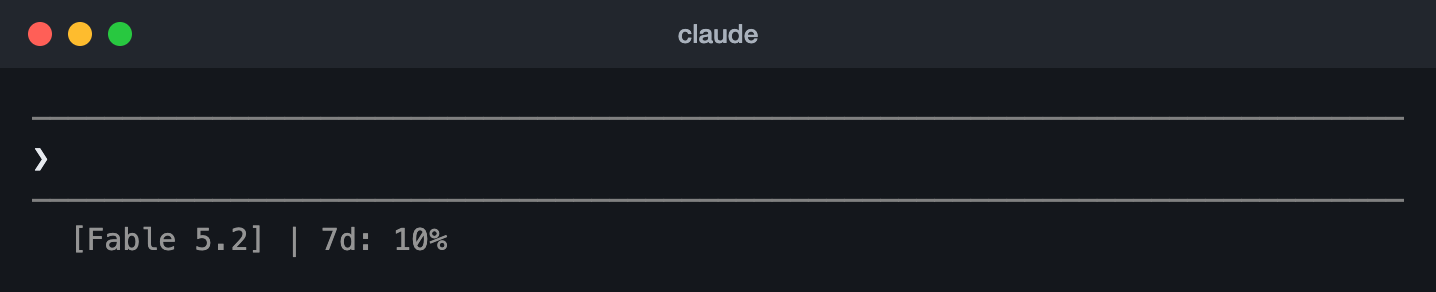
You will see something like [Opus] | 5h: 34% 7d: 12%. The numbers are there only on a Pro, Max or Ultra plan, and only after the session’s first API response, which can come before you send anything. Claude Code also passes when each window resets (rate_limits.five_hour.resets_at and rate_limits.seven_day.resets_at, in Unix seconds) if you want to add it.
For every other field the script gets, the same status line in Python and Node.js, one that shows when each limit resets, ready-made status lines and the fixes when it stays blank, see our Claude Code status line guide.
Sources, read 15 November 2026: How do usage and length limits work?, Usage limit best practices, Limit resets, Claude Code commands, Manage costs effectively, Customize your status line, Claude Code in VS Code, Claude Code Desktop, Claude Code in JetBrains IDEs.
Free community tools
These free, open-source tools are made by Claude Code users, not by Anthropic. They read Claude Code’s files on your computer or reuse its sign-in, so look at each project before you install it.
| Tool | Runs on | What it shows |
|---|---|---|
| ccusage | Any computer with Node.js | Token use and cost by day, week, month or session, and Claude’s five-hour blocks, from your local logs |
| Claude Code Usage Monitor | macOS, Linux, Windows (Python) | A live terminal dashboard with burn rate and a forecast of when you run out. It uses Claude Code’s official limit numbers when it has fresh ones, and labels its own estimates when it does not |
| ccstatusline | Anywhere Claude Code runs | A ready-made status line with usage, reset timers and weekly forecasts |
| CodexBar | macOS 14+, Linux | Claude, Codex and other providers’ limits with reset countdowns, in the menu bar |
| Claude Code Usage Monitor for Windows | Windows 10 and 11 | Usage and reset times in the taskbar, for Claude Code, Codex and more |
To try ccusage without installing anything:
npx ccusage@latestThen npx ccusage@latest claude daily for Claude Code alone, or npx ccusage@latest blocks for the five-hour windows. The others install like this:
uv tool install claude-monitor
claude-monitornpx -y ccstatusline@latestbrew install --cask codexbarwinget install CodeZeno.ClaudeCodeUsageMonitorSources, read 15 November 2026: ccusage README, Claude Code Usage Monitor README, ccstatusline README, CodexBar README, Claude Code Usage Monitor for Windows README.
How Claude’s usage limits work
Most paid plans have two kinds of limit: a session limit that resets every five hours, and weekly limits that reset once a week. Where both apply, you need room in both. Everything counts toward the same limits: chats on claude.ai, Claude Desktop, the mobile apps, Claude Code in the terminal and in your editor.
- The five-hour limit starts when you send your first message, and resets in full five hours later.
- The weekly limit covers all models. Max and Ultra plans also have a separate weekly limit for Fable. Your weekly reset is a fixed day and time given to your account, and it stays the same whenever you start using Claude.
- Verified Ultra accounts have no five-hour limit at all. If you see no Current session bar in Settings, then Usage, your Ultra account is verified.
- How fast you use them depends on how long and complex the work is, the features and tools you use, the model, and the effort level.
A worked example
Say you are on Pro and your weekly limit resets on Fridays at 14:00. On Monday you send your first message at 09:00. Your five-hour session runs until 14:00. If you use it all by 11:30, you wait until 14:00, and then the session is full again. Every session you use also eats into the week. By Thursday the five-hour session may be full and still not help, because the weekly limit is empty, and that one only comes back on Friday at 14:00.
The plans side by side
| Plan | Price | Five-hour limit | Weekly limits |
|---|---|---|---|
| Free | $0 | Yes, and it varies with demand | Yes |
| Pro | $20 a month (US) | Yes | One, across all models |
| Max | $100 a month | Yes, 5 times Pro | 5 times Pro, plus a separate Fable limit |
| Ultra (was Max 20x) | $200 a month | None for verified accounts | 10 times Pro, plus a separate Fable limit |
Anthropic’s pages give the limits as multiples of Pro, not as a number of messages, and say it may adjust them to manage capacity. Team and Enterprise plans have their own allowances. What each plan costs and includes, and how Max 20x became Ultra, is in our Claude Max plan guide.
Choosing between Claude Code and Codex? Their plans, prices and limits are side by side in our Codex vs Claude Code guide.
Choosing between Claude Code and Cursor? Their plans, prices and limits are side by side in our Claude Code vs Cursor guide.
Sources, read 15 November 2026: How do usage and length limits work?, Getting started with Claude, What is the Pro plan?, What is the Max plan?, What is the Ultra plan?, Use Claude Code with your Pro, Max, or Ultra plan.
How to make your allowance last
In Claude Code, every request carries the whole conversation so far, and in chats, longer conversations use more of your limit. So the biggest saving is keeping conversations small. These tips come from Anthropic’s own advice.
In Claude Code
- Start fresh with
/clearwhen you switch to unrelated work. It costs nothing. Use/compactwhen you are mid-task and want to keep going; you can tell it what to keep, as in/compact Focus on code samples and API usage. Compacting a big conversation is itself a big request. - Match the model to the job with
/model. Anthropic’s advice is Sonnet for most coding and Opus for hard problems;/model opusplanplans with Opus and does the work with Sonnet. - Lower the effort with
/effortfor routine work. Higher effort uses more tokens. - Run
/usageand read the suggestions. They point at whatever is behind 10% or more of your recent usage, such as a long CLAUDE.md or a busy MCP server. - Run
/contextto see what fills your context. Turn off MCP servers you are not using with/mcp, and keep CLAUDE.md under about 200 lines. - Be specific. "Add input validation to the login function in auth.ts" costs far less than "improve this codebase". For big changes, ask for a plan first (Shift+Tab to plan mode).
- Compact or clear before you step away. Claude Code keeps what it has already read in a cache, so re-reading a long conversation costs a fraction of reading it fresh. The cache lasts an hour after your last message on a Claude plan, and five minutes once you are on usage credits or an API key. After that, your next message reads the whole conversation again at the full rate, and so does
/compact, because compacting sends the conversation off to be summarised. So run/compactor/clearbefore a long break, or start a new session when you come back and bring over only what you need. - Watch what runs while you are away. Scheduled tasks, subagents and agent teams all send their own requests.
- For a typed language, install a code intelligence plugin from Anthropic’s marketplace, so Claude finds code by symbol instead of reading file after file. Install the language server first, then, for TypeScript,
/plugin install typescript-lsp@claude-plugins-official. - CLAUDE.md is loaded at the start of every session, even when you are doing something it has nothing to say about. Move instructions for one kind of job, such as reviews or migrations, out of CLAUDE.md into a skill. A skill loads only when it is used.
- Hand noisy work such as test runs and log reading to a subagent, so only a summary comes back to your conversation. A hook can also trim a command’s output before Claude reads it.
In chats on claude.ai, desktop and mobile
- Start a new conversation when a long one has done its job. Long conversations use more of your limit.
- Put documents you reuse in a project. Project content is cached and counts less when you use it again.
- Ask related questions in one message, and edit your prompt before you send it.
- Turn off connected apps and web search when a chat does not need them, and choose a lower effort level for everyday questions.
Tools that cut token use
The habits above are free and come first. If you use Claude Code every day, these tools go further. Apart from TokenEconomizer, they are made by independent developers, not by Anthropic, and they change how your agent works, so read each project before you install it.
TokenEconomizer is a free plugin from Microsoft Research and UC Berkeley (Apache 2.0) that learns from the sessions you have already run in a project and cuts the waste in the ones that follow. It does three things:
- It remembers how your project works: the build step that must run first, or the test command that works here. A fact is added at the start of each session once three sessions have confirmed it, and dropped when a later session contradicts it. This part is off until you turn it on, because it makes extra model calls.
- It stops loading tools you never use. Every loaded tool’s description is sent with every request, so a tool that goes unused for a while is left out of later sessions, and one command brings it back.
- It steps in when the agent is stuck in a loop, hitting the same failure again and again. It sends the agent one short note to try another way, and if that does not work, it tells you how to stop the turn. It never stops one itself.
Its authors measured 18.4 to 30.9% lower mean cost on SWE-Bench tasks across five combinations of agent and model. It works with Claude Code, Codex, the GitHub Copilot CLI and Pi, with experimental support for a few more. It needs Python 3.10 or newer, and what it learns stays on your computer. It is tested on Claude Code 2.1.300 to 2.1.310. Run this in the folder where you want to keep it, and leave the folder in place:
git clone https://github.com/microsoft/TokenEconomizer.git
claude plugin marketplace add "$PWD/TokenEconomizer"
claude plugin install tokeneconomizer@tokeneconomizer
Then start claude, trust the folder, and run /tokeneconomizer:status. Once per computer, and again after Claude Code updates, run /tokeneconomizer:toolprune refresh-catalog.
Four more, each widely used, recently updated and working with both Claude Code and Codex:
| Tool | What it does | GitHub stars, 11 Nov 2026 |
|---|---|---|
| RTK | Shrinks the output of test runs, diffs, logs and builds before the agent reads it: up to 90% less command output, which its README notes is not 90% off your bill | 86,250 |
| Caveman | Makes the agent answer in fewer words, and leaves code, commands, paths and error messages untouched | 119,131 |
| Context Mode | Runs the agent’s commands and file reads in a local sandbox, keeps the full output on your computer, and gives the agent only the part it asks for | 33,885 |
| CodeGraph | Builds a map of your code on your computer so the agent looks things up instead of reading file after file. Its benchmark: 62% fewer tokens and 44% lower cost on average, though its answers take up more of the context window in long sessions | 77,405 |
brew install rtk
rtk init -g
Restart Claude Code after it, and rtk gain shows what it saved.
npx skills add JuliusBrussee/caveman -gType /caveman if it does not start by itself, and say “stop caveman” to go back.
claude plugin marketplace add mksglu/context-mode
claude plugin install context-mode@context-modecurl -fsSL https://raw.githubusercontent.com/colbymchenry/codegraph/main/install.sh | sh
codegraph install
codegraph initCodeGraph’s README asks you to run codegraph install in a new terminal after the first line, and codegraph init inside each project. On Windows, its README has a PowerShell line in place of the first one.
Sources, read 15 November 2026: Manage costs effectively, How Claude Code uses prompt caching, How do usage and length limits work?, Usage limit best practices, Code intelligence plugins, TokenEconomizer README, RTK README, Caveman README, Context Mode README, CodeGraph README.
Questions people ask
Why did one prompt use my whole session?
Usage depends on how much Claude has to read and write, not on how many messages you send. A prompt that compares long documents, reads many files or uses tools can be very large, and the higher the model and effort, the more it costs. In Claude Code, every request also carries the whole conversation so far. Check /usage for what took the most, and start big jobs in a fresh conversation.
Which reset should I wait for?
Look at Settings, then Usage. If the Current session bar is full, wait for the five-hour reset. If a weekly bar is full, the five-hour reset will not help: you need the weekly reset, which comes at the same day and time every week.
Does a weekly reset also refill my Fable limit?
Anthropic lists three kinds of limit reset: a five-hour reset, a weekly reset that refills your weekly limit, and a Fable reset that gives back what you spent on Fable. Its page does not say whether the weekly reset also refills the separate Fable limit, so check Settings, then Usage, after you use one.
Do Claude chats and Claude Code share the same limits?
Yes. Claude on the web, Claude Desktop, the mobile apps and Claude Code in the terminal or your editor all count toward the same limits.
Why does the Free plan keep stopping me?
The Free plan has a session limit that resets every five hours and a weekly limit, and how many messages you get varies with demand. A long conversation, like a story you keep adding chapters to, costs more with every message. Start a new conversation for each part and put the story so far in a project, or move to Pro.
Does /usage include what I did on my other computer?
The plan bars are for your whole account. The breakdown of what used them is worked out from this computer’s sessions only, so it leaves out other machines and claude.ai.
Does using Claude in Cursor count toward my Claude limits?
Not when you pick a Claude model in Cursor’s own model menu. Cursor bills that itself, from prepaid credit or a usage pool on your Cursor plan, so it doesn’t use your Claude plan’s limits. Claude Code is different: run it in Cursor’s terminal and it still counts toward your Claude plan. Our Cursor usage guide covers how to check the Cursor side.
How do I check my Codex usage too?
Depending on your plan, Codex has a five-hour and a weekly limit of its own. Our Codex usage guide covers every way to check it.