Sunrise and sunset widget for your Mac
See today's sunrise and sunset, where the sun is between them and how long until it sets, right from your Mac menu bar. Wishbar turns plain English into widgets like this in minutes, using your own AI.
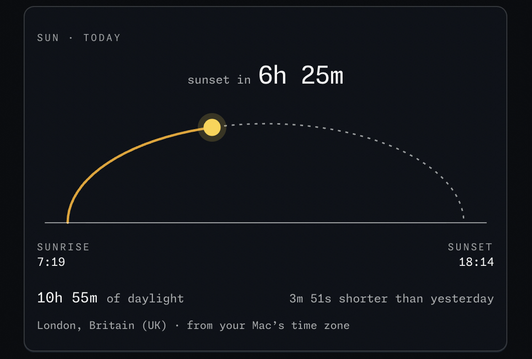
Sunrise and sunset · Today's sunrise and sunset times, the sun on its arc between them, a countdown to the next one, and how much daylight today has compared with yesterday.
Made with  Wishbar
Have Wishbar on this Mac? This opens it with this widget ready to make. Wishbar asks first, then your AI makes it in a few minutes.
The wish that made it, as typed into Wishbar:
Show me today's sun. A yellow sun that travels along an arc from sunrise on the left to sunset on the right, with the part of the arc it has already travelled lit gold and a thin horizon line under it. Above the arc, a countdown to the next sunrise or sunset.
Read all of itFold it
Under the ends, the sunrise and sunset times. Below, how many hours of daylight today and how much longer or shorter than yesterday, and the place name. Work out where I am from the Mac's time zone, no location permission and no IP lookup, and get the times from Open-Meteo, which is free and needs no key. At night show the sun as a hollow dot at the horizon.
“A widget like this can be made for you from one sentence, to your taste. Nobody else will have it.”
No card needed. You bring the AI: a free ChatGPT account is enough.
“Wishbar turned a one-sentence request into a working Mac widget in minutes … I've stopped hunting for menu-bar apps; I just wish for them now.”
What it does
- Draws today's path of the sun as an arc: sunrise on the left, sunset on the right, the part already travelled in gold, and a yellow sun where it is now.
- Counts down to the next sunset or sunrise. After dark the sun waits at the horizon as a hollow ring.
- Shows the sunrise and sunset times, the hours of daylight today, and how many minutes longer or shorter than yesterday.
- Finds your place from your Mac's time zone, so it needs no location permission and never looks up your address.
- Fetches the times from Open-Meteo a few times a day and keeps them, so the rest of the day works offline.
Where the data comes from, and what it needs
Open-Meteo. No account, no key. It runs on your Mac and talks to its source only. Once made, it runs without your AI: it uses no Claude or ChatGPT tokens.
- A time zone set to a city in System Settings (a plain UTC zone has no place).
When it is useful
- A glance at how much daylight is left before a walk or the school run.
- In the dark months, the line that says the days are getting longer again.
- The countdown to sunset for a photograph, or to sunrise for a run.
How to add this widget to your Mac
- Get Wishbar, free for seven days, and install it.
- Copy this widget's recipe link:
https://wishbar.app/recipes/sunrise-sunset.html - Paste it into the box at the bottom of Wishbar's panel and send it. Wishbar asks, then your AI builds it.
- Press Keep when you like what you see.
Questions people ask
Does it know where I am?
Only roughly. It reads the city your Mac's time zone points to, London for Europe/London, and uses that city's sunrise and sunset. It never asks for your location.
Does it need an account or a key?
No. Open-Meteo answers without one.
What happens when I am offline?
It keeps the last times it fetched and shows them with a small stale mark until it can refresh. The times for the day do not change, so they stay right.
What if my time zone is not a city?
Then it says so and asks you to pick a city under Date & Time in System Settings.
Is the arc to scale?
No. It is the same half-ellipse every day; only the sun's position along it is true to the clock.
Added Last updated


More like this
See the gallery's Time section.