Hit a ChatGPT usage limit? Here’s which one, and when it resets.
ChatGPT has no single usage limit: everyday text chats are unlimited on Free, Go, Plus and Pro, and virtually unlimited on Business and Enterprise, within OpenAI’s fair-use rules. Thinking, the Pro models, images, voice, file uploads, deep research, and Work and Codex (OpenAI’s agents for longer tasks and coding) each have their own allowance and reset time. Settings, then Usage, shows what’s left of Work and Codex, and from December, OpenAI says, ChatGPT and Codex will share one allowance on Plus, Pro and Business.
By NarenLast updated
Stuck right now? Your options
- A Thinking or Pro model limit: ChatGPT may carry on with another available model, or you can pick one yourself. Otherwise, wait for the reset time ChatGPT shows when it has one. On Pro $200, reaching the weekly GPT-6 Pro limit switches you to GPT-5.6 Thinking at Medium on its own.
- Work or Codex: if you hit the limit in the middle of a task, it can finish the request it’s working on, within fair-use limits. Then open Settings, then Usage to see which limit you’ve reached (on Go, a monthly one), and when it resets. From there you can use a saved reset if one shows, buy credits (on Plus and Pro, and for some Free and Go users), or, on some Plus and Pro accounts, buy an instant reset. The limit notice may also offer an upgrade. Switching models won’t refill the shared allowance. If the notice names one model, that model has a limit of its own, and another model can carry on.
- Images, voice or file uploads: each has its own limit and its own reset, and ChatGPT tells you when you reach one. None of these limits applies to Codex. Deep research has its own counter too.
- On the Free plan: upgrading to Plus, Pro or Business resets your limits.
- Support can’t reset a limit. Contact them if your usage looks counted wrong, or access hasn’t come back after the reset time.
Everyday text chats are unlimited on Free, Go, Plus and Pro, and virtually unlimited on Business and Enterprise, within OpenAI’s fair-use rules, so you can keep chatting while you wait.
Sources, read 15 November 2026: GPT-6 and other models in ChatGPT, ChatGPT Free Tier FAQ, ChatGPT Business models and limits, ChatGPT Enterprise and Edu models and limits, Deep research in ChatGPT, Managing usage with GPT-6 Astra in Work and Codex, Using Codex with your ChatGPT plan, How resets work in Codex, Paid weekly Work and Codex rate limit resets, Using Credits for Flexible Usage in ChatGPT, Codex pricing, ChatGPT pricing.
What changes in December
OpenAI’s help page Understanding ChatGPT and Codex usage limits (read 13 November 2026) says that, "starting in December", "Plus, Pro, and Business plans’ usage allowance will be shared across ChatGPT and Codex". It also says:
- "Your usage for ChatGPT and Codex will be measured in tokens." How much you use depends on the model you choose and the task. More advanced models and complex tasks generally use more.
- "Instant chat will not draw from your usage."
- OpenAI expects "most users won't need to wait for their usage to reset more often" than they do now.
- You’ll see your "combined remaining usage and reset times in Settings → Usage".
- At the limit, you can "wait for it to reset, upgrade your plan, or buy credits" for eligible features.
The page gives no exact date and no size for the shared allowance on any plan, and it names only Plus, Pro and Business. Until the change, Chat keeps its own limits, separate from Work and Codex.
Sources, read 15 November 2026: Understanding ChatGPT and Codex usage limits, GPT-6 and other models in ChatGPT.
Every way to check what’s left
Where you look depends on which limit you mean. ChatGPT shows a meter for Work and Codex today. For the limits in chat, it tells you when you reach one.
| Where | How | What you see |
|---|---|---|
| ChatGPT on the web | Settings, then Usage | What’s left of your Work and Codex allowance, the five-hour and weekly windows and when each resets, your credit balance, and any saved resets |
| ChatGPT desktop app | Settings, then Usage & billing (some OpenAI pages call it Usage) | The same, plus your reset history and, on some Plus and Pro accounts, Buy an instant reset |
| Work, on the web | The sidebar | Your remaining Work usage |
| Codex on the web | chatgpt.com/codex/settings/usage | Your Codex limits and reset times, from the same allowance as Work |
| Codex CLI | /status | Your remaining limits, during a session |
| Codex CLI | /usage | Your token use by day, week or all time, and any saved reset to redeem |
| Deep research | The counter in ChatGPT | How many deep research tasks you have left |
| Chat: Thinking, Pro models, images, voice, uploads | The notice when you reach one | Which limit, and the reset time when ChatGPT has it. OpenAI’s help pages describe no meter for these, and say ChatGPT doesn’t show how much of your upload quota is left |
https://chatgpt.com/settings/usageThe mobile app has no reset controls or reset history yet. Reset controls are on the web and in the desktop app, and the history is in the desktop app.
In Codex: /status and the status line
In the Codex CLI (our Codex CLI guide has the install and the sign-in), type this during a session to see your remaining limits:
/status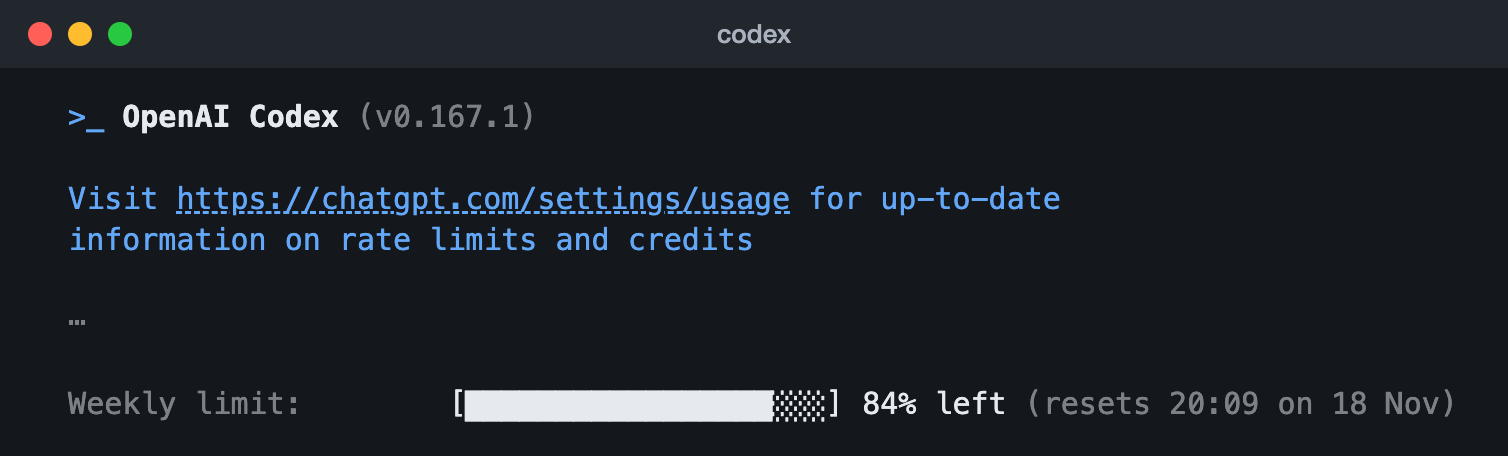
/status in the Codex CLI 0.167.1 (13 Nov 2026): the weekly limit, what is left and when it resets, and a pointer to Settings, then Usage. The lines with the account, workspace and session are left out (the ⋯).To keep both limits on screen, type /statusline and turn on the rate limit items, or add this to the end of ~/.codex/config.toml:
[tui]
status_line = ["model-with-reasoning", "five-hour-limit", "weekly-limit", "context-remaining"]
If the file already has a [tui] line, put the status_line line under it instead, replacing any status_line line already there.

/usage daily, /usage weekly and /usage cumulative show where your tokens went. Our Codex usage guide covers every Codex surface, and our Codex status guide goes through /status row by row.
What the limit messages mean
| You see | What it means | What to do |
|---|---|---|
| "You've hit your usage limit." in Codex, usually with an option for your plan (upgrade, buy credits or ask your admin), then "try again at" a time or "try again later." | Your Work and Codex allowance is used up for now | Take the option it offers, or check Settings, then Usage, for which window. Wait, or use a saved reset |
| "You've hit your usage limit for" a model, with "Switch to another model now", in Codex | That model has a limit of its own | Pick another model |
| "Your workspace is out of credits." in Codex | Your Business or Enterprise workspace has used its credits | Owners: add credits. Members: ask the owner to refill |
| "You hit your spend cap" in Codex | A spend cap set in your workspace is reached | Owners: raise the cap. Members: ask an owner to raise it |
| A banner such as "50 images in the last day" or "resets in 720 hours" | An image, voice or upload limit | Wait for it to reset. It doesn’t touch Codex |
| "Context window full" or "Chat memory full" | Not a usage limit: that one conversation can’t hold any more | Start a new chat. You don’t need to wait, and if the notice offers an upgrade, that keeps you in the same chat |
| "Device limit reached" | Not a usage limit: that paid account can’t be used on this device | Sign in with another account you own, or cancel and ask for a refund. Credits or a reset won’t clear it |
| A temporary usage restriction | OpenAI’s misuse safeguards stepped in, and ChatGPT tells you | If you think it’s a mistake, contact Support |
Sources, read 15 November 2026: Managing usage with GPT-6 Astra in Work and Codex, Using Codex with your ChatGPT plan, How resets work in Codex, Using Credits for Flexible Usage in ChatGPT, Uploading files and audio to ChatGPT, Images in ChatGPT, Deep research in ChatGPT, ChatGPT release notes, Codex pricing, Slash commands in Codex CLI, Codex usage-limit messages (source), Codex status line items (source), Understanding card and device limits in ChatGPT, ChatGPT Free Tier FAQ, GPT-6 and other models in ChatGPT, ChatGPT Business models and limits, TOML v1.0.0.
Free tools that show your ChatGPT usage
If you want a meter that stays on screen, these free tools add one. None is made by OpenAI. Most of them reuse your signed-in session to read the same numbers ChatGPT or Codex shows, from endpoints OpenAI doesn’t document, so any of them can stop working when OpenAI changes something. Tools that count messages only see what you send where they run. Look at each project before you install it.
| Tool | Runs on | What it shows |
|---|---|---|
| ChatGPT Usage Meter | Chrome, Edge, Brave | A strip above the chat box: Thinking messages left, five-hour and weekly usage where your plan has them, deep research, image and upload quotas, and a countdown when you hit a limit. Its code is on GitHub |
| AI Toolbox | Chrome and other Chromium browsers | Messages sent today and your rate-limit status. History charts are a paid extra |
| tokn.watch | macOS 13+ | ChatGPT and Claude limits with reset countdowns, in the menu bar |
| CodexBar | macOS 14+, Linux | Codex limits with reset countdowns in the menu bar, beside many other AI tools. Open source |
| Claude Code Usage Monitor for Windows | Windows 10 and 11 | Codex and Claude Code usage and reset times in the taskbar. Open source |
brew install --cask codexbarwinget install CodeZeno.ClaudeCodeUsageMonitorChatGPT Usage Meter installs from the Chrome Web Store or Edge Add-ons. AI Toolbox installs from the Chrome Web Store. tokn.watch installs from its own site.
Sources, read 15 November 2026: ChatGPT Usage Meter, ChatGPT Usage Meter README, AI Toolbox, tokn.watch, CodexBar README, Claude Code Usage Monitor for Windows README.
How ChatGPT’s usage limits work
ChatGPT counts different things in different ways. Everyday text chats are unlimited on Free, Go, Plus and Pro, within OpenAI’s fair-use rules, and virtually unlimited on Business and Enterprise. Everything else has a limit of its own, and each one resets on its own clock.
The plans side by side
| Plan | Price (US) | Thinking and Pro models in chat | Work and Codex |
|---|---|---|---|
| Free | $0 | Think, on GPT-5.6 Luna. No Medium, High or Pro | Limited Codex, and limited Work in the desktop app |
| Go | $8 a month | Think, on GPT-5.6 Luna. No Medium, High or Pro | Limited Codex on a monthly allowance, and limited Work in the desktop app |
| Plus | $20 a month | Medium and High, not Extra High or Pro | A five-hour and a weekly limit (estimates below) |
| Pro | $100, $200 or $500 a month | Every level. GPT-6 Pro has a weekly message limit, higher on the bigger plans | No five-hour limit for now. A weekly allowance that grows with each plan |
| Business | Standard seats $20 a user a month billed yearly, $25 monthly; Premium seats $100 a user a month billed yearly, $125 monthly. At least 2 seats in all | Standard seats: 15 Pro messages a month. Premium: 50 a week | Standard: the same estimates as Plus on OpenAI’s Codex pricing page. Premium: more, with no five-hour limit |
| Enterprise and Edu | Through OpenAI’s sales team | Set by your workspace | With flexible pricing, no fixed limit: usage is paid in credits, or in US dollars on some Enterprise agreements. Without it, the same per-seat limits as Plus for most features |
OpenAI’s help pages give no message counts for Thinking on personal plans; when you reach a limit, ChatGPT shows the reset time when it has one. Its Plus page adds that message caps may apply at busy times. On Pro $100, GPT-6 Pro and GPT-5.6 Sol Pro share one weekly allowance, so switching between them doesn’t give you more. What Codex costs on each of these plans, and with an API key, is in our Codex pricing guide.
Limits on tools
| Feature | The limit | How it resets |
|---|---|---|
| Voice in chat | Free: limited. Go: 3 hours (on GPT-Live-1.1 Quip), by OpenAI’s Voice page; its Go page says the same as Free. Plus: 3 hours. Pro $100: 15 hours. Pro $200: unlimited, within abuse guardrails. Pro $500: not on the Voice page. OpenAI’s pricing page marks Pro voice unlimited. Business Standard: 3 hours; Premium: 15 hours; then 1.25 credits a minute | Over a rolling 24 hours |
| File uploads | Up to 80 files every 3 hours, and 3 a day on Free. OpenAI may lower these at peak times | On a rolling basis. ChatGPT shows no counter |
| Images | No number published for personal plans. Pro: "Unlimited and faster image creation", within abuse guardrails | The banner tells you, for example "50 images in the last day" |
| Deep research | Varies by plan | Every 30 days from your first use, on plans with a fixed monthly allowance. The counter shows what’s left |
Work and Codex: a five-hour and a weekly window
Work and Codex share one allowance, and on Plus, Pro and Business, ChatGPT for Excel, PowerPoint and Word can draw on it too. On Go, Plus, Pro and Business, so can an app you’ve let use your plan through Sign in with ChatGPT (on Business, only if an admin allows it). Depending on your plan there’s a five-hour window and a weekly one, and you need room in both.
- A five-hour window starts with your first Work or Codex message after the last window ended. You can use it up before the five hours are over, even with plenty of the week left.
- The weekly limit caps how much you can do over the week.
- Pro plans and Business Premium seats have no five-hour limit for now. Go has a monthly allowance.
- There’s no fixed number of messages. The model, the size of the task, the reasoning level, Fast mode and whether it runs in the cloud all change what each message uses.
OpenAI’s estimate of local messages in one five-hour window on Plus and Standard Business seats, from its Codex pricing page. These are ranges, not limits, and OpenAI’s Business help page gives slightly different ones for Standard seats:
| Model | Local messages per five hours |
|---|---|
| GPT-6 Astra | 5 to 45 |
| GPT-6.1 Sol | 15 to 160 |
| GPT-6.1 Terra | 35 to 285 |
| GPT-6 Sol | 15 to 150 |
| GPT-6 Luna | 350 to 3,000 |
A worked example
Say you’re on Plus. At 09:00 you ask Work to build a spreadsheet, and that first message opens a five-hour window that ends at 14:00. By 11:30 a long task has used the window up. Work can finish the request it’s working on, but new Work and Codex tasks wait until 14:00. Chat isn’t affected, because it keeps its own limits for now, so you can keep asking questions. Every window you use also counts toward the week, so once the weekly limit is gone, a fresh five-hour window won’t help until the weekly reset. Settings, then Usage, shows both times.
Sources, read 15 November 2026: ChatGPT pricing, Codex pricing, GPT-6 and other models in ChatGPT, ChatGPT Free Tier FAQ, What is ChatGPT Go?, What is ChatGPT Plus?, About ChatGPT Pro tiers, ChatGPT Business models and limits, ChatGPT Business overview, ChatGPT Enterprise and Edu models and limits, ChatGPT Work and Codex, Managing usage with GPT-6 Astra in Work and Codex, How resets work in Codex, Using Credits for Flexible Usage in ChatGPT, ChatGPT Voice, Uploading files and audio to ChatGPT, Images in ChatGPT, Using Codex with your ChatGPT plan, Deep research in ChatGPT, ChatGPT Rate Card, Using your ChatGPT plan in other apps and sites, Sign in with ChatGPT.
How to make your allowance last
What helps, from OpenAI’s own pages:
- Save Thinking and the Pro models for the questions that need them. Everyday text chats are unlimited, and OpenAI says that from December, Instant chat won’t draw from the shared allowance.
- Pick the model and reasoning level before you start. Lower effort makes your allowance go further, and OpenAI notes that Astra at Low effort can outperform Sol at High.
- Leave Fast mode off unless you need the speed. It uses your allowance 2.5 times as fast.
- Check Settings, then Usage, before a big task, and every week or two to learn your pace.
- Give Work or Codex only the files and sources the task needs, and say what format and length you want back.
- Cloud tasks may use more than local ones, and images made in Work or Codex use the allowance about 3 to 5 times as fast.
- If Codex keeps saying "Context automatically compacted" without getting anywhere, stop and start a new chat with a short summary of your goal. A new chat doesn’t reset your limits.
- On Business, if you don’t want Instant to add reasoning by itself, turn off Higher intelligence in Settings, then General. Automatic reasoning can use your reasoning allowance.
- In Codex, keep AGENTS.md small and turn off MCP servers you aren’t using. Our Codex usage guide has more.
Before you pay for more
- On a personal plan, your included usage goes first, then credits, and once you have a balance it is spent at the limit without asking. Our Codex credits guide has what they cost, who can buy them, what they pay for, automatic reload, expiry and refunds.
- An instant reset is a different purchase: it applies the moment you pay, even if you have usage left, and it moves your weekly reset. OpenAI generally doesn’t refund it.
- If a reset or a purchase doesn’t seem to show, refresh Settings, then Usage, and check you’re in the right account before you buy another.
Sources, read 15 November 2026: Understanding ChatGPT and Codex usage limits, GPT-6 and other models in ChatGPT, About ChatGPT Pro tiers, ChatGPT Business models and limits, Managing usage with GPT-6 Astra in Work and Codex, Using Codex with your ChatGPT plan, How resets work in Codex, Paid weekly Work and Codex rate limit resets, Using Credits for Flexible Usage in ChatGPT, Codex pricing.
Questions people ask
When does my ChatGPT usage limit reset?
Each limit keeps its own clock. A Work or Codex five-hour window ends five hours after the message that opened it, and Settings, then Usage, shows when your weekly limit resets. Voice is measured over a rolling 24 hours, uploads over a rolling three hours (3 a day on Free), and deep research every 30 days from your first use on plans with a monthly allowance. For Thinking and the Pro models, ChatGPT shows the reset time when it has one.
What does "1 reset available" or "Full reset" mean?
It’s a banked reset: a free, one-time reset OpenAI added to your account, for example from a referral promotion. Using it brings your main Codex allowance back to 100%: the five-hour and weekly windows on Plus and Business Standard, the weekly one on Pro, the monthly one on Go. Use it in Settings, then Usage & billing (or Usage), in the desktop app, in Usage settings on the web, or with /usage in the Codex CLI. In Usage settings it only works when at least one of those allowances has less than 80% left, and it never touches image, upload or voice limits. Using it can change your next reset time, so check Settings, then Usage, afterwards: you may see 0% used and no saved resets left. Resets don’t add up past 100%, so don’t use a second one to test the first.
Can I buy a reset?
Some Plus and Pro personal accounts can, from Usage settings in the desktop app, or from the offer ChatGPT shows when the weekly limit runs out (reaching only the five-hour limit doesn’t bring it up). It restores the five-hour and weekly allowance at once, can’t be saved for later, and moves your next weekly reset to seven days after your next Work or Codex request. It isn’t offered on Free, Go, Business, Enterprise or Edu, and OpenAI says it generally doesn’t refund them.
Does upgrading reset my limits?
From Free, yes. OpenAI says your limits reset when you move to Plus, Pro or Business.
Can OpenAI Support reset my limit?
No. Support can look into it if your usage seems counted wrong, or if access hasn’t come back after the reset time shown. Tell them which limit, the reset time shown, when it happened (with your time zone) and the model you used, and add a screenshot.
How many messages do I get on Plus?
Everyday text chats are unlimited on Plus, within OpenAI’s fair-use rules, though its Plus page says message caps may apply at busy times. Plus includes Medium and High thinking, but not Extra High or Pro, and OpenAI doesn’t publish a message count for them. For Work and Codex, the estimates are in the table above.
Is ChatGPT Free unlimited?
Everyday text chats are, within OpenAI’s abuse safeguards. File uploads (3 a day), images, voice, data analysis, deep research and Codex all have their own limits, and ChatGPT tells you when you reach one.
How many images can I make?
OpenAI’s help pages don’t give a number for personal plans. When you reach the limit, a banner tells you, for example "50 images in the last day". Pro includes "Unlimited and faster image creation", within abuse guardrails.
What’s the file upload limit?
Up to 80 files every 3 hours, and 3 a day on Free, and OpenAI may lower these at peak times. Documents and presentations can be up to 512 MB, text and document files 2 million tokens, spreadsheets about 50 MB, and images 20 MB. ChatGPT doesn’t show how much of the upload quota you have left.
How many deep research tasks do I get?
It depends on your plan, and the counter in ChatGPT shows how many you have left. On plans with a fixed monthly allowance, it resets every 30 days from your first use.
Will my chats use up my Codex allowance?
Not yet. Chat has its own limits, and image, voice and upload limits don’t apply to Codex. Work and Codex already share one allowance. From December, OpenAI says Plus, Pro and Business will share one allowance across ChatGPT and Codex, and that Instant chat won’t draw from it.
How big will the shared allowance be?
OpenAI hasn’t said. Its page gives no number for any plan. It says usage will be measured in tokens, and that it expects most people won’t wait for resets more often than they do now.
How do I check my Codex or Claude usage too?
Codex shares the Work allowance described here; our Codex usage guide covers every way to check it. Claude has limits of its own; our Claude usage guide covers those.