Is Claude down? How to check its status.
To see if Claude is down, open status.claude.com, Anthropic's official status page: it lists claude.ai, the Claude API, Claude Code and more, each marked Operational or not, with any open incident at the top. In Claude Code, /status is a different thing: a screen with your own version, model, account and connection. If the status page shows no incident and Claude still will not answer, you may have reached a usage limit, met heavy demand, or have a sign-in or connection problem, and this guide shows how to tell.
By NarenLast updated
The quick answer
| You want to know | Look here | What you see |
|---|---|---|
| Is Claude down right now? | status.claude.com | Each Claude product marked Operational or not, and any open incident at the top |
| What is Claude Code running as? | /status in Claude Code | Your version, model, account and connection |
| Have I used up my plan? | Settings, then Usage, or /usage in Claude Code | Your limits and when they reset: see our Claude usage guide |
This page cannot tell you whether Claude is down this minute. Anthropic’s status page shows whether Anthropic has confirmed a problem, and the rest of this guide shows how to read it, how to be told when something breaks, and what to check when it says all is well but Claude still will not answer.
Sources, read 14 November 2026: Claude Status, Claude Code commands, Troubleshoot Claude error messages.
Where is Claude's official status page?
Anthropic's status page is status.claude.com. The older address, status.anthropic.com, sends you to it. Anything open right now sits at the top. Under it is a list of Claude products, each with its state today and a bar for every day of the past 90 days (60 on a narrow screen).
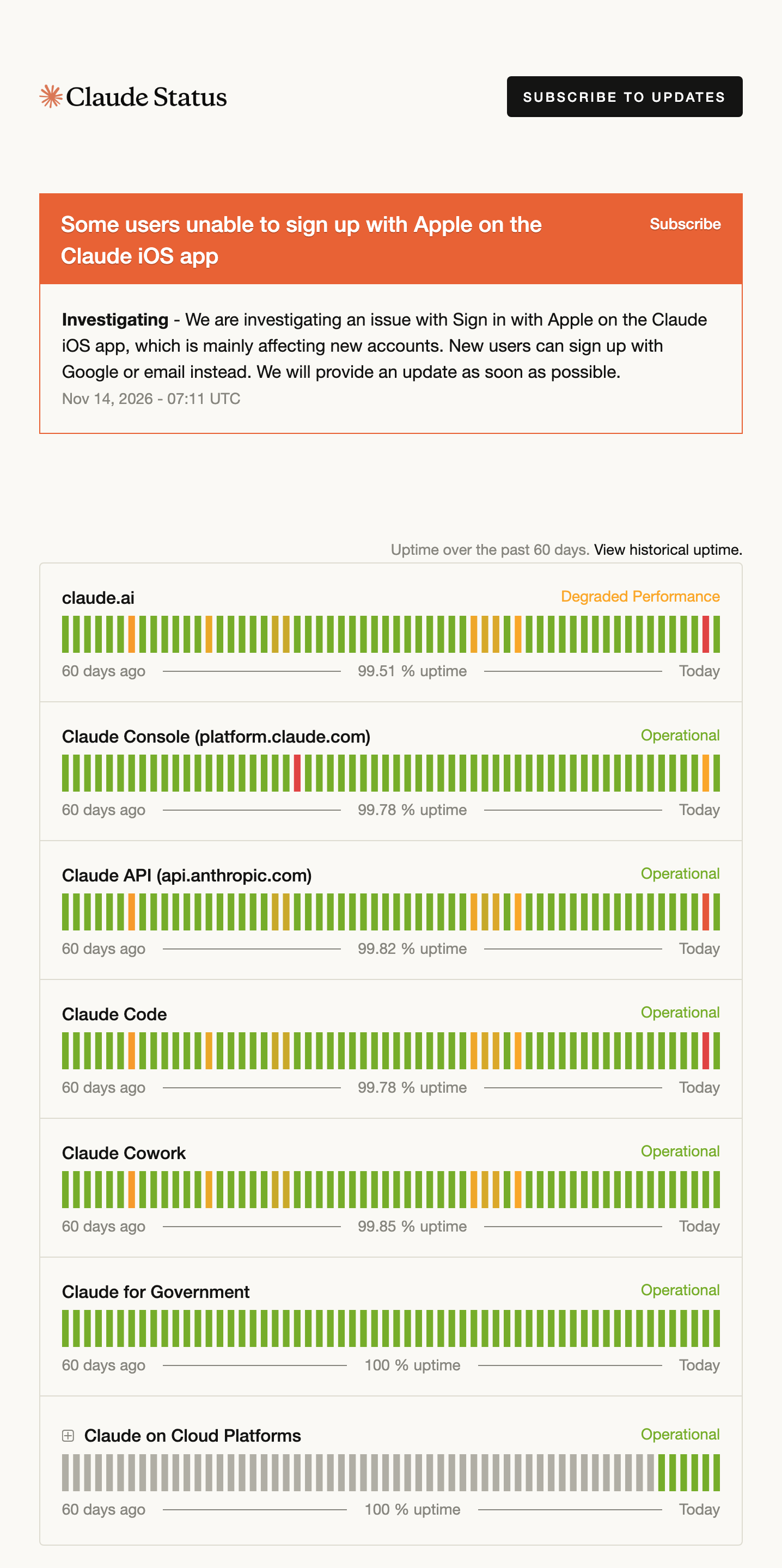
What each line covers
Find the line for the thing you use. On 14 November 2026 the page listed these:
- claude.ai. When Anthropic reported errors on 13 November, it counted the mobile apps with claude.ai.
- Claude Console (platform.claude.com).
- Claude API (api.anthropic.com). Claude Code calls this API for its answers, so read this line too if you use Claude Code.
- Claude Code.
- Claude Cowork.
- Claude for Government.
- Claude on Cloud Platforms, a group that opens into Claude Platform on AWS, Claude in Microsoft Foundry and Claude Models on Google Cloud (Anthropic managed).
Each line carries one of five states: Operational, Degraded Performance, Partial Outage, Major Outage or Maintenance. The daily bars use the same colours, so a look along a row shows how the past weeks went, and "View historical uptime" opens the months before.
A product can be fine while another is not. On the day of the picture above, some people, mainly with new accounts, could not sign up with Apple on the iPhone app, claude.ai was marked Degraded Performance, and Claude Code and the API were Operational. So read the line for your product, then read the incident.
Sources, read 14 November 2026: Claude Status, Claude Status API.
How to read an incident
An incident has a title that names what is affected, then dated updates with the newest first. Each update starts with a label. The ones on the page that day were Investigating, Identified, Monitoring and Resolved, with Update on the posts in between. By Monitoring, Anthropic is watching the recovery, so things may already work for you. Read the update to see whether a fix went in. The time under each update is in UTC.
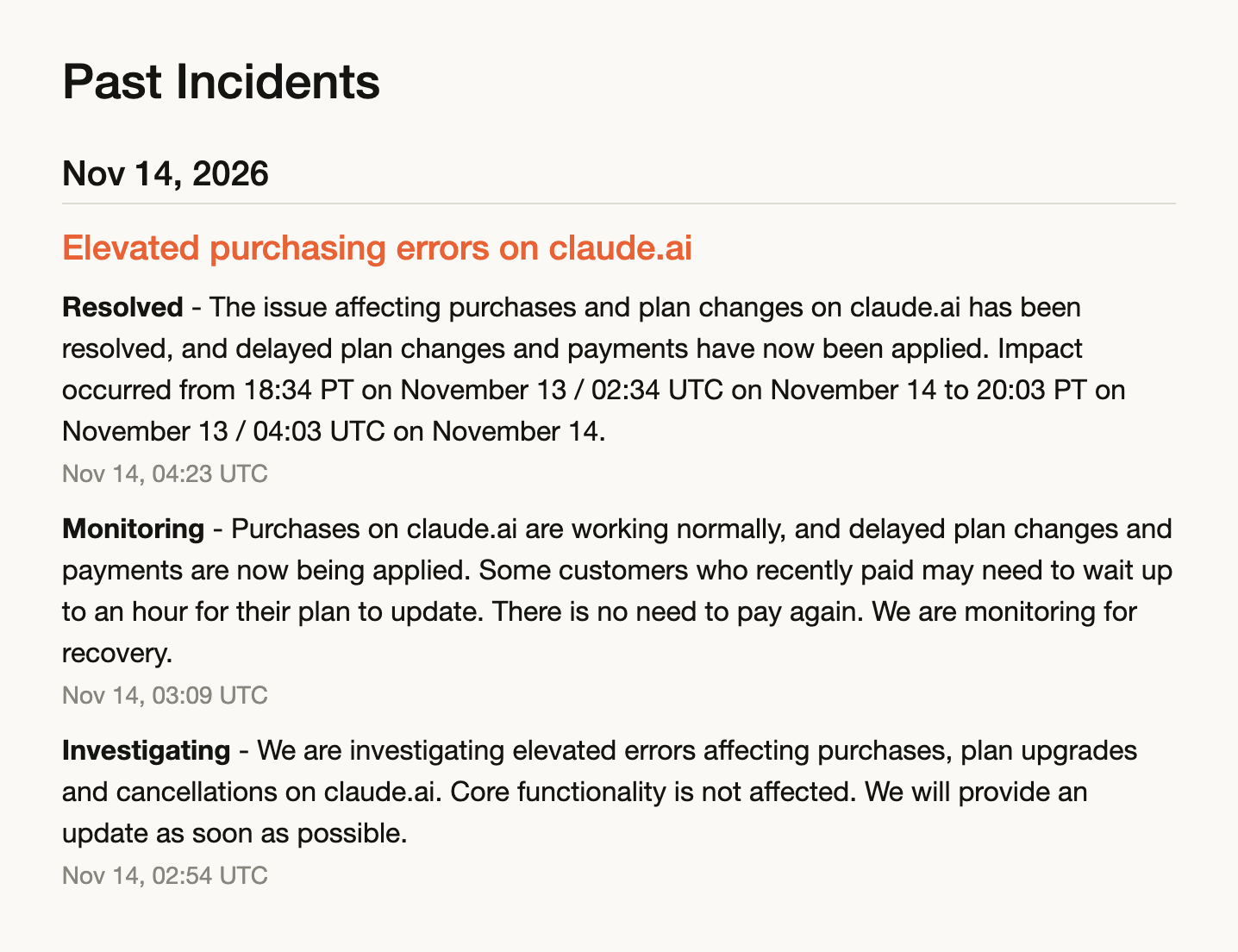
The updates often say more than the coloured line does: which features are still slow, and what to do meanwhile. For older ones, Incident History has every incident by month.
Sources, read 14 November 2026: Claude Status, Incident History.
How to get told when Anthropic reports an incident
Press Subscribe to Updates at the top of the status page, and pick how you want to hear:
- Email, whenever Anthropic creates, updates or resolves an incident.
- A text message, when an incident is created or resolved.
- Slack or a Microsoft Teams channel, for incident updates and maintenance.
- A webhook, which also fires when a product changes state.
- A feed for a reader app: Atom or RSS.
An open incident has a Subscribe of its own, if you only want to follow that one. And for a script or a dashboard, the page has a public API in JSON. This address gives every product, its state and the open incidents in one answer:
https://status.claude.com/api/v2/summary.jsonSources, read 14 November 2026: Claude Status, Claude Status API.
Is it an outage, or your usage limit?
When the status page shows no incident and Claude still will not answer, the message on your screen says what to check: your plan’s limit, heavy demand, a server error, your sign-in or your own connection. Anthropic’s Help Center says that capacity problems "will not appear on our status page", because it counts them as normal load, not as a fault.
| What you see | What it is | What to do |
|---|---|---|
| "5-hour limit reached" or "You've reached your weekly limit" (Claude), "You've hit your session limit" or "You've hit your weekly limit" (Claude Code) | Your plan’s usage limit. The message is about your account, not about the service | Wait for the reset time in the message. Our Claude usage guide has every other way to keep working |
| "Due to unexpected capacity constraints, Claude is unable to respond to your message. Please try again soon." | High demand across all users. Anthropic does not count it as an outage | Try again in a few minutes |
API Error: 500 Internal server error. (Claude Code) | A failure inside the API, not caused by your prompt, settings or account | Check the status page, wait a minute and send the message again. If it goes on with no incident posted, run /feedback |
API Error: Repeated 529 Overloaded errors. (Claude Code) | The API is at capacity for everyone. It is not your usage limit and does not count against it | Try again in a few minutes, or switch model with /model, since capacity is tracked per model |
API Error: Server is temporarily limiting requests (not your usage limit) | A short throttle that has nothing to do with your plan | Wait briefly and try again. Check the status page if it goes on |
Unable to connect to API. Check your internet connection and its relatives | A problem on the way to the API: your network, VPN, proxy or firewall | From the same terminal, run curl -I https://api.anthropic.com |
| A general error when you sign in to Claude, such as "There was an error logging you in" | A sign-in problem. Anthropic’s first checks are your VPN and your browser | Turn off the VPN and your browser extensions, clear the cache and cookies, then check the status page |
Claude Code tries again by itself after a passing failure, such as a server error, an overload or a dropped connection: up to 10 times, waiting longer each time. It does not always retry a failure that arrives partway through an answer. While it retries, the spinner shows a line like Retrying in Ns · attempt x/y. So when one of the errors above does reach you, Claude Code has already made the retries that apply.
Sources, read 14 November 2026: Troubleshoot Claude error messages, Claude Code error reference, Automatic retries.
What /status shows in Claude Code
/status is about your own Claude Code, not about Anthropic’s service. Anthropic’s commands page says it opens Settings on the Status tab, "showing version, model, account, and connectivity", and that it works while Claude is responding. Type it and press Enter:
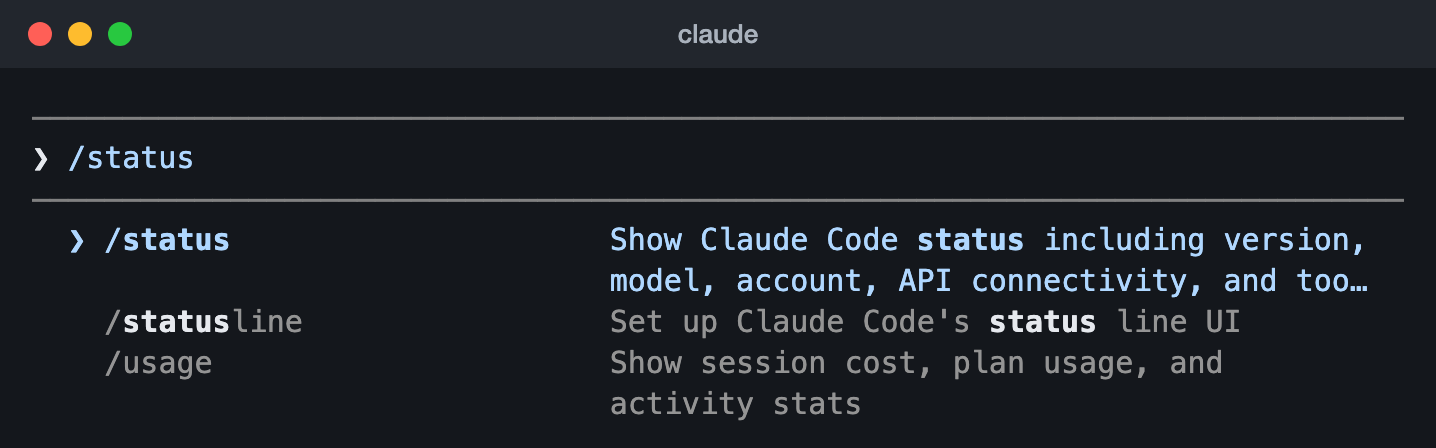
/status typed in Claude Code 2.1.325 (14 Nov 2026), with /statusline and /usage right under it in the menu.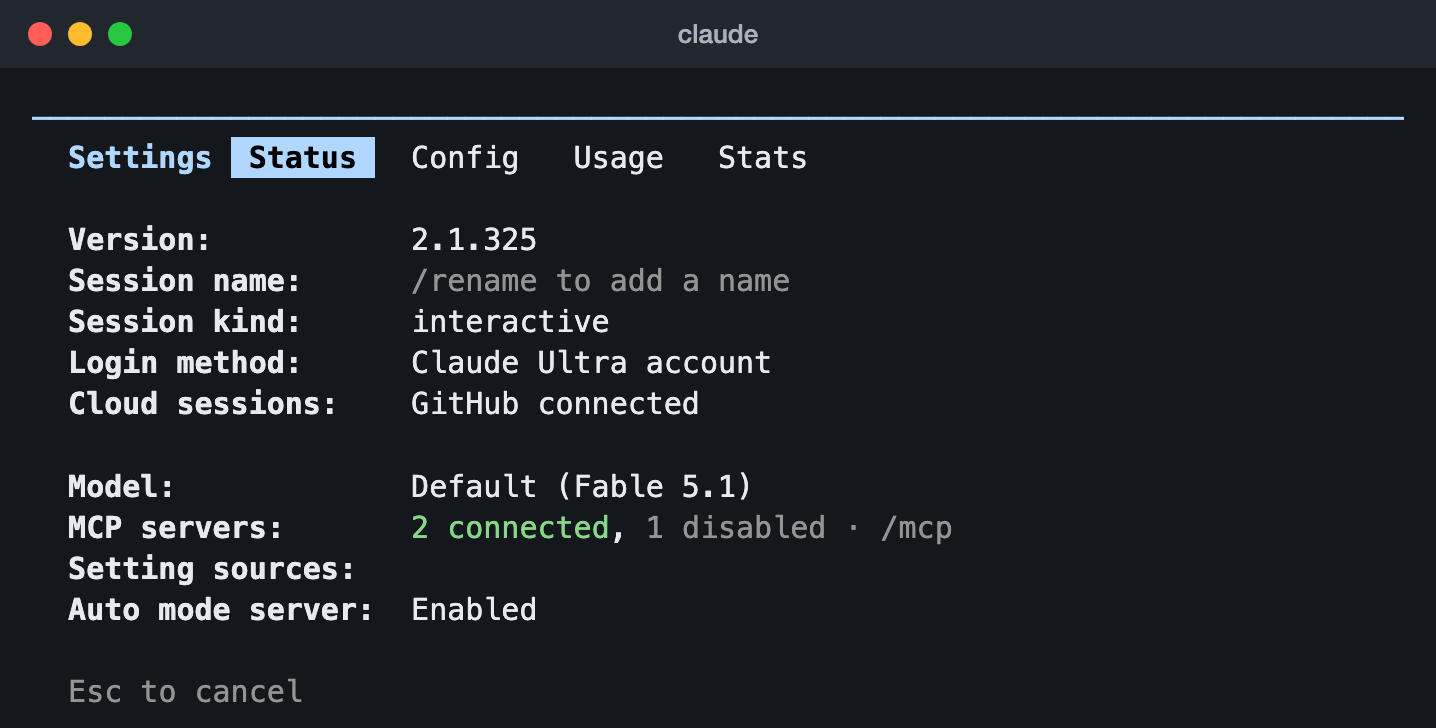
What it is good for
- Which sign-in is in use. Anthropic’s error reference says to "run
/statusat any time to see which credential is currently active". If anAPI keyrow is there and is not marked as not in use, a strayANTHROPIC_API_KEYmay be sending your requests through that key and not through your plan. - Whether your login has expired. A
Loginrow says so before a request fails, and/loginsigns you in again. - Which version and model you are on, to quote in a bug report or to compare with a colleague.
- How many MCP servers are connected, and which settings files are in play.
What it does not show
- Your usage limits. Those are on the Usage tab next to it, or
/usage. Our Claude usage guide covers every way to check them. - Whether Anthropic has an incident open. On a working session in 2.1.325 the tab had no row about the service at all. For that, the status page is the place.
- The status line. That is the row at the bottom of Claude Code, set up with
/statusline: see our Claude Code status line guide.
If Claude Code itself seems broken, /doctor runs a checkup of your installation and settings.
Sources, read 14 November 2026: Claude Code commands, Claude Code error reference.
Questions people ask
Is Claude down right now?
Open status.claude.com. If Anthropic has confirmed a problem, it is in a box at the top, and the line for the affected product is no longer marked Operational. No box and every line Operational means Anthropic has not reported one.
Why is Claude not working when the status page says Operational?
Three common reasons. You have reached your plan’s usage limit, which is yours alone and never on the status page. Demand is high, which Anthropic does not post as an incident. Or something between you and Claude is in the way, such as a VPN, a proxy or a browser extension. The message on your screen shows which to check first.
Is status.anthropic.com still the status page?
It forwards to status.claude.com, which is the address Anthropic’s Help Center and Claude Code’s error messages give.
Does Claude Code have its own line on the status page?
Yes. Claude Code is listed by itself, apart from claude.ai and the Claude API, so it can be marked down while the others are fine, or the other way round.
What is the difference between /status and /statusline?
/status opens a screen you look at once: version, model, account. /statusline sets up the status line, a row that stays at the bottom of Claude Code and shows whatever you ask for.
Does an overloaded error use up my limit?
No. Anthropic’s error reference says a 529 "is not your usage limit and doesn't count against your quota".
Sources, read 14 November 2026: Claude Status, Troubleshoot Claude error messages, Claude Code error reference, Claude Code commands.