Weather widget for your Mac
See the temperature now, the next 12 hours and how much daylight is left, right from your Mac menu bar. Wishbar turns plain English into widgets like this in minutes, using your own AI.
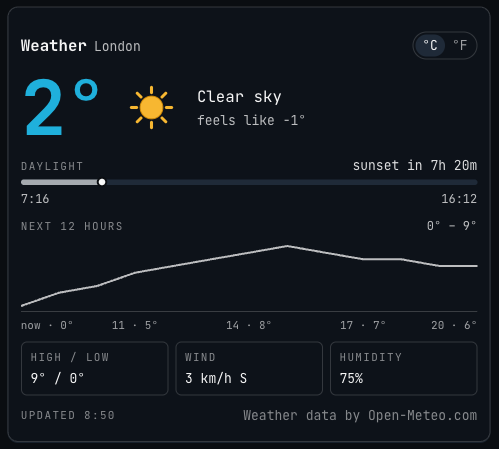
Weather · A weather widget for your Mac menu bar: the temperature now as one big number, the next 12 hours, daylight left, wind and humidity, with no account or key.
Made with  Wishbar
Have Wishbar on this Mac? This opens it with this widget ready to make. Wishbar asks first, then your AI makes it in a few minutes.
The wish that made it, as typed into Wishbar:
Add a weather widget for where I am. Show the temperature now as one very large bold number in the accent colour, the only colour on the card, under a bold Weather title with the place name beside it. Next to the number, the conditions in words, like Light rain, and what it feels like.
Read all of itFold it
Under that, a daylight bar from today's sunrise to today's sunset, with a marker for now and how long until the sun sets or rises. Then a line chart of the temperature over the next 12 hours, and three small boxes: today's high and low, the wind, and the humidity. Add a small °C and °F switch. Work out where I am from the Mac's time zone, no location permission and no IP lookup, and get the weather from Open-Meteo, which is free and needs no key. Refresh every 15 minutes. At the bottom, a small credit that opens open-meteo.com: Weather data by Open-Meteo.com. Keep everything except the temperature in white and grey.
“A widget like this can be made for you from one sentence, to your taste. Nobody else will have it.”
Just your email, no card. You bring the AI: a free ChatGPT account is enough.
“Wishbar turned a one-sentence request into a working Mac widget in minutes … I've stopped hunting for menu-bar apps; I just wish for them now.”
What it does
- Shows the temperature now as one very large number in the accent colour, with an icon for the conditions in its own colours, a yellow sun, blue rain or a pale moon, the conditions in words, like Light rain, and what it feels like.
- Draws today's daylight as a bar from sunrise to sunset, with a marker for now and a countdown to the next sunset or sunrise.
- Draws the temperature over the next 12 hours as a line, with the lowest and highest beside it and a reading every three hours underneath.
- Puts today's high and low, the wind with its direction, and the humidity in three small boxes.
- Switches between °C and °F with one click and remembers your choice; in °F the wind reads in miles an hour.
- Keeps each answer from Open-Meteo for 15 minutes before asking again, credits it on the card, and keeps the last answer for when you are offline.
Where the data comes from, and what it needs
Open-Meteo. No account, no key. It runs on your Mac and talks to its source only. Once made, it runs without your AI: it uses no Claude or ChatGPT tokens.
- A time zone set to a city in System Settings (a plain UTC zone has no place).
When it is useful
- One look before you leave: how cold it is, what it feels like, and whether it warms up by lunch.
- Knowing how much daylight is left for a walk, a run or the drive home.
- A quiet weather check between tasks, without opening a browser tab or picking up your phone.
How to add this widget to your Mac
- Get Wishbar, free for seven days, and install it.
- Copy this widget's recipe link:
https://wishbar.app/recipes/weather.html - Paste it into the box at the bottom of Wishbar's panel and send it. Wishbar asks, then your AI builds it.
- Press Keep when you like what you see.
Questions people ask
Is there a weather widget for the Mac menu bar?
Yes, this one: it opens from the W in your menu bar, whatever window is in front. Your Mac's own widgets go on the desktop or in Notification Center instead: Control-click the wallpaper and choose Edit Widgets to add them.
Where does the weather come from?
From Open-Meteo, a free weather service built on open data from national weather services. Its licence asks for a credit beside the numbers, so the card says Weather data by Open-Meteo.com, and a click on that line opens its site.
Does it need an account or a key?
No. Open-Meteo answers without one for non-commercial use, such as a widget of your own, at fewer than 10,000 calls a day. This widget keeps each answer for 15 minutes before asking again. For commercial use, Open-Meteo asks you to subscribe.
Does it know where I am?
Only roughly. It reads the city your Mac's time zone points to, London for Europe/London, and shows that city's weather. It never asks for your location and never looks up your IP address.
Can I have my own town, the chance of rain or the UV index?
Yes, say so in the wish. Name your town and the widget is made for there. Open-Meteo also gives the chance of rain and the UV index hour by hour, so ask for either and your AI adds it.
How often does it update?
Every 15 minutes while it can reach Open-Meteo, which bases its current conditions on 15-minute data. If a request fails, it tries again at the next refresh. While the panel is open the countdown to sunset or sunrise moves on every minute. The card says when the weather was last fetched.
What happens when I am offline?
It shows the last weather it fetched and says offline, with the time it is from. With nothing saved yet, it says it cannot reach Open-Meteo and that the weather will appear once you are back online.
Can I put it on my Mac desktop?
Not this one. Wishbar's widgets live in its panel, which opens from the W in your menu bar, so the weather is one click away whatever window is in front.
What if it does not look the way I want?
Say what to change, in plain words. The first version here had no picture of the weather, and one more line added the sun above: "Add an icon for the current conditions, in the colours of the thing itself (a sun yellow, rain blue, a moon pale)."
How long does it take to make?
About four minutes in Wishbar's own test: Claude made the widget from the wish above in 151 seconds on 13 November 2026, and the follow-up just above took 90 more the next morning.
Added Last updated


More like this
See the gallery's Places and travel section.