Hacker News top 5 widget for your Mac
Read the five top stories on Hacker News and their points, right from your Mac menu bar. Wishbar turns plain English into widgets like this in minutes, using your own AI.
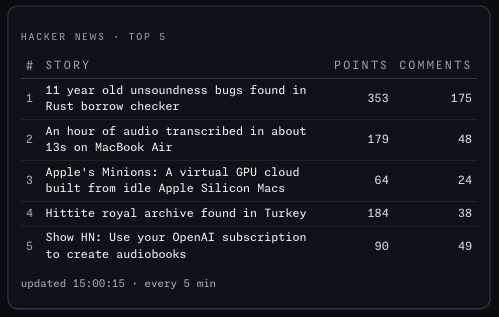
Hacker News top 5 · The five stories on the Hacker News front page right now, with their points and comment counts: the title opens the article, the count opens the discussion.
Made with  Wishbar
Have Wishbar on this Mac? This opens it with this widget ready to make. Wishbar asks first, then your AI makes it in a few minutes.
The wish that made it, as typed into Wishbar:
Show me the top 5 stories on Hacker News right now: the rank, the title, the points and the number of comments. Clicking a title opens the article in my browser; clicking the comment count opens the Hacker News discussion. Refresh every five minutes while the panel is open, and show when it last updated.
Read all of itFold it
If Hacker News cannot be reached, keep the last five on screen and mark them stale.
“A widget like this can be made for you from one sentence, to your taste. Nobody else will have it.”
No card needed. You bring the AI: a free ChatGPT account is enough.
“Wishbar turned a one-sentence request into a working Mac widget in minutes … I've stopped hunting for menu-bar apps; I just wish for them now.”
What it does
- Shows the top five stories as a small table: the rank, the title, the points and the number of comments.
- Click a title to open the article in your browser; click the comment count to open the Hacker News discussion.
- Refreshes every five minutes while the panel is open; a line underneath says when it last updated.
- If Hacker News cannot be reached, the last five it saw stay on screen, marked stale, with a button to try again.
Where the data comes from, and what it needs
Hacker News' public API. No account, no key. It runs on your Mac and talks to its source only. Once made, it runs without your AI: it uses no Claude or ChatGPT tokens.
When it is useful
- A glance at what developers are reading without opening a tab.
- A quiet check between tasks; nothing pings you.
How to add this widget to your Mac
- Get Wishbar, free for seven days, and install it.
- Copy this widget's recipe link:
https://wishbar.app/recipes/hacker-news.html - Paste it into the box at the bottom of Wishbar's panel and send it. Wishbar asks, then your AI builds it.
- Press Keep when you like what you see.
Questions people ask
Does it need an account?
No. Hacker News publishes the front page openly; the widget reads it and nothing else.
What happens when Hacker News is down?
The last five stories stay on screen with the word stale beside them. It never invents a story.
Does it refresh when the panel is closed?
No. It refreshes while you are looking, so it costs nothing while you are not.
Added Last updated


More like this
See the gallery's News and the web section.