How to put a countdown on your Mac.
A countdown shows how many days are left until a day you are waiting for: Christmas, a holiday, a wedding, your last day at work.
By NarenLast updated
Made with Wishbar
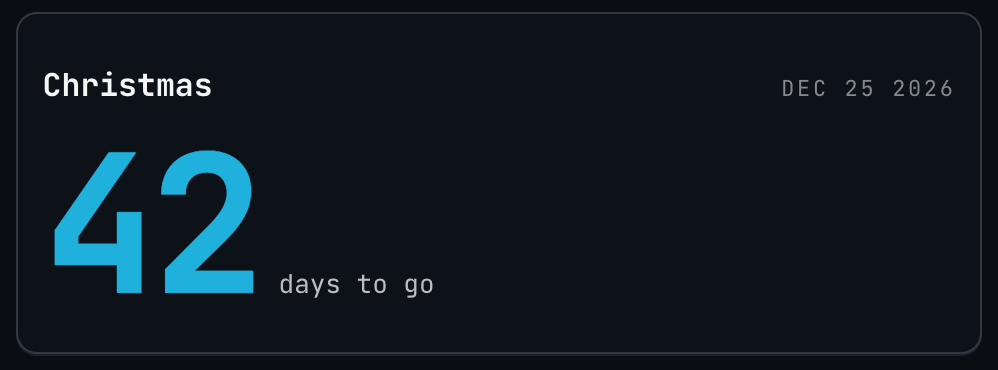
A Christmas countdown, made from one sentence. Try Wishbar free for 7 days.
On a Mac you can keep it on your desktop or in the menu bar at the top of the screen, so you see it every time you look up. Below are three good ways to get one, and two more for when you only need it once.
The short version
| Way | Where you see it | Good to know |
|---|---|---|
| A countdown app | On your desktop, as a widget. | Free to download. Each app decides what is paid and how your countdown looks. |
| A shortcut | In the menu bar, when you click it. | Free and already on your Mac, but it tells you only when you ask. |
| A widget you describe in a sentence | In the menu bar, always there. | Your day, your words, your look. It needs an app and an AI account; the last section shows it. |
| A countdown website | In a browser tab. | Two minutes to set up and easy to share as a link, but you have to go and look. |
| A spreadsheet formula | In Excel, Google Sheets or Numbers. | Good for a list of dates, but you open the file to see it. |
Sources, read 20 November 2026: Countdown to Any Date (timeanddate.com), DAYS function (Microsoft Support), DAYS function (Google Docs Editors Help), Run a shortcut while working on your Mac (Apple).
On your desktop: a countdown app and its widget
On a Mac, widgets come with apps. So for a countdown that sits on your desktop or in Notification Center, you install a countdown app, then add its widget:
- Open the App Store on your Mac and search for countdown widget.
- On an app's page, look at two lines before you get it: Compatibility, for the macOS it needs, and In-App Purchases, for what is paid.
- Install the app, open it once and add your day.
- Add its widget to your desktop: Control-click the wallpaper, choose Edit Widgets, find the app, then click its widget. The full steps, for every macOS, are in our guide to adding widgets on a Mac.
The four countdown apps we looked up on 20 November 2026 were all free to download, and the two made for the Mac alone needed macOS 14.0 and 14.6. What you cannot change is the design: an app shows your day the way its maker drew it.
What about the Clock and Calendar apps?
The Clock app's timers count down from a length of time, like 5 minutes or 1 hour, so they suit the oven and the laundry, not the days until a wedding. Calendar is the place to keep the date itself: add it as an all-day event with an alert, and use one of the ways on this page for the number.
Sources, read 20 November 2026: Add and customize widgets on Mac (Apple), The App Store's records for four countdown apps, Set timers in Clock on Mac (Apple).
In the menu bar for free: a shortcut
The Shortcuts app on your Mac has an action that does this exact sum. Build it once, pin it to the menu bar, and the days left are one click away:
- Open the Shortcuts app and make a new shortcut. Name it after your day, like Days until Christmas.
- Add the action Get Time Between Dates.
- Set it to count from the current date to your date, in days.
- Add an action that shows the answer, such as Show Notification, and put the result of the step above in it.
- In the shortcut's details, turn on Pin in Menu Bar.
- Click the Shortcuts icon in the menu bar, then your shortcut, whenever you want the number.
This is the honest limit of the free way: the shortcut answers when you ask. Nothing counts down in front of you, and there is no picture to enjoy. For a number that stays on screen, use a countdown app (above) or a widget you describe (the last section).
Sources, read 20 November 2026: Run a shortcut while working on your Mac (Apple), Shortcuts Rewind: Dates, Calendars, and Beyond (MacStories).
In a browser: a countdown website
A countdown page needs no install and works on any computer. timeanddate.com has a free one, and it takes about two minutes:
- Open Countdown to Any Date on timeanddate.com.
- Pick a design. There are ready ones for a birthday, a wedding, a vacation, retirement, Christmas and more.
- Type a title for your countdown, then set the month, day and year.
- Choose the place of the event, so the countdown ends at midnight there and follows its clock changes.
- Choose Just Days if you want the days alone, without hours, minutes and seconds.
- Copy the web address of your countdown. That link is your countdown: bookmark it, or send it to the people counting with you.
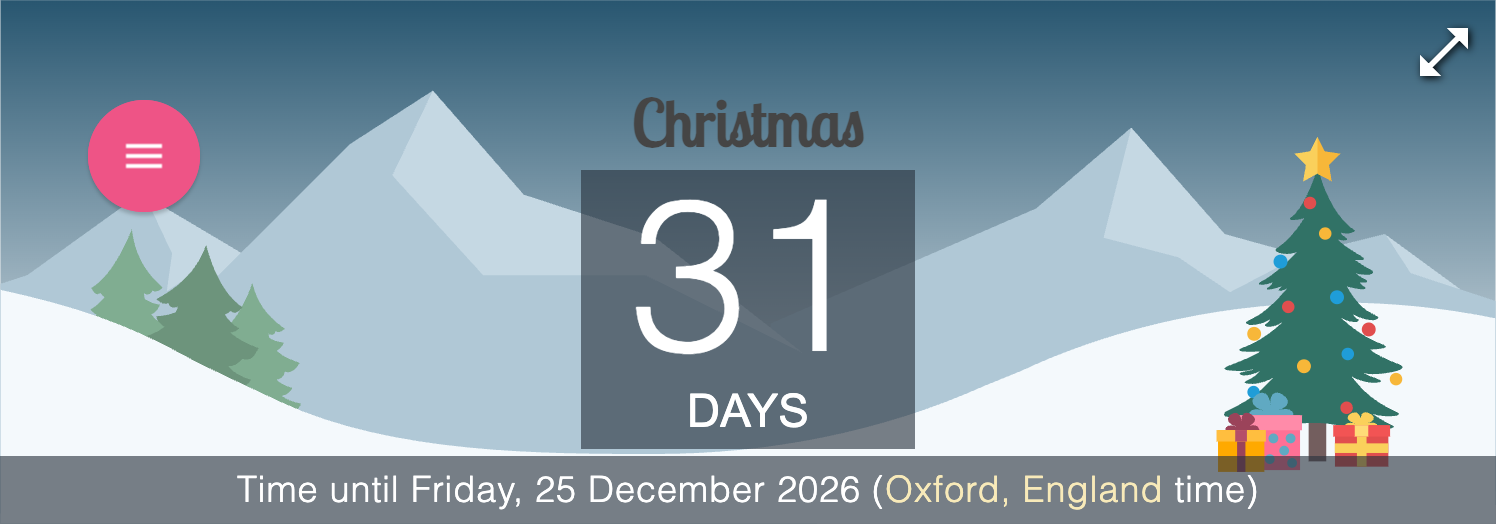
To keep it close, bookmark it or leave it open in a tab. It is still a web page: you see the number when you go and look.
Sources, read 20 November 2026: Countdown to Any Date (timeanddate.com).
For several dates: a spreadsheet formula
A spreadsheet can do the sum for you and redo it every day. The DAYS function gives the days between two dates, the end date first, and TODAY is always today. So this is the days left until Christmas 2026:
=DAYS(DATE(2026,12,25),TODAY())Change the three numbers to your own year, month and day. Keeping a list? Put each date in column A and use this next to it, then copy it down:
=DAYS(A2,TODAY())- A leap day is counted for you.
- After the day has passed, the answer goes negative: that is how many days ago it was.
- Numbers on a Mac has DATE, DAYS and TODAY too, in its own list of date functions.
Sources, read 20 November 2026: DAYS function (Microsoft Support), DAYS function (Google Docs Editors Help), List of functions by category (Apple, Formulas and Functions Help).
The dates people count down to
A countdown is only as right as its date, and some of the dates people count to move every year. Here are the big ones for the next twelve months, with the rule behind each, so your countdown ends on the right day.
| What | Next date | How the date is set |
|---|---|---|
| Black Friday | Friday 27 November 2026 | The day after Thanksgiving Day in the United States, so it moves: Friday 26 November in 2027. |
| Christmas Day | Friday 25 December 2026 | Fixed: 25 December every year. In 2027 it is a Saturday. |
| New Year's Day | Friday 1 January 2027 | Fixed: 1 January. |
| Ramadan | Expected Monday 8 February 2027 | It follows the moon, so it comes earlier each year, and the first day depends on sighting the new crescent. Calendars mark the date tentative, and it can differ by a day between countries. Eid al-Fitr is expected on 9 or 10 March 2027. |
| Valentine's Day | Sunday 14 February 2027 | Fixed: 14 February. |
| Mother's Day | Sunday 7 March 2027 in the UK, Sunday 9 May 2027 in the US | Two different days, so set the one for your country. |
| Easter Sunday | Sunday 28 March 2027 | The first Sunday after the first full moon on or after 21 March, in the church calendar. It moves every year. |
| Diwali | Friday 29 October 2027 in the UK list, Thursday 28 October in the US list | It follows the Hindu lunar calendar, and the day can differ by country. Check the day your family keeps. |
| Halloween | Sunday 31 October 2027 | Fixed: 31 October. |
| Thanksgiving (US) | Thursday 25 November 2027 | A Thursday in late November, so the date moves. |
| Your own day | A birthday, a wedding, a holiday, an exam, your last day at work | You know this one. For retirement, count to the day agreed with your employer, or to the day you reach pension age. |
Counting to a day that moves? Set next year's date by hand when this year's has passed, unless the way you pick works it out for you.
Sources, read 20 November 2026: Holidays in the United States, 2027 (timeanddate.com), Holidays in the United Kingdom, 2027 (timeanddate.com), Black Friday in the United States (timeanddate.com), Easter Sunday in the United States (timeanddate.com), Ramadan 2027 (IslamicFinder).
Questions people ask
How do I put a countdown on my Mac desktop?
Install a countdown app from the App Store, then add its widget: Control-click the wallpaper, choose Edit Widgets, find the app and click its widget. Desktop widgets need macOS Sonoma 14 or later; on an older Mac, widgets go in Notification Center.
Can I put a countdown in the Mac menu bar?
Yes, two ways. Free: build a shortcut with the Get Time Between Dates action and turn on Pin in Menu Bar, and it tells you the days left when you click it. Or use a menu bar app that shows a countdown as a widget; the last section of this page has one.
How many days until Christmas?
On 20 November 2026 it was 35 days to Christmas Day, Friday 25 December 2026. For the number on any other day, type =DAYS(DATE(2026,12,25),TODAY()) into Excel or Google Sheets.
When is Ramadan 2027?
Ramadan 2027 is expected to begin on Monday 8 February 2027, with Eid al-Fitr on 9 or 10 March. The date is tentative: the month starts when the new crescent moon is sighted, so it can differ by a day between countries. Check with your local mosque before you set a countdown.
Why does Black Friday's date change every year?
Because it is the day after Thanksgiving Day in the United States, which is a Thursday in late November, not a fixed date. Black Friday is 27 November in 2026 and 26 November in 2027.
How do I count down to my retirement?
Use the day you have agreed with your employer, or the day you reach pension age, as the date. In a spreadsheet, type =DAYS(DATE(2031,6,30),TODAY()) with your own year, month and day. A countdown website or app works the same way: give it that one date.
How do I count down to a birthday?
Count to the next one: use this year's date if the birthday is still ahead, and next year's if it has passed. A spreadsheet, a website countdown or an app all take that date; change it once a year, after the day.
Does a countdown count today?
The formula on this page counts the nights left: on the day before, it reads 1, and on the day itself, 0. A countdown that shows hours and minutes too counts to the moment, not the day, so it can read one day lower. If two countdowns disagree by a day, that is why.
Sources, read 20 November 2026: Add and customize widgets on Mac (Apple), Run a shortcut while working on your Mac (Apple), DAYS function (Microsoft Support), Ramadan 2027 (IslamicFinder), Holidays in the United States, 2027 (timeanddate.com), Black Friday in the United States (timeanddate.com).
Or make the countdown you want, from one sentence
The Christmas countdown at the top of this page came from six words: "add widget counting days until Christmas". In our test on 13 November 2026 it was made in under a minute.
That is Wishbar, a Mac app that lives in your menu bar. You type what you want in plain English, or in your own language, and your own AI, ChatGPT through Codex or Claude, builds it as a live widget in the panel under the W. A free ChatGPT account is enough. Claude needs a paid plan. There is no app to buy for each new day: you wish for the next countdown.
These four are in the gallery too. Each was made from a sentence and, once made, counts on from your Mac's own clock with no internet. If Wishbar is already on this Mac, the button under a picture opens it with that widget ready to make.
Black Friday countdown
Made with Wishbar
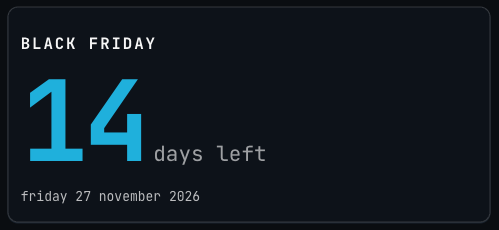
Days until Black Friday, then hours and minutes on the last day. It works out next year's date by itself.
Retirement countdown
Made with Wishbar
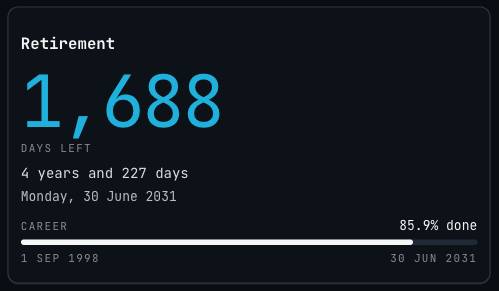
The days to the day you choose, in years and days too, with a bar of your working life so far.
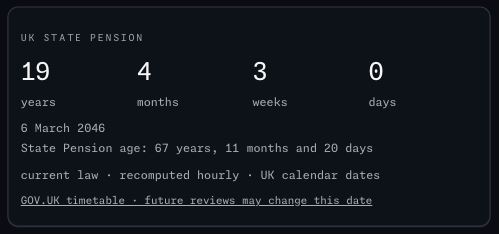
State Pension countdown
Made with Wishbar
From a date of birth alone: the day you reach UK State Pension age, and the years, months, weeks and days until it.
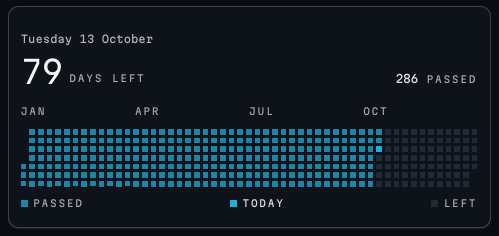
Year progress
Made with Wishbar
The countdown everyone shares: the days left in the year, drawn as a grid with today marked.
Three wishes to copy
These are the wishes that made three of the countdowns on this page, word for word. Copy one into Wishbar and change the day to yours. The same shape works for a birthday, a wedding, a holiday or a launch: name the day in the wish.
add widget counting days until ChristmasA countdown to Black Friday, 27 November 2026. Big number of days left, the date under it, and once we are inside the last day switch to hours and minutes. After the day, say "Black Friday was N days ago" until the end of the month, then count down to next year's. Refresh once a minuteA countdown to my retirement on 30 June 2031. Show the days left as one very large number in the accent colour, the only colour on the card, under a bold Retirement title, with the years and days left and the date itself under it. Add a progress bar from my first day at work, 1 September 1998, to that day, with the percentage done. Keep everything else in white and grey, and keep it up to date on its own.Not quite right the first time? Say what to change, in plain words: a different date, a bigger number, hours and minutes on the last day.
Get Wishbar in the Black Friday and Cyber Monday sale, with a 14-day money-back guarantee.
Don't have it yet? Try Wishbar free for 7 days, or see every widget in the gallery.

“I don't need a separate app for every small thing I want to see.”