SpaceX share price widget for your Mac
Watch SpaceX's share price and how much it has moved today, right from your Mac menu bar. Wishbar turns plain English into widgets like this in minutes, using your own AI.
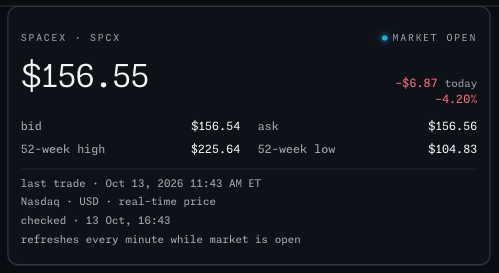
SpaceX share price · SpaceX's share price (SPCX) in your menu bar: the last price, today's change, the bid and ask, the 52-week high and low, and whether the market is open.
Made with  Wishbar
Have Wishbar on this Mac? This opens it with this widget ready to make. Wishbar asks first, then your AI makes it in a few minutes.
The wish that made it, as typed into Wishbar:
Show me the SpaceX share price, ticker SPCX, from Nasdaq: the live price, today's change in dollars and percent, the bid and ask, the 52-week high and low, and whether the market is open. Show the time of the last trade and whether the price is real-time or delayed.
Read all of itFold it
Refresh every minute while the market is open. If a refresh fails, keep the last quote on screen and say it is stale.
“A widget like this can be made for you from one sentence, to your taste. Nobody else will have it.”
No card needed. You bring the AI: a free ChatGPT account is enough.
“Wishbar turned a one-sentence request into a working Mac widget in minutes … I've stopped hunting for menu-bar apps; I just wish for them now.”
What it does
- Shows the last sale price in dollars, today's change in dollars and percent, the bid and ask, and the 52-week high and low.
- Shows the market status in Nasdaq's own words: open, closed, pre-market, after hours.
- Refreshes every minute while the market is open and every five minutes otherwise; the footer shows Nasdaq's own last-trade time and says whether the price is real-time or delayed.
- If the quote cannot be fetched, the last good price stays on screen, marked stale.
Where the data comes from, and what it needs
Nasdaq's quote feed for SPCX, the numbers behind Nasdaq's SPCX page (the widget never reads the web page itself). No account, no key. It runs on your Mac and talks to its source only. Once made, it runs without your AI: it uses no Claude or ChatGPT tokens.
When it is useful
- One number you keep an eye on, without a trading app open.
- The market status at a glance before you look at anything else.
How to add this widget to your Mac
- Get Wishbar, free for seven days, and install it.
- Copy this widget's recipe link:
https://wishbar.app/recipes/spacex-share-price.html - Paste it into the box at the bottom of Wishbar's panel and send it. Wishbar asks, then your AI builds it.
- Press Keep when you like what you see.
Questions people ask
Is the price live or delayed?
It is whatever Nasdaq's public quote sends, with the market status Nasdaq reports next to it, and a footer that says real-time when Nasdaq flags the quote so.
Can I pick another share?
Not in this widget. A different share is a different wish, and takes a minute to make.
Does it need an account?
No.
Added Last updated


More like this
See the gallery's Finance section.