Claude Code usage widget for your Mac
See how much of your Claude Code plan you have used, right from your Mac menu bar. Wishbar turns plain English into widgets like this in minutes, using your own AI.
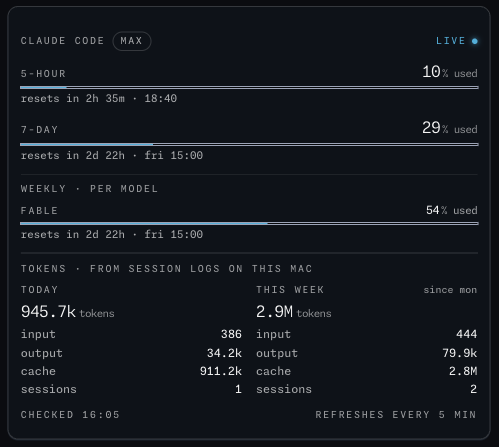
Claude Code usage · How much of your Claude Code plan you have used this week and in the current five-hour window, plus the tokens behind it from the logs on your own Mac.
Made with  Wishbar
Have Wishbar on this Mac? This opens it with this widget ready to make. Wishbar asks first, then your AI makes it in a few minutes.
The wish that made it, as typed into Wishbar:
Show me my Claude Code usage from the sign-in Claude Code already has on this Mac: the five-hour window and the seven-day window of my plan as bars with the percentage used and when each one resets, and the weekly limits per model where Claude reports them.
Read all of itFold it
Underneath, from Claude Code's own session logs on this Mac, the tokens used today and this week, split into input, output and cache, and how many sessions that was. If there is no sign-in, say so. Refresh every five minutes while the panel is open.
“A widget like this can be made for you from one sentence, to your taste. Nobody else will have it.”
No card needed. You bring the AI: a free ChatGPT account is enough.
“Wishbar turned a one-sentence request into a working Mac widget in minutes … I've stopped hunting for menu-bar apps; I just wish for them now.”
What it does
- Shows the five-hour window and the seven-day window of your plan as bars with the percentage used and when each resets, the weekly limits per model where Claude reports them, and your plan’s name.
- Underneath, from Claude Code’s own session logs on your Mac: the tokens used today and this week, split into input, output and cache, and how many sessions that was.
- Reads the sign-in Claude Code already has on your Mac; if there is none, it says sign in. Nothing leaves your Mac except the request Claude Code itself would make.
Where the data comes from, and what it needs
Anthropic's usage service, asked with the Claude Code sign-in already on this Mac. It needs an account you already have on this Mac. It runs on your Mac and talks to its source only. Once made, it runs without your AI: it uses no Claude or ChatGPT tokens.
- Claude Code installed and signed in
When it is useful
- Knowing before a long session whether the week has room.
- Seeing the five-hour window reset without opening a terminal.
- Knowing what a day of making widgets actually cost in tokens.
How to add this widget to your Mac
- Get Wishbar, free for seven days, and install it.
- Copy this widget's recipe link:
https://wishbar.app/recipes/claude-code-quota.html - Paste it into the box at the bottom of Wishbar's panel and send it. Wishbar asks, then your AI builds it.
- Press Keep when you like what you see.
Questions people ask
Does Wishbar see my Claude password?
No. It reads the sign-in Claude Code keeps on your Mac, the same way Claude Code does, and shows the usage.
What if I am not signed in?
The widget says so in place of the plan bars; the token totals from the logs on your Mac still show.
Does it work with Codex too?
That is the Codex usage widget, next to this one in the gallery.
Does checking my usage use some of it?
No. It asks Anthropic's usage service for the numbers and never sends Claude a message, which is what uses your plan.
Added Last updated


More like this
See the gallery's Your Mac section.