Skip to content

Make a wish. Get a live widget.

Type what you want in your language. Your own AI builds it, one click away in your Mac's menu bar. No code.

Sale: buy from $19

Black Friday sale. Ends soon.

Try free for 7 days

No card needed.

★★★★★Every reviewer gave it 5 stars

14-day money-back guarantee, no questions asked. A free ChatGPT account is enough. Pay once from $19. macOS 13 or later.

Your wish

Add a widget that shows bin collection day and which bin is due for collection (Green, black etc)…

Your own AI built it. It's live in your menu bar.

Wishbar
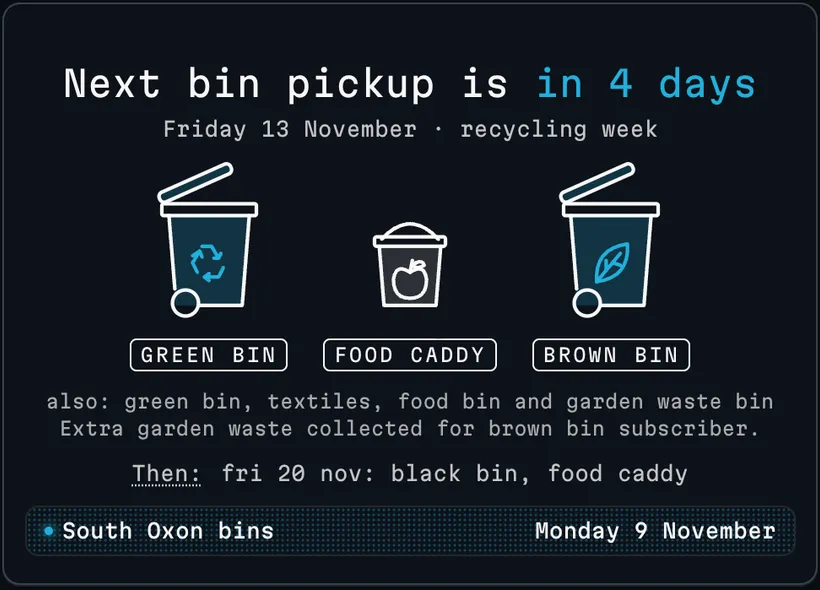
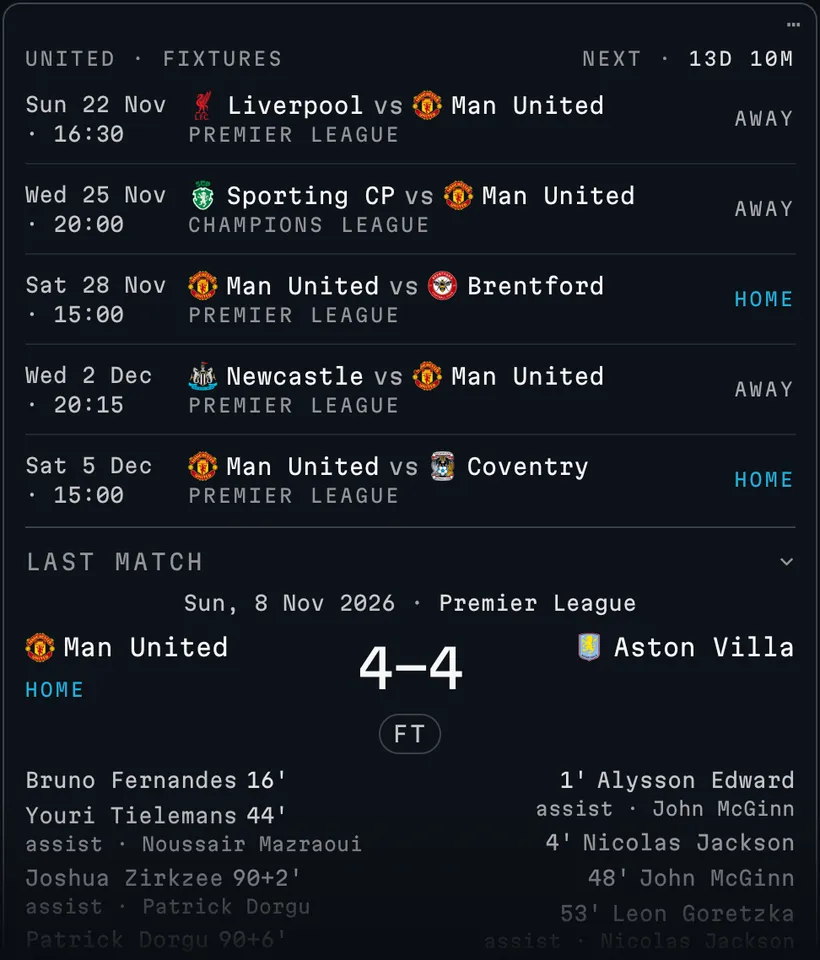
The bins widget: the next bin pickup is in 4 days, Friday 13 November, recycling week, with the green bin, the food caddy and the brown bin.The Manchester United widget: the next five matches with each club's badge, home or away, and the last match, 4-4 with Aston Villa, with the scorers.
Try another wish

Real wishes and real widgets, sped up. A widget usually takes one to three minutes to build, and some took more messages to look just right.

Pay once, no subscription14-day money-back guaranteeSigned and notarised by Apple

It can alert you, too

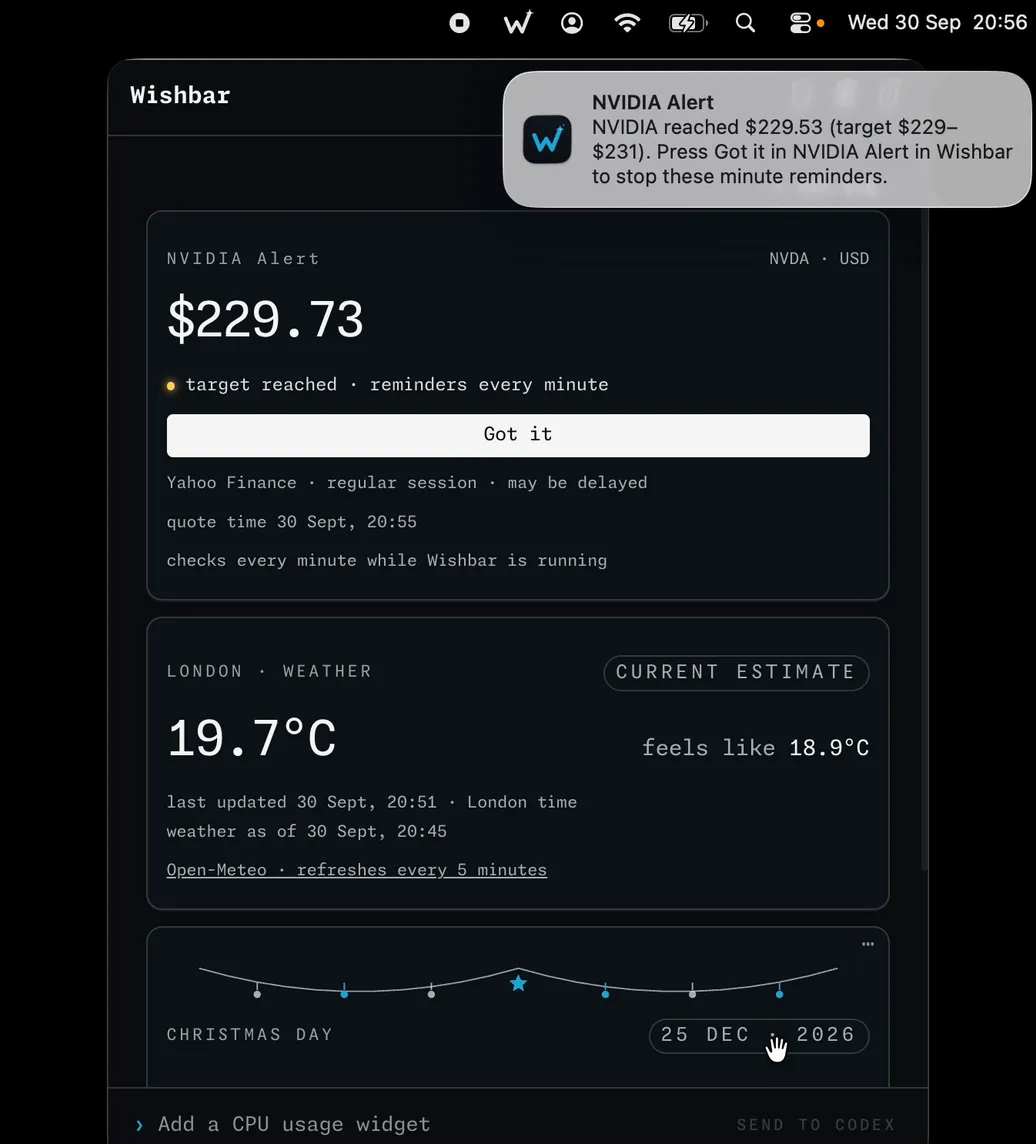
Ask for an alert, and your widget watches for you. This one rings when NVIDIA's share price reaches the number you set, and keeps ringing every minute until you press Got it.

“My own alert rang near $195, so I bought NVIDIA. It rang again near $230, so I sold.” Naren, who made Wishbar

The Wishbar panel with three widgets: an NVIDIA share price with a Got it button, London weather, and a Christmas countdown. A macOS alert says NVIDIA reached $229.53.

The wish · “Show me NVIDIA's share price and alert me when it is around $230. Keep reminding me every minute until I press Got it. Call it NVIDIA Alert.”

One wish. One widget, made for you.

Each tab is a real wish, typed into Wishbar, and what came back.

You, to Wishbar

Add a new widget that shows my next meeting from my Mac's calendar: its name in large text, the time it starts, and a countdown to it in minutes. Under it, list the rest of today's meetings with their start times. Show each meeting in its calendar's colour, as the Calendar app does.

Read all of itFold it

Keep it simple and easy to read at a glance, with no timeline or chart. Send me a notification five minutes before each meeting starts, even when the panel is closed. Refresh every minute. Give this widget some character: add a touch that suits what it's about, and use your own taste in how it looks.

Wishbar

  • Claude wrote the widget
  • It appeared in your panel, once you let it use Calendar when your Mac asked
  • You pressed Keep, and it reads your calendar every minute

1 widget · a real wish · 27 Oct 2026

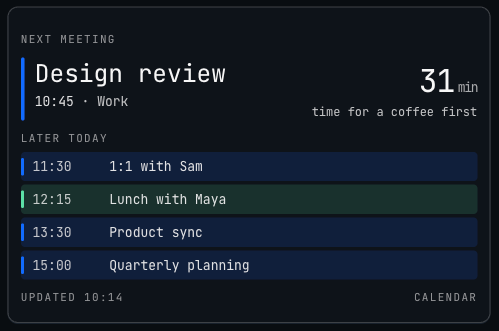
The next-meeting widget: Design review at 10:45 on the Work calendar, in 31 minutes, with the note “time for a coffee first”, then later today 1:1 with Sam at 11:30, Lunch with Maya at 12:15 in green, Product sync at 13:30 and Quarterly planning at 15:00

You, to Wishbar

Show me the weather as a big board I can read at a glance: a large icon for the conditions now and the temperature in very large numbers, with today's sunrise, sunset and the wind under it. Beside it, what it feels like, the humidity and what to expect right now.

Read all of itFold it

Under that, one row for today and one for tomorrow, each with its conditions and an icon, the UV index, the chance of rain, and the low and high. Work out where I am from my Mac's time zone, with no location permission. Use a free weather source that needs no account, such as Open-Meteo, and refresh every 15 minutes while the panel is open. Give this widget some character: add a touch that suits what it's about, and use your own taste in how it looks. Here is a picture of how I want it to look: (picture attached)

Wishbar

  • Claude wrote the widget, in under four minutes
  • You asked for some colour, then more room. Each change took under 30 seconds
  • You pressed Keep, and it checks the weather every 15 minutes while the panel is open

1 widget · a real wish · 27 Oct 2026

The weather board for London: a sun, 14 °C in large cyan numbers, sunrise 06:45 and sunset 16:42, wind 11 mph from the south-west; feels like 12°, humidity 71%, rain likely in the next 3 hours; today light rain, UV 1, 98% chance of rain, low 10° and high 17°; tomorrow overcast, UV 1, 6%, low 9° and high 15°

You, to Wishbar

Add a new widget that shows the average price of regular gas in the Midwest this week, where I live, per gallon, how it changed since last week, what it was a month ago, and how it compares with the US average. Under it, show a chart of the last 12 weeks.

Read all of itFold it

Use a free source that needs no account or key, such as the government's weekly EIA figures. Refresh once a day. Give this widget some character: add a touch that suits what it's about, and use your own taste in how it looks.

Wishbar

  • Claude wrote the widget, in under three minutes
  • It appeared in your panel
  • You pressed Keep, and it checks for the week's new price every day

1 widget · a real wish · 26 Oct 2026

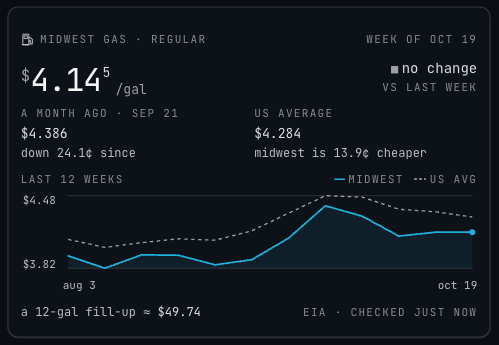
The Midwest gas price widget: regular at $4.14 and five tenths a gallon for the week of 19 October, no change from last week, $4.386 a month ago, 13.9 cents cheaper than the US average of $4.284, a chart of the last 12 weeks for the Midwest and the US, and a 12-gallon fill-up at about $49.74

You, to Wishbar

Show me my Claude Code usage from Claude Code's own /usage: the windows of my plan as bars with the percentage used and when each one resets, and the weekly limits per model where Claude reports them. Underneath, from Claude Code's own session logs on this Mac, the tokens used today and this week, split into input, output and cache, and how many sessions that was.

Read all of itFold it

If Claude Code is not signed in, say so. Refresh every five minutes while the panel is open. Give this widget some character: add a touch that suits what it's about, and use your own taste in how it looks.

Wishbar

  • Claude wrote the widget
  • It appeared in your panel
  • You pressed Keep, and it checks your usage every five minutes while the panel is open

1 widget · a real wish · 26 Oct 2026

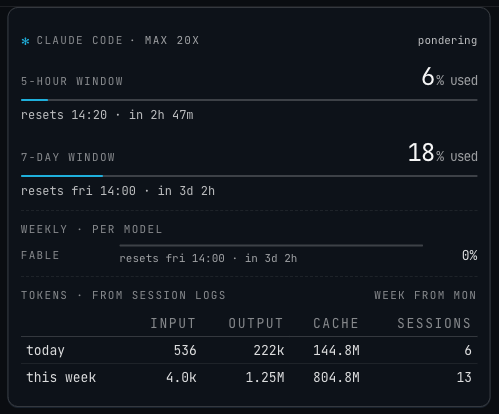
The Claude Code usage widget: the Max 20x plan, 6% of the five-hour window used, resetting at 14:20, 18% of the seven-day window used, resetting on Friday at 14:00, the weekly Fable limit at 0%, and from the session logs today: 536 input tokens, 222 thousand output, 144.8 million cache, in 6 sessions

Ask for things no app store has.

No company builds an app for one person. Here you build your own, in your own words, for your own need.

Year progress
Read all of it (the Year progress wish)
Show how much of this year is left, like GitHub's contribution graph. At the top, a quiet line with today's weekday, date and month, like Thursday 8 October, without the year. Under it, one big thin number for the days left with a small spaced-out label DAYS LEFT beside it, and on the right the smaller number of days passed with the label PASSED. Count today as passed. Then the whole year as a grid of small square cells with sharp corners: one column per week, seven rows for Sunday to Saturday, with JAN, APR, JUL and OCT written above it. Passed days in the accent colour, a little faded, today in the full accent colour, and the days left in a dark grey. Under the grid, a small legend: PASSED, TODAY and LEFT. Hovering a square shows its day number and whether it has passed, like: day 177 · passed. Use small capital labels in a monospaced font. Call it Days left in the year.
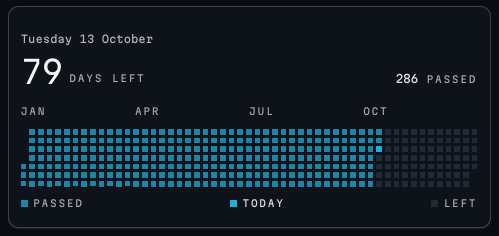
The days left in the year widget: Tuesday 13 October, 79 days left and 286 passed, and the whole year as a grid of small squares like GitHub’s contribution graph, the passed days in blue, today brighter, and the days left in dark grey
State Pension countdown
Read all of it (the State Pension countdown wish)
Show me how long until my UK State Pension. I was born on 14 March 1978. Show the time left as years, months, weeks and days, recomputed every hour, with the date itself and my State Pension age underneath.
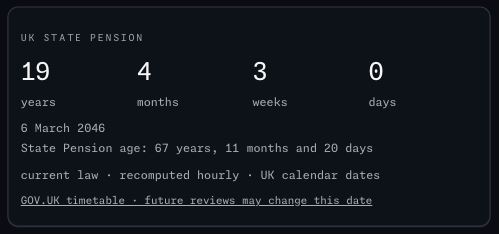
The State Pension widget: 19 years, 4 months, 3 weeks and 0 days until 6 March 2046, at a State Pension age of 67 years, 11 months and 20 days, under current law, from the GOV.UK timetable
Latest YouTube uploads
Read all of it (the Latest YouTube uploads wish)
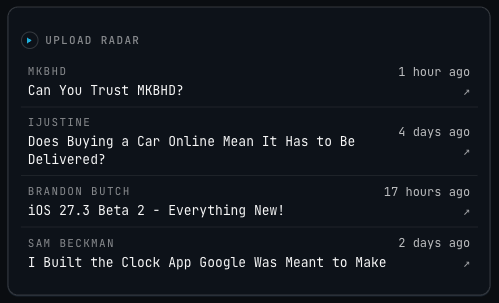
Show me the newest video from each of these YouTube channels: MKBHD, iJustine, Brandon Butch and Sam Beckman, with the video title and how long ago it was posted. Clicking a line opens the video. Refresh every hour. Give this widget some character: add a touch that suits what it's about, and use your own taste in how it looks.
The latest YouTube uploads widget, titled UPLOAD RADAR beside a blue play button: the newest video of four channels, each on a line that opens the video, with its title, how long ago it was posted and a small arrow: MKBHD, "Can You Trust MKBHD?", 1 hour ago; iJustine, "Does Buying a Car Online Mean It Has to Be Delivered?", 4 days ago; Brandon Butch, "iOS 27.3 Beta 2 - Everything New!", 17 hours ago; and Sam Beckman, "I Built the Clock App Google Was Meant to Make", 2 days ago
10-year Treasury yield
Read all of it (the 10-year Treasury yield wish)
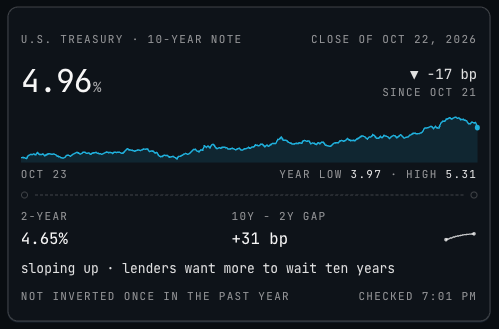
Show me the 10-year US Treasury yield: today's rate, how much it moved since the day before, and a small line of the last year. Under it, show the 2-year yield and the gap between the two, and say when the curve is inverted. Use the US Treasury's own daily figures, which need no account, and say which day they are for. Refresh every hour. Give this widget some character: add a touch that suits what it's about, and use your own taste in how it looks.
The 10-year Treasury yield widget: 4.96% at the close of 22 October, down 17 basis points since 21 October, a line of the past year between a low of 3.97 and a high of 5.31, the 2-year yield at 4.65%, the gap between them at plus 31 basis points, and the note that the curve slopes up and was not inverted once in the past year

See what you can make

Made once. Yours to keep.

A widget stays in your menu bar. It can keep itself up to date and send you an alert when something changes. Once made, it needs no AI to keep working, unless it is built to ask your AI each time it runs.

Stand reminder

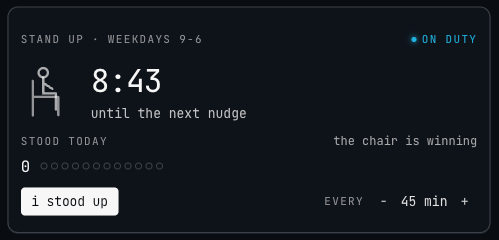
Add a new widget that reminds me to stand up every 45 minutes between 9 am and 6 pm on weekdays, with a macOS notification that says "Stand up and stretch for two minutes", even when the panel is closed. Show the time until the next reminder, how many times I have stood up today, and a button to say I stood. Let me change the 45 minutes. Give this widget some character: add a touch that suits what it's about, and use your own taste in how it looks.

A real wish · 26 Oct 2026

Try one. Right here.

Box breathing · Press start and breathe with it: in, hold, out, hold, four to twenty seconds each. Voice on or off.

Made with Wishbar

The wish, as typed into Wishbar:

Make a box breathing guide like the calm breathing apps. Draw a soft square. A small round character, like the one from the old arcade game, travels along the sides one side per step and eats the dots on that side as it goes: breathe in along the top, hold down the right side, breathe out along the bottom, hold up the left side.

Read all of itFold it

Give each step its own calm colour, and show the step in big words in the middle with a countdown of the seconds. Say each step out loud as it starts, with a button to turn the voice off. Start at 4 seconds per side and let me add a second at a time as I get better, up to 20 seconds, and remember my choice. Add start and stop buttons, count the rounds I finish today, and show a small note under the square: if you feel dizzy, stop and breathe normally.

“I've stopped hunting for menu-bar apps; I just wish for them now.”

Mani, Co Founder

Naren, who made Wishbar
From the maker

Hey, it's Naren. I made Wishbar.

Here are the three widgets I use most, and why I wished for them.

Wish one

Can I call Mum now?

I call my mum every day, sometimes more than once, depending on my day. She lives in a care home in India and I live in the UK: four and a half hours apart in summer, five and a half in winter. For years I kept her clock on my phone's home screen and did the sum in my head before every call: is she at lunch? At tea? In bed by now? I even wrote little scripts to work it out. They never helped, because I had to remember to run them.

So I wrote a wish: I typed in her schedule and explained the situation. Wishbar turned it into a widget in my menu bar, and now I can see at a glance whether I can call her right now and, if not, when I can.

CAN I CALL MUM NOW?
Yes
Until 4:30 pm your time, when she goes to bed.
Mum · India7:42 pm
You · UK3:12 pm
Next free in your daytime: tomorrow 9:00 to 11:30 am · 11:50 am to 2:30 pm
Wish two

What does this month's money cost me today?

Every month I send my mum money for her care home in India. I send pounds, she receives rupees, and the rate changes every day. Some days the same rupees cost me a few pounds more, some days a few pounds less.

So I wrote a wish: how much I send each month, and that I wanted to know the best day to send it. Wishbar turned it into a widget, and now I can see what this month's amount costs me in pounds right now, and whether today is a good day to send it or a day to wait.

WHAT DOES THIS MONTH COST ME?
£1 buys₹118.02
This month's rupees cost you today
£423.65
Better than the 30-day average (₹117.40)
Updated 2 min ago · mid-market rate
Wish three

Will it rain in the next 30 minutes?

I walk 10,000 steps every day, and I have not missed a single day in over two and a half years. But I live in England, so the weather can change while I am putting my shoes on. Before I go out I need to know one thing: is it going to rain in the next 30 minutes? If yes, I go for a short walk in the waterproof shoes and the raincoat. If no, I can go for a long one.

I used to check the BBC, Apple Weather, even a little phone app I built just for this question. So I wrote a wish: will it rain in the next 30 minutes, and for how long? Wishbar turned it into a widget in my menu bar, and now I look there instead, because I am at my desk most of the day anyway.

RAIN IN THE NEXT 30 MIN?
Rain in 22 min
Light, for about 15 minutes. A short walk now, or a long one after 3:50 pm. Take the raincoat.

No app store will ever have these three, because only I need them. I did not have to wait for anyone to build them. That is the whole point of Wishbar.

Pricing

Pay once. No subscription.

Black Friday and Cyber Monday sale: 50% off every licence. Ends soon. Every purchase has a 14-day money-back guarantee.

Free 7-day trial

Trial · 1 Mac

$0for 7 days

Full Wishbar access. After 7 days it locks; a paid licence reopens your saved widgets.

Get free trial licence
  • No card or automatic charge.

Solo · 1 Mac

$39$19one-time, sale price

For the Mac you use every day.

Buy Solo
  • 14-day money-back guarantee
Most people pick this

Personal · 2 Macs

$49$24one-time, sale price

Your desk Mac and your laptop.

Buy Personal
  • 14-day money-back guarantee

Family · 5 Macs

$69$34one-time, sale price

The whole household, one purchase.

Buy Family
  • 14-day money-back guarantee
  • Pay once. There is no subscription, and every update is included.
  • 14-day money-back guarantee. Not for you? Email hello@wishbar.app with the address you bought with, and you get a full refund. No questions asked.
  • Signed with our Apple Developer ID and notarised by Apple. macOS opens it like any other Mac app.
  • A licence key is required: the free 7-day trial key, or a paid one. Either is in your Polar customer portal shortly after you complete checkout, with the download; Polar's email links you there.
  • It uses your own ChatGPT or Claude account. A free ChatGPT account is enough. Claude needs a paid plan. Your AI works only while it makes or changes a widget; most widgets then run without it. The only thing you pay us for is Wishbar.
  • macOS 13 Ventura or later, Apple silicon and Intel. Solo covers 1 Mac, Personal 2, Family 5.

Prices in US dollars; where VAT applies it is included. Final currency, tax and total are shown by Polar at checkout.

Already have a key? How to activate.

“Wishbar feels genuinely well crafted - it has a clean, developer-friendly interface and makes building useful desktop widgets surprisingly effortless.”
Abdul Khader, Director, Zazo Partners ·
FAQ

Fair questions.

What does Wishbar do?

You type what you want in your language, like "a widget that shows the live gold price", and your own AI builds it as a live widget inside Wishbar, one click away in your menu bar. It runs there from then on. You write no code.

Can I wish in German, or in my own language?

Yes. Type your wish in German, Spanish, Hindi, Chinese or any language your AI understands, and Wishbar builds the widget in that language. Wishbar's own buttons and menus are in English for now. Your widgets and what they show stay on your Mac; your wish goes only to your own ChatGPT or Claude account.

Who is it for?

Anyone on a Mac who wants a small tool nobody has made. People who cannot code, because Wishbar writes it for them. And people who can, because it saves them building a small app for every small thing, and keeps every widget in one place.

What problem does it solve?

Each new thing you want in your menu bar usually means another app to find and install, sometimes one to pay for, and it rarely does exactly what you want. Wishbar replaces all of that with one wish: describe the widget, and keep it if you like it.

How is this different from a menu bar app, or from asking ChatGPT?

With a normal menu bar app, you get what the app does, and nothing more. With Wishbar, you say what you want and that is what you get: the usual things, like battery health, CPU, memory or a to-do list, or something nobody has made, like a countdown to your own date or an alert at your own price. Ask for changes until it is right. ChatGPT can only answer when you ask it. A Wishbar widget stays in your menu bar, can keep itself up to date, and can send you an alert. Once it is made, it needs no AI, unless it is built to ask your AI each time it runs.

Are there any other costs?

Not from us: Wishbar is a one-time purchase. It builds with your own AI account. A free ChatGPT account is enough (inside Wishbar it appears as Codex, OpenAI's builder). Claude also works, and needs a paid Claude Pro or Max plan. Whatever your AI provider charges, if anything, you pay them, not us.

Does a widget keep using my Claude or ChatGPT allowance?

Only while your AI makes or changes it. Once you keep a widget, it runs on your Mac by itself and uses no Claude or ChatGPT tokens, however long you keep it. The exception is a widget built to ask your AI each time it runs, for fresh ideas or a written summary of the news, say: that uses your allowance. Most widgets in the gallery need no AI once they are made. The Claude Code usage widget asks Claude Code for its usage report.

Do I need to know how to code?

No. You describe what you want in your own words, in any language, and your AI writes the code. You never have to read it.

How long does a widget take?

With ChatGPT, usually one to three minutes. With Claude, about three. A big widget can take longer. While it works, Wishbar shows you what the AI is doing. When it is ready, the widget appears in your panel with two buttons: Keep, to keep it, and Undo, to take it away.

Which Macs does it run on?

macOS 13 Ventura or later, on Apple silicon and Intel.

How many Macs can I use it on?

The free 7-day trial covers 1 Mac. Solo covers 1 Mac, Personal 2 and Family 5. Every tier is the full app.

Can I get a refund?

Yes. There is a 14-day money-back guarantee, no questions asked.

Is there a Windows version?

Not today. Wishbar is Mac-only. Leave your email and we will tell you if that changes.

Who sees my wishes?

Your wish goes to the AI you connected, on your own account: ChatGPT or Claude. It writes the widget. We never see your wishes. The widget is a small set of files on your Mac, in its own folder under .wishbar/extensions in your home folder, and you can open it, change it or delete it whenever you like.

What leaves my Mac?

Your wish goes to the AI you connected, ChatGPT or Claude, on your own account. A widget fetches what it shows from the sites it uses, like a weather or share-price site. When you enter your licence key, Wishbar sends the key and an id for your Mac to Polar and to our licence check. And if "share usage data" is on in Settings, Wishbar sends the usage events listed in the privacy policy, tied to a number, not to your name. Wishbar also checks for its own updates and for updates to the AI tool you connected, and, when you add a gallery widget, sends your licence key to wishbar.app and fetches its recipe and picture.

What permissions does it need?

Installing and running Wishbar asks for nothing. A widget may need something on your Mac to do its job: your calendar for a meetings countdown, a folder if it saves a file, a notification if it needs to alert you. macOS asks the first time Wishbar needs that kind of access. Your answer applies to Wishbar for that permission, and you can say no.

Do I need an account?

Not with us. Your licence key and the download are in your Polar customer portal shortly after you complete checkout, Polar's email links you there, and you paste the key in once. For a purchase, your receipt is there too. The only sign-in is to your own ChatGPT or Claude account, inside Wishbar, and it walks you through it.

Can I undo what the AI did?

Yes. When the AI finishes, you get two buttons: Keep and Undo. Undo puts the widget's files back the way they were; it cannot reverse something the build already did elsewhere, such as sending a message. Once you Keep, that change is final: to change or remove the widget later, make a new wish.

What if I switch Macs?

The free trial covers 1 Mac; Solo covers 1, Personal 2 and Family 5. Deactivate the old Mac, either in the licence screen inside Wishbar or in your Polar customer portal, then paste your key on the new one. Your key and your Macs are in the portal; for a purchase, your receipt is there too.

How do I get the app again, or find my key?

Your Polar customer portal has your licence key, the download and, for a purchase, your receipt. Sign in there with the address you used at checkout.

Is there a free trial?

Yes: full Wishbar access on 1 Mac, free for 7 days. No card and no automatic charge. Start it on the pricing page. After 7 days, Wishbar locks; your widgets and settings stay saved, and entering a paid licence restores access. Paid licences come with the 14-day money-back guarantee.

Is the download safe?

Yes. Wishbar is signed with our Apple Developer ID and notarised by Apple, which means Apple has scanned it for malware and macOS opens it like any other downloaded Mac app: no security workaround, no Terminal. You get it from your Polar customer portal after checkout.

Wall of love

Don't take my word for it.

Every review, unedited. If you are quoted here and want it removed, email hello@wishbar.app and it goes the same day.

Wishbar turned a one-sentence request into a working Mac widget in minutes - I asked for a Claude usage tracker and got exactly that, pulling live data, without touching any code myself. I've stopped hunting for menu-bar apps; I just wish for them now. It's easily the most "it just works" AI tool on my Mac - impressively accurate, and it delivers exactly what I actually need.

Zero friction. No account hoops, no manual to read - I typed my first wish and it just built the thing. Within five minutes I had a live widget in my menu bar. That first-run experience sold me instantly.

Mani
Co Founder ·

I have been using Wishbar for more than a week now on my personal MacBook.

It's a great handy tool which has made my everyday tasks and activities remarkably simpler.

First time setup and initial configuration was quite easy and straightforward.

Wishbar has quickly become part of my daily routine. Instead of juggling a bunch of separate widgets scattered around my desktop, I have everything in one clean, simple spot.

It's intuitive enough that I didn't need a tutorial, and it doesn't feel heavy or slowing down my MacBook.

Simple widgets I have managed to create so far:

- Weather updates based on my local region.

- Price movements tracker of my favourite stocks.

- Price movements tracker of my favourite cryptos.

- Overall performance tracker of my investment portfolio.

- Latest technology and business news updates.

Big thanks to the creators of Wishbar, wishing you all the success ahead.

Sandeep Ramchandani
Director, RR Testing Services · · LinkedIn

WishBar is super promising! The ability to build custom, functional widgets on demand genuinely feels like a cheat code for desktop workflows. Being able to plug micro-gaps in your daily setup without writing an entire app from scratch is a total game-changer for me.

During the initial beta test period, I built two widgets:

SaaS Idea Generator: Spits out valid SaaS concepts with long, contextual prompts I can paste directly into Claude Code.

Smart Stock Ticker: Tracks my watchlist and sends notifications with brief summaries whenever there's a steep price movement.

It took an idea and turned it into a working desktop utility in minutes. That level of flexibility for power users is incredible!

WishBar is one of the most exciting tools I’ve used recently. If you love tailoring your workspace with personalized and private automation, you need to check it out.

On top of that, Narendra and team are moving at absolute lightning speed - shipping fixes and polishing edge cases almost daily based on feedback.

Sudesh Gutta
Senior Software Engineer, Akamai · · LinkedIn

The Wishbar app has been truly sensational. Throughout the seven-day trial, I found myself using it day after day and quickly realised just how useful and convenient it is. Whenever I had a question, or an idea, I would normally open ChatGPT or Gemini, but now I find myself turning to Wishbar instead. It has become a really valuable part of my everyday routine. I would also like to sincerely thank you for giving me the opportunity to trial Wishbar and experience it.

Getting started with Wishbar was incredibly easy and enjoyable. During my seven-day trial, I found myself using it every day and quickly realised how useful it could be. Whenever I had a question, query or idea, I would normally open ChatGPT or Gemini, but I now find myself turning to Wishbar instead. It has become a really useful part of my everyday routine, and I’m genuinely impressed by how convenient it is. At first, you will not know how to use the Wishbar, but as you use it over and over again then it becomes really easy to use it to its full extent.

Rushil
year 10 student ·

I’m someone who uses a lot of developer and AI tools in my day-to-day workflow, especially for productivity and experimentation.

Wishbar feels genuinely well crafted - it has a clean, developer-friendly interface and makes building useful desktop widgets surprisingly effortless. I liked how naturally it turns a simple request into a working utility, while still feeling at home as a macOS menu-bar app.

For anyone who wants to quickly create small productivity tools, trackers, dashboards, or personal utilities without breaking their flow, it’s a very compelling experience.

Abdul Khader
Director, Zazo Partners · · LinkedIn

I’ve been using Wishbar for about a week now, and I’m genuinely impressed.

The best part is that it doesn’t feel like a normal menu bar app with a fixed set of features. You can describe what you want in your own words, and it works with Codex or Claude to build useful little widgets inside the app. I’ve been using it with Codex, and that worked really well for me.

For example, if there’s a website or data source you regularly check, like rates, share prices, or energy prices, you can ask Wishbar to build a widget with the statistics you want to see. You can keep making changes until it looks and works the way you want. It can also keep track of the data and, if needed, export the data you’ve collected as part of the widget. That is something you often don’t get with fixed menu bar apps.

That’s what made the idea click for me. It feels like having a small custom app builder on the Mac, without needing to start a proper development project each time.

What I also like is that it doesn’t feel limited to one small widget. You can keep building more visualisations and organise them in a way that suits you, either on a scrollable page or in separate tabs.

There are still a few early rough edges. Sometimes, after making changes, the visual doesn’t load straight away, but using the refresh button fixes it. You also need access to Codex or Claude, and I’m not sure yet how smooth it would be on free accounts, as token limits or wait times could become a factor.

Overall, I liked it enough to purchase it, and I’m excited to see where it goes next.

Getting started was quite straightforward. I installed Wishbar, connected it with Codex, and was able to start describing the kind of widget I wanted to build.

It took a little bit of trial and error to get the result exactly how I wanted, but that is also part of what I liked about it. I could keep asking for changes and improving the widget step by step instead of being stuck with a fixed app.

For something that is still early, the onboarding felt good overall. Once I understood the idea, it was easy to see the value.

Srinu
IT Consultant ·

Really like the core idea - type what you want, get a live widget in your menu bar. That's a clean pitch. And the Market 3Lens example which I have developed using Stock Market Influencer Adam Khoo youtube video actually backs it up: it's not just a pretty mockup, it's pulling real signals (recession, froth, trend) with sensible notes when data's stale or hasn't landed yet. That gives me some confidence the AI behind it is doing real work, not just faking a nice-looking screen.

Good experience

Veer Reddy Karri
Software Test Engineer, Jiya Technologies · · LinkedIn

I got the opportunity to try Wishbar through a friend, and honestly, I initially thought it would be just another app that I’d probably ignore. But when I was bored, I decided to give it a try - and I was pleasantly surprised!

What I really love about Wishbar is how easily you can create useful widgets using simple plain English. You can create a water-hydration schedule, set reminders for daily activities, track stocks you’re interested in, and keep them refreshed with live updates. Basically, whatever you need, you can simply ask for it and Wishbar creates it for you.

The alerts are another great feature, with pop-ups and sounds that make sure you don’t miss important reminders.

I genuinely loved the experience. I’d recommend everyone give Wishbar a try before deciding whether it’s for you. I’m pretty sure you’ll enjoy it as much as I did! ⭐⭐⭐⭐⭐

Narayana Sankuratri
Siebel Consultant, Worldpay · · LinkedIn

Hi, I found the Wishbar app referred to by a friend. It is a mac menu bar app that turns my Menu Bar Into a Personal Task Assistant.

A Mac productivity app.

Tucked away until I need it with one click.

All handy features in one organized place.

All standard things - Timer, weather, stock prices, news and fun trivia - But with your own customization using AI. Your imagination and/or necessity is the limit.

Ready to turn rough thoughts into clear, actionable tasks using AI in few seconds.

No limit or constraint and create your own AI generated tasks and as many as you want. Can work wonders with Claude pro.

Lightweight menu bar design, diff themes, easy to use.

If you live on a Mac then Wishbar is a no‑brainer. It’s fast, unobtrusive, and surprisingly good at creating your own idea based tasks with AI.

Overall it is brilliantly simple and my Rating is 5*.

-DVCM

Easy to start and simple to use.

Connect to any AI - provides 2 options. Click of a button.

Organize into categories helped me.

Try a fun "developer joke" task every day.

Chandra Dhulipala
IT consultant ·

Had the privilege of (beta) testing Wishbar and can say that the app had been built to the highest standards as there were minimal defects.

Wishbar is a very useful utility that sits on your menu bar, providing valuable insights through the widgets you create using the coding AI tools. Found the app very useful and helpful with the widgets I created in it.

Very easy to setup and use application.

Anil
Test Consultant ·

I came across Wishbar a few weeks ago and installed it on my Mac without expecting much. I'm not a developer, so I assumed it would be one of those tools that sounds simple but needs a lot of fiddling.

What I use it for is pretty ordinary. I wanted the Formula 1 schedule for the week in my local time, because the race times are always at odd hours where I am and I was tired of converting them in my head every week. I wanted reminders for my meetings, with a countdown to the next one. And I wanted an alert when a stock hits a price I care about. I made each of these by opening a new tab and typing what I wanted in normal sentences, the same way I'd explain it to a colleague.

I've ended up making several of these little widgets, and I think of them as my own small agents, because each one does one job without me having to ask. This is the part that changed my day. Before, if I wanted to know something, I would open ChatGPT or a search page, write out my question, and wait. I did that many times a day without noticing how much time it ate. Now the information is already on my screen the moment I look at it. I don't write a prompt or run a command. I asked for each thing once and it just keeps doing its job. It's hard to say exactly how much time that saves, but over a week it's noticeable.

I also expected these widgets to keep using my ChatGPT allowance, but they don't. Once you press Keep, the widget runs on its own and only uses free data sources or things on your Mac. I leave several running all day, and I haven't seen my laptop slow down or the battery drain faster than usual. The notifications come up as normal Mac alerts, even when the Wishbar window is closed.

It isn't perfect. It only works on a Mac, and you need your own ChatGPT or Claude account because the AI isn't included. A free ChatGPT account worked for me, but I've read that Claude needs a paid plan. Sometimes the first version of a widget isn't what I pictured, and it takes two or three rounds of small changes to get it right. And if you ask for a widget that writes something new every time it runs, that one will use your AI allowance, so I don't make many of those.

Still, it has made my daily routine easier. I'm not searching for the same things over and over anymore, and I don't need a separate app for every small thing I want to see. Thanks to the people who built it. It's a small tool, but I use it every single day.

Benony John
Quality Assurance, Google Operations Center · · LinkedIn

Stop hunting. Start wishing.

Get Wishbar
Pay once, no subscription14-day money-back guaranteeSigned and notarised by AppleLicence key required

Not ready to try it yet?

Leave your email and I'll send you the link, so you can try it later.

›

Confirm from your inbox and you are in: the link to try Wishbar on your Mac, then product updates and notes from the maker, including new things I build. Unsubscribe any time with one click. I never sell your address.